
A polyphase chorus modulator with two selectable engines — a clean Digital path and a bucket-brigade Analog path — a variable multi-voice architecture, and a full suite of analog-modeling controls.
Introduction

ThorusXT is a polyphase chorus modulator built around a variable multi-voice architecture, tasteful input filtering, and a real-time visualizer. Two fully modeled signal paths — a clean Digital engine and a warm, bucket-brigade Analog engine — let you move from pristine shimmer to noisy vintage texture within a single interface.
Two Engines, One Chorus
ThorusXT runs on a switchable engine and opens on the Analog path. Every control on the main page drives whichever engine is active, so you can audition the same modulation setting through two completely different signal paths:
| Engine | Character | Signal path |
|---|---|---|
| Analog | Warm, colored, slightly noisy | Each voice runs its own bucket-brigade device (BBD) delay line — companded noise reduction, Sallen-Key anti-alias and reconstruction filters, optional analog hiss, per-voice component variance, and slow modulation-depth drift. |
| Digital | Clean, precise, transparent | Voices are interpolated taps on a shared delay line with no companding. A band-limited sample-rate reducer — anti-aliased going in, reconstructed coming out — sits on the chorused content, so the Quality control becomes a digital downsampling stage rather than a clock rate. |
The Analog Settings panel is only active when the Analog engine is selected; the Input Filtering panel applies to both engines.
More Voices, More Choices
ThorusXT is built around a variable voice architecture, and voice count is continuous. As you sweep the Voices control, the last voice fades in and out smoothly rather than switching in steps, so you can automate density without zipper artifacts. Use fewer voices for pronounced, identifiable modulation, or add more to blur the lines into a thick, immersive wash.
Reflexive Refinement
A one-pole crossover keeps your low end tight: everything below the Crossover frequency bypasses the modulation entirely and is re-blended at a level you set with Low Gain, while the band above it is chorused. A Tone low-pass inside the feedback loop tames highs and keeps resonance musical. Color settings can be adjusted directly on the real-time display.
Multi-Mode
ThorusXT offers two stereo behaviors. Standard produces a sound stage that reflects the input material; Wide redistributes the voice modulator phases across the stereo field for an expanded, immersive image. Move through these spaces freely with the Speed and Depth controls.
Available Formats
ThorusXT is a native plug-in — no host sampler required. An A/B comparison switch and effect mix allow for no-risk experimentation on any track.
Interface Overview
ThorusXT presents all controls on a single page with a real-time display of the active engine’s modulation. Click a zone to learn more about it.
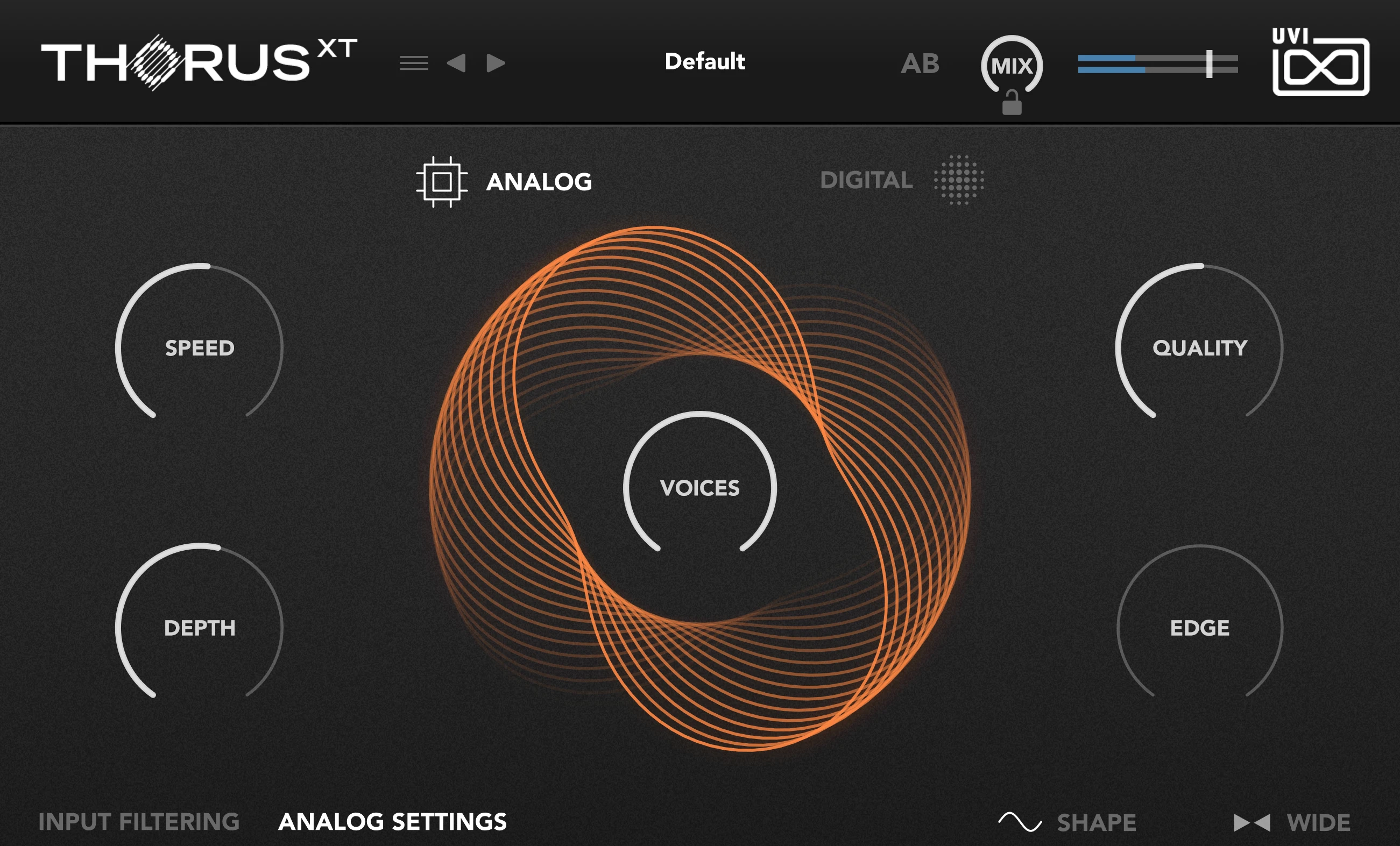
- 1 Menu Toggle
Toggle the drop-down menu to access preset management.
- Load and Save
- Save or recall ThorusXT presets.
- Factory Presets
- Browse UVI-supplied presets.
- User Presets
- Access and organize your saved presets.
- 2 Preset Name
Displays the name of the currently loaded preset. Click the name to open the preset browser; use the arrows to step through presets.
- 3 A/B Snapshot
Stores two plugin states for instant comparison. The first click stores the current state to A; following clicks swap between banks A and B.
- 4 Mix & Lock
- Mix
- Equal-power wet/dry balance for the whole effect. 0% is fully dry, 100% is fully wet.
- Lock
- The padlock beside the knob locks the Mix value so it is kept when you load a different preset — audition presets at a constant wet/dry blend.
- 5 Level & Meter
- Level
- Output level in dB (−60 to +12). Drag the slider to set the final output level.
- Meter
- Stereo output level meter, integrated with the level slider.
- 6 Engine — Analog / Digital
Selects the signal path.
- Analog
- Bucket-brigade (BBD) voices — warm, colored, with optional noise, variance and drift. Enables the Analog Settings panel.
- Digital
- Clean interpolated-delay voices with sample-rate reduction on the chorused band.
- 7 Speed
Rate of the voice modulators (0.1–1.0 Hz).
- 8 Depth
Modulation depth in cents (1–40) — the amount of pitch variation each voice applies.
- 9 Voices
Number of chorus voices (2–8), continuously variable. The final voice crossfades in and out for smooth, artifact-free automation.
- 10 Quality
In Analog mode, sets the BBD base clock rate (1–48 kHz) that governs delay-line resolution; Variance spreads each voice around it. In Digital mode, sets the sample-rate reduction frequency on the chorused band.
- 11 Edge
Controls feedback and chorus color (−100% to +100%). Around 0 the algorithm blends feedback to avoid spectral holes; at −100% time-varying notches dominate; at +100% increased feedback produces resonant peaks that can self-oscillate.
- 12 Panel Tabs
- Input Filtering
- Low Gain, Crossover and Tone — active in both engines.
- Analog Settings
- Rejection, Emphasis, Noise, Variance, Ratio and Reactivity — active only in Analog mode.
- 13 Shape
Modulator waveform: Sine (smooth, classic) or Triangle (more linear sweep).
- 14 Mode
Stereo behavior. Standard reflects the input's natural stage; Wide spreads voice phases across channels for an expanded image.
Signal Flow
Both engines share the same routing. The input is split by the crossover into a clean low band and a chorused high band; only the high band is modulated, and the two are recombined before the wet/dry mix:
- Split — a one-pole low-pass at the Crossover frequency separates the low band (pass-through) from the high band.
- Low band — kept clean, scaled by Low Gain, and held aside.
- High band — fed to the voice modulators (Analog BBD or Digital delay taps), with Tone low-passing the wet/feedback signal and Edge setting feedback.
- Recombine — the processed high band is summed back with the low band.
- Mix — equal-power blend of the dry input and the recombined wet signal.
Engine & Main Controls
The five main knobs drive whichever engine is active.
| Control | Range | Default | Description |
|---|---|---|---|
| Speed | 0.1 – 1.0 Hz | 0.2 Hz | Rate of the voice modulators. |
| Depth | 1 – 40 cents | 5 cents | Pitch-variation depth applied by each voice. |
| Voices | 2 – 8 | 4 | Number of chorus voices, continuously variable — the last voice crossfades for smooth density automation. |
| Quality | 1 – 48 kHz | 48 kHz | Analog: BBD base clock rate (delay-line resolution). Digital: sample-rate reduction frequency on the chorused band. |
| Edge | −100% – +100% | 0% | Feedback amount and chorus color. |
Shape
Selects the waveform used by every voice modulator.
Mode
| Mode | Description |
|---|---|
| Standard | Voice modulator phases produce a sound stage reflective of the input material. |
| Wide | Phases are distributed across channels for an expanded, immersive stereo image. |
Analog Settings
Active only when the Analog engine is selected, these controls shape the modeled bucket-brigade path. They are organized into three groups, each with its own visual display: Aliasing, Stability and Compander.
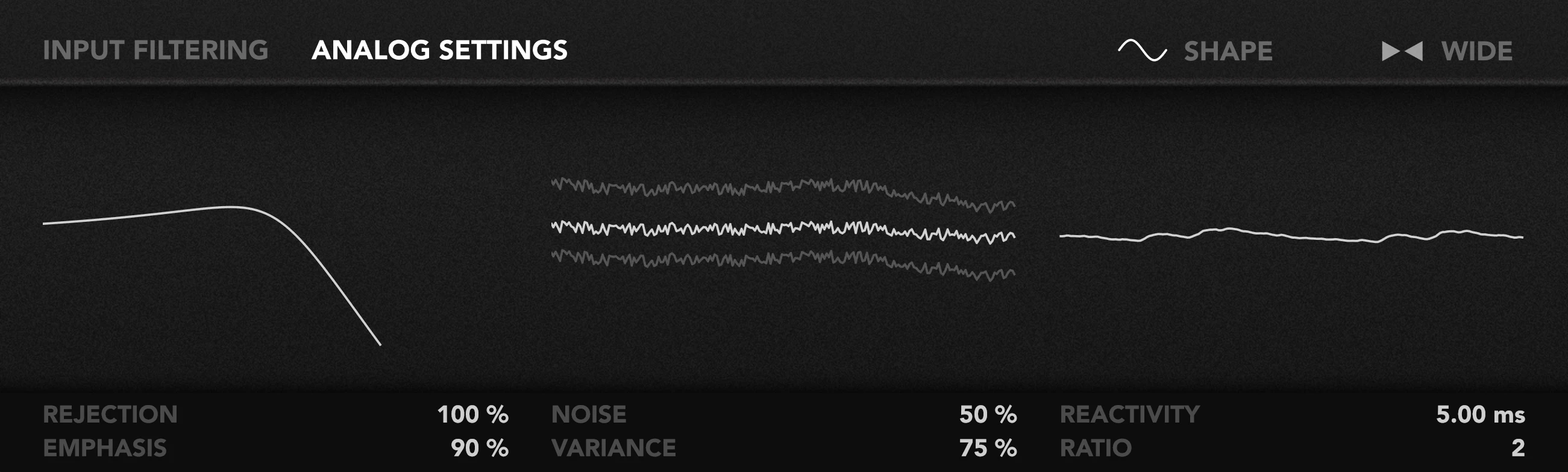
Aliasing
The anti-aliasing and reconstruction filters that give the bucket-brigade path its band-limited character.
| Control | Range | Default | Description |
|---|---|---|---|
| Rejection | 0 – 100% | 50% | Anti-alias / reconstruction filter cutoff. Higher values lower the cutoff (relative to Quality) for a darker, smoother tone. |
| Emphasis | 0 – 100% | 50% | Resonance (Q) at the filter edge, applied to the sampling and reconstruction filters. |
Stability
Analog imperfections — hiss and component tolerances — that bring the path to life.
| Control | Range | Default | Description |
|---|---|---|---|
| Noise | 0 – 100% | 0% | Analog hiss injected inside the delay chain after compression — the expander ducks it with the signal. High-passed at the crossover frequency. |
| Variance | 0 – 100% | 0% | Component spread between voices — per-voice filter cutoff, resonance, and delay-time offsets — plus a slow drift on modulation depth that keeps the sound alive. |
Compander
The noise-reduction stage that compresses the signal into the delay line and expands it on the way out.
| Control | Range | Default | Description |
|---|---|---|---|
| Ratio | 2 – 6 | 2 | Compander ratio. Higher values deepen noise reduction and exaggerate the character set by Reactivity. |
| Reactivity | 1 – 50 ms | 5 ms | Compander gain-tracking speed. Slow settings stay clean and transparent; fast settings begin following low-frequency content, introducing amplitude-modulation. |
Input Filtering
Active in both engines, the Input Filtering panel controls the crossover split and the wet-path tone.
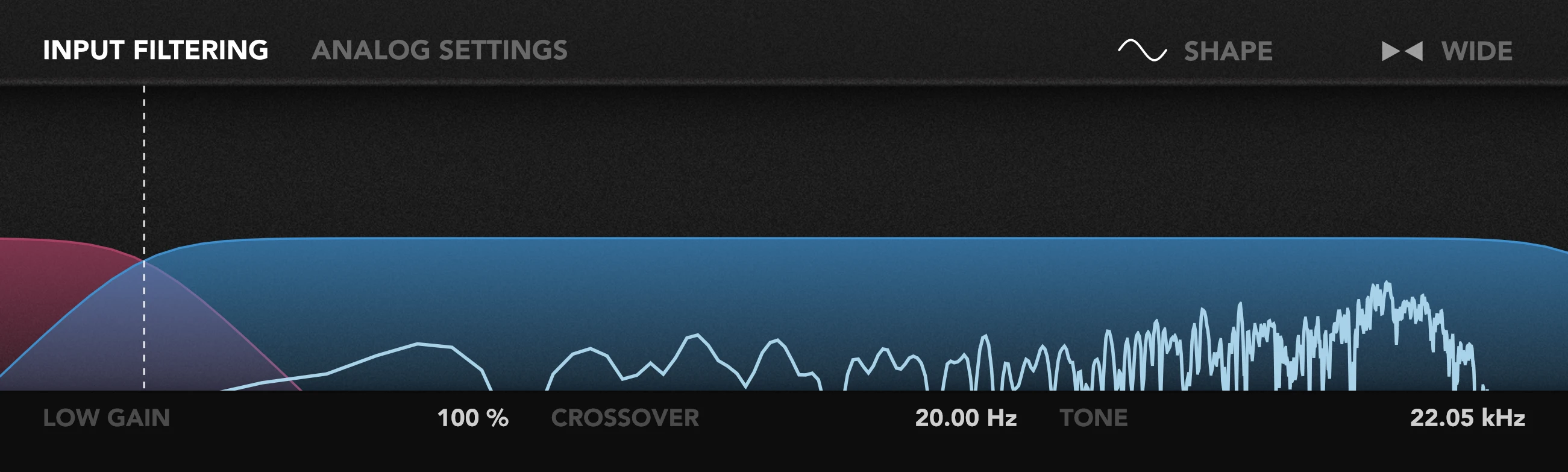
| Control | Range | Default | Description |
|---|---|---|---|
| Low Gain | 0 – 200% | 100% | Level of the clean low band (below the crossover) re-added to the output. |
| Crossover | 20 – 5000 Hz | 20 Hz | Split frequency between the clean low band and the chorused high band. Also sets the high-pass for analog noise. |
| Tone | 2 – 22 kHz | 22 kHz | Low-pass on the chorused high band — darkens the effect, tames Edge feedback, and shapes the Quality reduction in Digital mode. |
Preset Browser
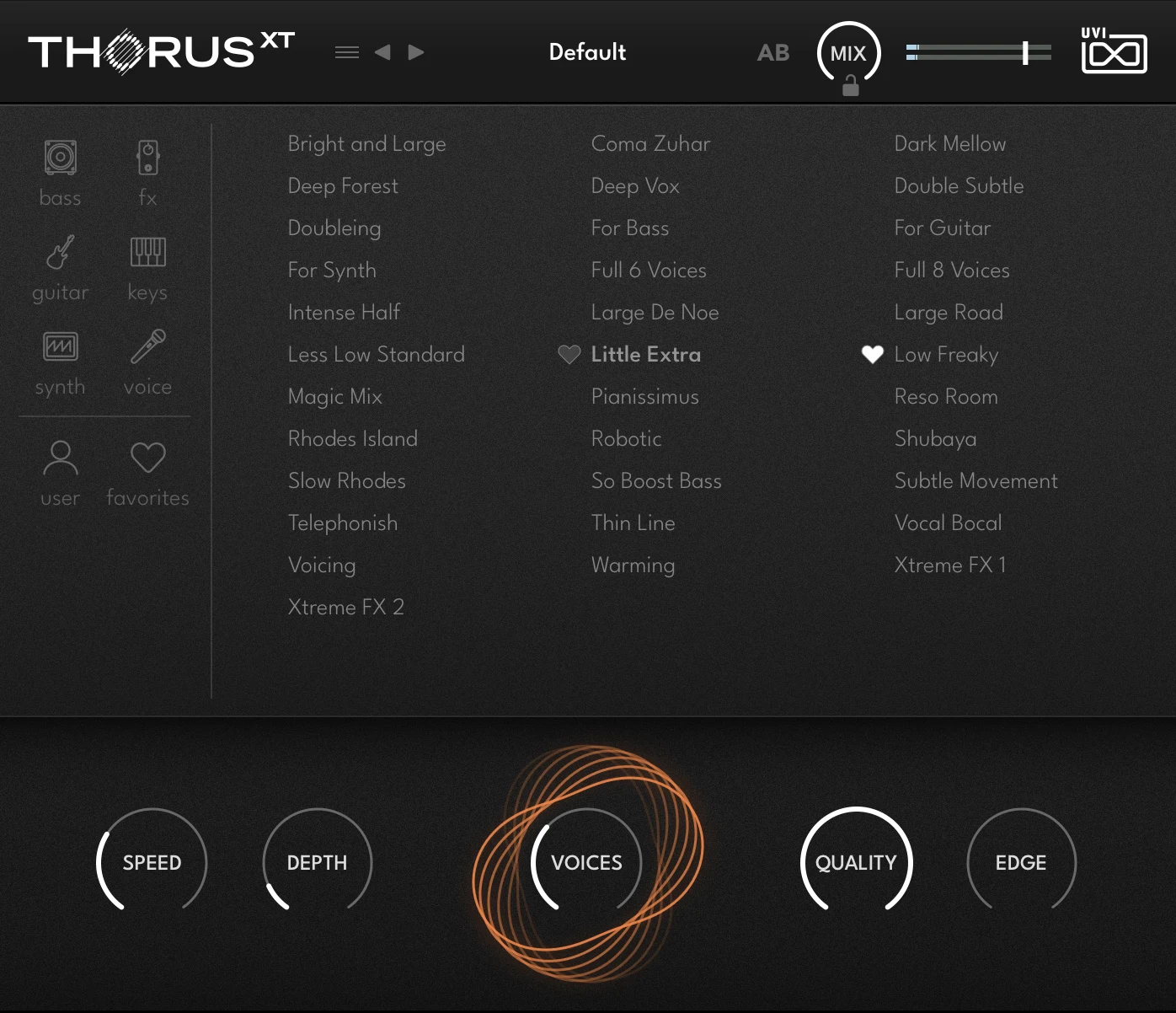
Click the preset name in the header to open the full-screen browser. Presets are laid out alphabetically across columns, and the currently loaded preset is highlighted. The five main controls and the visualizer stay docked along the bottom of the browser, so you can keep tweaking and auditioning without closing the list.
Categories & Collections
The rail on the left narrows the list down to what you need:
| Filter | Shows |
|---|---|
| Bass · FX · Guitar · Keys · Synth · Voice | Factory presets tagged for that type of material. |
| User | Presets you have saved yourself. |
| Favorites | Presets you have flagged with the heart icon. |
Favorites
Click the heart beside a preset to add it to — or remove it from — your Favorites. Favorited presets are then collected under Favorites, keeping your go-to sounds one click away regardless of which category they belong to.
Presets & Comparison
ThorusXT’s factory presets cover a wide range of material — synths, drums, guitar, keys and vocals. Use the A/B switch to compare two states instantly, and the Mix control to dial in exactly the amount of character a track needs. Save your own starting points to the User bank via the menu.
Credits and Thanks
Produced by UVI
DSP — Rasmus Kürstein · Rémy Muller
Software — Rasmus Kürstein · Rémy Muller · Olivier Tristan · Thomas Kowalski
GUI — Nathaniel Reeves · Thomas Kowalski
Preset Design — Damien Vallet · Alain Etchart · Simon Stockhausen · Vincenzo Bellanova · Theo Gallienne
Documents — Nathaniel Reeves · Kai Tomita