

100 masterfully-designed presets capturing the irresistible energy of modern Afro Pop — driving drums, punchy basslines, melodic keys and rhythmic sequences arranged as construction-kit ready tracks.
Introduction
Bring the irresistible energy of Afro Pop into your productions with a vibrant Falcon expansion inspired by one of today’s most infectious musical movements. Packed with 100 presets, Afropop delivers everything from driving drums and punchy basslines to melodic keys and rhythmic sequences, designed to capture the genre’s signature groove and contemporary sound.
Explore a curated selection of construction kit-style presets that make it easy to build complete tracks, each including drums, bass, keys, and sequences that lock together seamlessly. Whether you’re aiming for radio-ready anthems or experimental fusions, Afropop gives you an instant palette of sounds built to move both body and soul.
INFO Page
The Info tab provides an overview of the selected program, houses macro controls, and provides a location for custom text and images via the (i) view. This page is available in both Falcon and UVI Player.
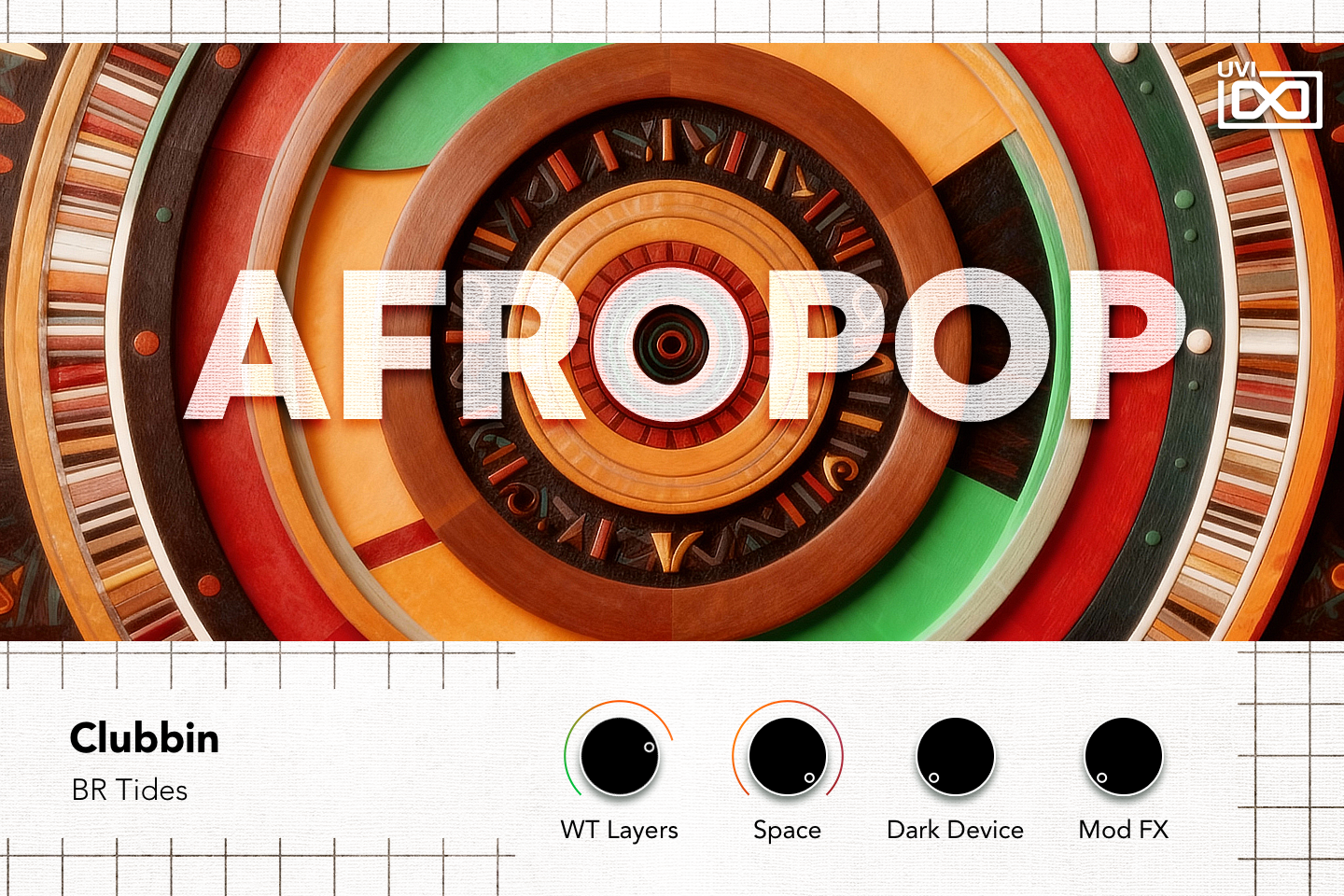
- 1 AFROPOP logo
The logo is a level meter: it reacts to the program’s output level as you play.
- 2 Category and preset
The preset’s category (Clubbin) above its name (BR Tides).
- 3 Macros
The four knobs are the preset’s Macros 1 to 4 and take their names, so labels change from preset to preset (often Space, Excite, Redux, Convolver). In BR Tides, WT Layers brings in the two wavetable layers under the brass, Space raises the delay mix and reverb wet level, Dark Device crossfades a convolver from dry to wet, and Mod FX raises the chorus mix and phaser depth.
Macros can be controlled via MIDI, OSC, host automation and Lua scripting.
Macros
As with Falcon Factory Content, Afropop’s patches are programmed with macros that give quick access to the key parameters of each patch. Afropop also ships with a custom front panel built using Falcon’s Script feature. The panel parameters are wired to the macros and can be controlled via MIDI, OSC, host automation and Lua scripting for easy customization and expressive performance.
For more details on macros, see Falcon’s software manual.
Program Information
Press the Script button above the panel to switch to Falcon’s macro view, then the (i) button in its upper right to display program information. Many factory presets contain details about the program such as modwheel assignments, macro descriptions or tips for playing it. You can add and save descriptions for your own programs as well.
EDIT Page
If you want more control over a sound than the macros provide, the EDIT tab gives you full access to all parameters. Patches in Falcon are built within a fixed hierarchy: at the very top is the Program, inside the Program are Layers, within each Layer are Keygroups, and inside the Keygroups are Oscillators. Audio effects, MIDI effects and modulators can be placed on any level.

- 1 Program Editor
Top-most level of the patch. Broad changes affecting the overall sound: add audio or MIDI effects, adjust volume, pan and pitch.
- 2 Layer Editor
Group and modify Keygroups. Same effect/modulation slots as the Program, plus velocity curve, polyphony modes and unison settings.
- 3 Keygroup Editor
Ground level of the patch — hosts oscillators, defines MIDI note and velocity ranges, and sets basic oscillator attributes like pitch and trigger modes. Effects instanced here run per-voice, with the extra CPU cost that implies.
The mapping, oscillator and modulation editors are described in Falcon’s software manual: see Hierarchy and Edit.
Preset List
100 presets organized as 19 construction-kit style collections. Each kit bundles drums, bass, keys, and sequences that lock together seamlessly for fast track building.
01 — Tchoko
6- BS Log Drum
- DR Perc Loops Sliced
- DR Temple
- KEY Bam
- LD Timekeeper
- VOX Singularity
02 — Highlife
7- ARP Nightseeker
- BS Moi
- DR Coeur
- DR Kick
- EP Fleur
- FX WT Riser
- GT Solo
03 — Naija
4- BS Prism
- DR Sur
- GT Sunlit
- LD Tropical
04 — Harlem Bae
5- BS Symmetry
- DR Plate
- DR Rim
- PLK Razon
- PLK Sundance
05 — Pattern
6- BS Log Out
- DR Move It Percs
- DR Solo
- KEY Rounded
- LD Australe
- ORG Stay
06 — Kontrol
5- BS Punch
- DR Focus
- FX Textures
- PD Suive
- PLK Habibi
07 — Diaspora
7- BS Real
- DR Parler
- DR Seraphic
- FX Punctuator
- GT Aye
- GT Maxim
- WND Sante
08 — Red Gyal
5- BS Demain
- DR Tempo
- FX Noise Rise
- GT Arrive
- VOX Chery
09 — Oga
6- BS Squares
- DR Argent
- DR Hat
- FX Riser Lex
- LD Sine Lament
- PLK Permis
10 — Clubbin
7- BR Tides
- BS Active
- DR PercLoops
- DR Touche
- FX Supra
- GT Red
- VOX Chanter
11 — Kitenge
6- BS Jaloux
- DR Chaud
- DR Coucou
- PLK Balance
- PLK Coco
- PLK Dja
12 — ABK
5- BS Alors
- DR Paroles
- KEY Tema
- PD Malice
- PLK Trop Tard
14 — Kolese
6- BS Reese
- DR Encore
- DR Perc Mata
- KEY Rhodium
- PD Warm City
- PLK Admiral
15 — Wahala
4- BS Toca
- DR Marine
- DR Perc Mania
- LD Sails
16 — Vimto
4- BS Shapes
- DR Pearl
- MLT Marimbatic
- PLK Serene
17 — Afropolis
5- BS Baba
- DR Haste
- PD Light Sweep
- PLK Follow
- PN No Doubts
18 — Sakara
4- BS Caravan
- DR Perc Lit
- DR Red
- PLK Sio
19 — Pressure
4- BS Rez
- DR Perc Shades
- DR Shore
- KEY Phantom
20 — Mafana
4- BS VII
- DR Panama
- GT Alamo
- PLK Tight Knock
Credits and Thanks
Sound Design — Vincenzo Bellanova
GUI & Graphics — Anthony Hak
Documents — Nathaniel Reeves · Kai Tomita
UVI Team