Hierarchy
Falcon is a hierarchy of components, structured so that you can focus on the high-level arrangement or drill down to deeper levels as you prefer.
Multi 1 per instance
The whole Falcon instance: every part, plus the master level — master effects, the master aux buses fed by each part’s sends, and master modulators and event processors. In the Tree and in menus, this level appears as the Master node. Saving the multi saves all of it, including each part’s program.
Part 1 or more
A slot in the multi that plays one program. The part has its own MIDI input, audio output, volume, pan and transposition, and its own effects, modulators and event processors, separate from the program’s. Part settings are saved in the multi, not in the program.
Program 1 per part
The instrument you load and save as a preset. It holds program-wide settings (octave, polyphony, streaming), effects that every layer passes through, program modulators and event processors, and the mappers, which exist only at this level. Its own aux buses, the program aux FX, are fed by the sends of its layers and keygroups.
Layer 1 or more
Groups keygroups and decides how they play: play mode (poly or mono), portamento, unison voices and velocity curve. Its effects, modulators and event processors only affect its own keygroups. It is the lowest level that takes event processors.
Keygroup 1 or more
The ground level: a key and velocity range (edited in the Mapping Editor), the oscillators it triggers, and their trigger settings. Effects here run per voice, with the extra CPU cost that implies. Keygroups do not take event processors.
Effects Multi
Audio effects processing the signal of this level and everything below it, in the order they are listed (left to right).
At this level: Master insert effects, and the master aux effects fed by each part’s sends.
Modulators Multi
Modulation sources — envelopes, LFOs, macros… They change parameter values on this level and below, but never carry audio or MIDI themselves.
Events Multi
MIDI event processors — arpeggiators, micro tuners, script processors… They transform MIDI before it reaches the levels below.
At this level: Master event processors are the first to see an incoming note.
Effects Part
Audio effects processing the signal of this level and everything below it, in the order they are listed (left to right).
Modulators Part
Modulation sources — envelopes, LFOs, macros… They change parameter values on this level and below, but never carry audio or MIDI themselves.
Events Part
MIDI event processors — arpeggiators, micro tuners, script processors… They transform MIDI before it reaches the levels below.
Effects Program
Audio effects processing the signal of this level and everything below it, in the order they are listed (left to right).
Modulators Program
Modulation sources — envelopes, LFOs, macros… They change parameter values on this level and below, but never carry audio or MIDI themselves.
At this level: Envelopes placed here still retrigger with each note when they modulate a keygroup parameter; on a layer or program parameter they do not.
Events Program
MIDI event processors — arpeggiators, micro tuners, script processors… They transform MIDI before it reaches the levels below.
Mappers Program
Modulation mappers sit between a modulation source and a parameter and reshape the source’s values along the mapper curve. They exist on the program only.
Effects Layer
Audio effects processing the signal of this level and everything below it, in the order they are listed (left to right).
Modulators Layer
Modulation sources — envelopes, LFOs, macros… They change parameter values on this level and below, but never carry audio or MIDI themselves.
At this level: Envelopes placed here still retrigger with each note when they modulate a keygroup parameter; on a layer or program parameter they do not.
Events Layer
MIDI event processors — arpeggiators, micro tuners, script processors… They transform MIDI before it reaches the levels below.
At this level: An arpeggiator added here only plays this layer’s keygroups.
Effects Keygroup
Audio effects processing the signal of this level and everything below it, in the order they are listed (left to right).
At this level: Effects run once per voice: better separation, more CPU than on the levels above.
Modulators Keygroup
Modulation sources — envelopes, LFOs, macros… They change parameter values on this level and below, but never carry audio or MIDI themselves.
At this level: Parameters at this level are modulated per voice, so the envelopes assigned to them retrigger with each note.
Oscillators Keygroup
Oscillators generate the initial sound, by sampling or by synthesis. A keygroup can hold several, layered freely.
Step 1 / 10 Multi · MIDI
A MIDI note enters the multi. Master event processors see it first.
Step 2 / 10 Part · MIDI
Every part whose MIDI input matches the note’s port and channel receives it and runs it through its own event processors.
Step 3 / 10 Program · MIDI
The note passes through the program’s event processors.
Step 4 / 10 Layer · MIDI
Each layer runs the note through its own event processors. This is the last level where MIDI can be changed.
Step 5 / 10 Keygroup · MIDI
Every keygroup whose key and velocity range contains the note starts a voice, which retriggers the envelopes modulating its parameters.
Step 6 / 10 Keygroup · Audio
The keygroup’s oscillators generate the audio, and its effects process it, voice by voice.
Step 7 / 10 Layer · Audio
The audio climbs back up: the layer’s effects…
Step 8 / 10 Program · Audio
…the program’s effects…
Step 9 / 10 Part · Audio
…the part’s effects, on the way to the part’s audio output…
Step 10 / 10 Multi · Audio
…and the master effects, before Falcon’s outputs. Modulators act on parameters at every step without ever being on the audio or MIDI path.
For example, a multi might contain two parts, shown below. The first plays a simple program: a single layer holding a single keygroup, whose only oscillator is a Pluck, routed into a spectrum analyzer on the program. The second plays Brush Stack Dark, from UVI Augmented Piano: several sustain, release and pedal-release layers, each holding dozens of keygroups with one sample per note, a script processor, envelopes and LFOs on the program, and a program effect chain from convolver and EQ to delay and reverb.
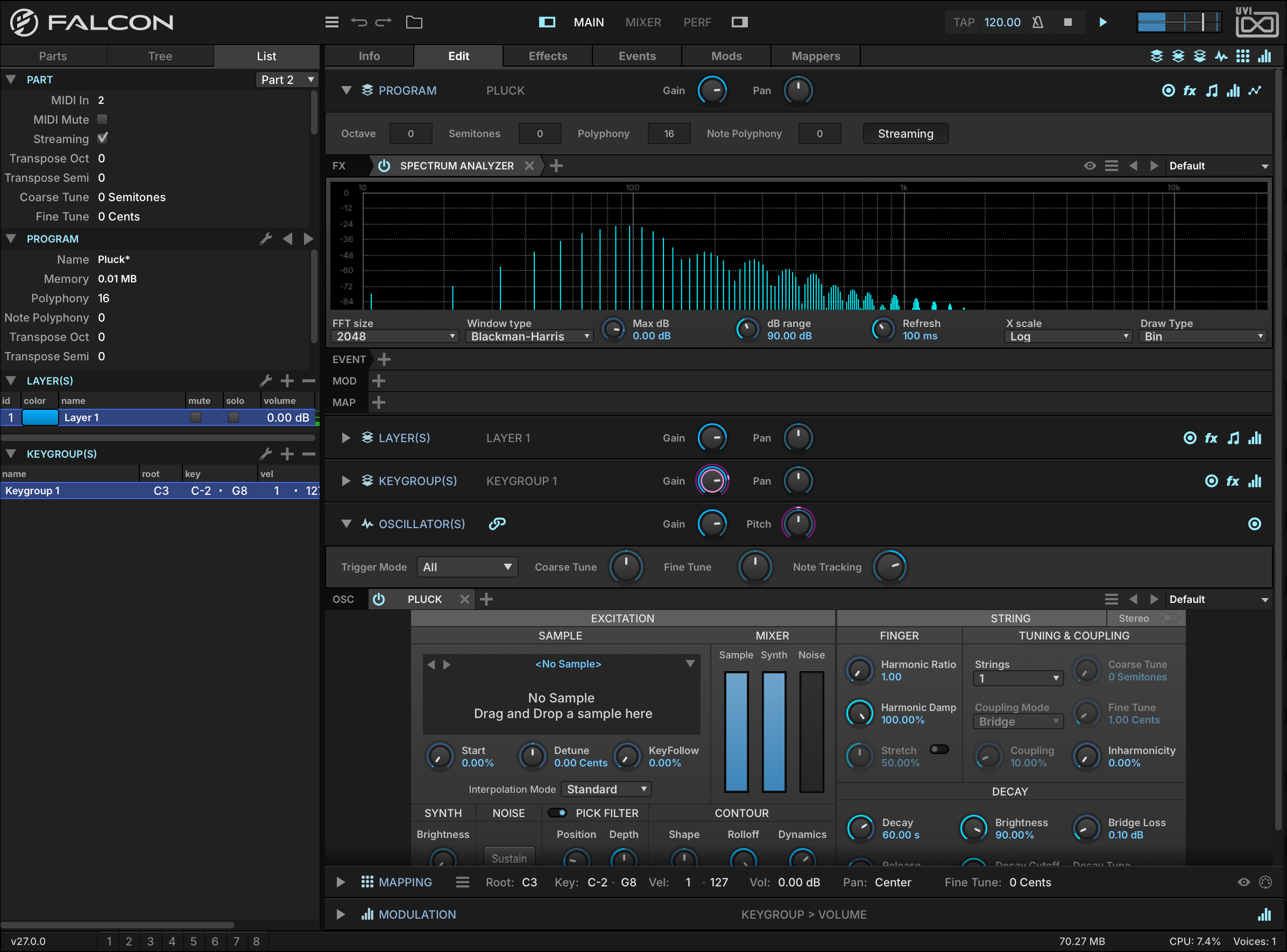
A single Pluck oscillator routed into a spectrum analyzer
- 1 One layer, one keygroup
The List view spells the program out: a single layer holding a single keygroup that spans the whole keyboard — the smallest program there is.
- 2 Program effects
A Spectrum Analyzer inserted on the program. Everything the program plays passes through it, so it shows the harmonics of the note being held.
- 3 Layer and keygroup
The LAYER(S) and KEYGROUP(S) sections are collapsed here; with a single one of each there is nothing else to select.
- 4 Pluck oscillator
The keygroup’s only oscillator. Pluck is a string-synthesis oscillator: a short excitation — pitched oscillator, noise or sample — is fed through a filtered delay line. See Oscillators › Pluck.
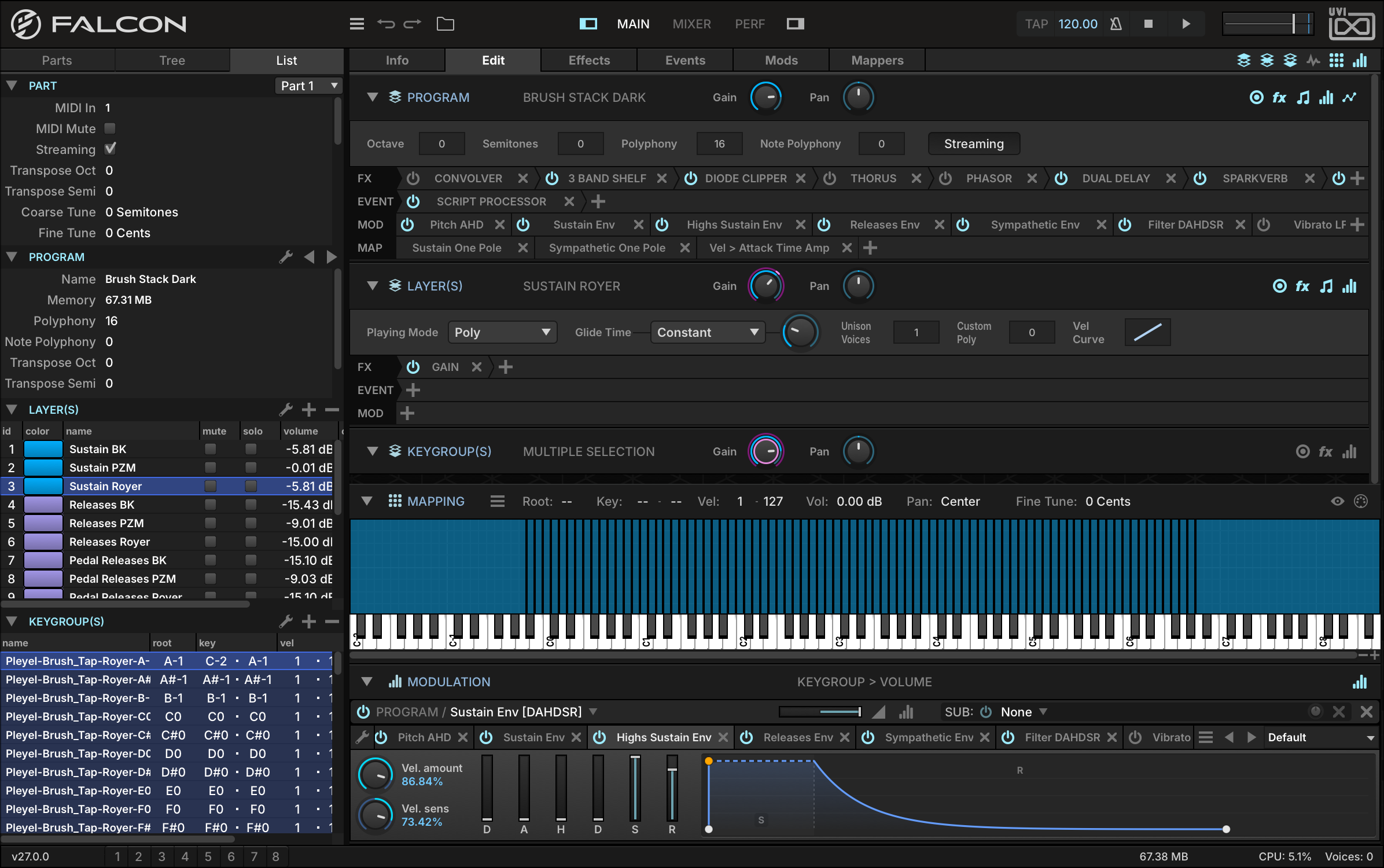
Dozens of keygroups make up just one of the many layers of Brush Stack Dark, from UVI Augmented Piano
- 1 Layers
Each row is a layer, with its own mute, solo and volume: sustain, release and pedal-release layers, several of each.
- 2 Keygroups
The keygroups of the selected layer — one per sampled note, each with its root key and its key and velocity range.
- 3 Program effects
Every layer passes through this chain: convolver, EQ, clipper, chorus, phaser, delay and reverb, processed left to right.
- 4 Program event processors
A Script Processor handles incoming notes before they reach the layers.
- 5 Program modulators
Envelopes for the sustain, the highs, the releases and the sympathetic resonance, a filter envelope, and vibrato and tremolo LFOs.
- 6 Mappers
Modulation mappers, which only exist at program level.
- 7 Layer
The selected layer, Sustain Royer: play mode, glide, unison and velocity curve, and its own effects, events and modulators — a single Gain effect here.
- 8 Keygroups
MULTIPLE SELECTION: every keygroup of the layer is selected, so an edit applies to all of them at once.
- 9 Mapping
The selected keygroups laid out across the keyboard, one column per note.
At its simplest, you can launch Falcon, load some instruments or loops, and just begin playing without worrying about how it’s all put together. At the other end, you can craft your own advanced, multi-layered programs from scratch containing dozens or hundreds of oscillators with numerous modulation sources, and then mix many instruments and loops together using multiple parts and effects chains.
The sounds included with Falcon or with partner Soundware contain highly detailed and richly varied programs that don’t require any editing at all. However, Falcon also provides the means to modify and extend sounds, which can be peeled back one layer at a time for increasingly detailed adjustments.
Components
The basic components of Falcon are oscillators, effects, event processors and modulators. These components, described in the following sections, can be combined in near-infinite variations to produce compelling sounds and instruments.
Oscillators
Oscillators generate the sound. Each keygroup holds one or more of them, of two types: sampling oscillators, which play back audio samples, and synthesis oscillators, which generate the sound without samples. For each oscillator type, see Oscillators.
Effects
Effects process the audio signal, from filters, delays and reverbs to analysis tools such as spectrum analyzers. They can be inserted at every level, from a single keygroup up to the master output, and a whole chain can be saved and recalled as a Multi FX preset. For using effects, see Interface › Effects; for each effect type, Effects.
Modulators
Modulators move the values of controls; they never carry audio or MIDI themselves. Internal sources (envelopes, LFOs, macros) come from Falcon itself, and envelopes and LFOs can be created at every level from the master down to the keygroup; external sources include MIDI messages and host automation. For using modulation, see Interface › Modulation; for each modulator type, Modulators.
Event Processors
Event processors transform or generate MIDI before it reaches the oscillators, from arpeggiators and micro-tuners to script processors, which extend Falcon in Lua. They can be inserted at every level from the master down to the layer, but not on keygroups. For using event processors, see Interface › Events; for each event processor type, Event Processors.