

111 presets of vintage-inspired electronic timbres — single-key soundscapes, arpeggiated sequences, polyphonic synth patches and rhythmic textures channelling the golden age of analog synthesis.
Introduction
Utilizing Falcon’s deep synthesis and modulation capabilities, the Analog Motion expansion delivers rich and dynamic electronic timbres evocative of the golden age of analog synthesis. Analog Motion was inspired by the vanguards of synth-driven pop music and classic genre film scores of the ’80s, such as John Carpenter, Vangelis, Giorgio Moroder, Tangerine Dream and Thomas Dolby.
Drawing from these influences, Analog Motion provides Falcon users with a wide variety of patch types, including single-key soundscapes, arpeggiated sequences, traditional polyphonic synth sounds, rhythmic textures and more. This expansion pack of 111 presets is ideal as either professional grade analog-inspired synth patches ready for immediate use, or as inspirational starting points for adventurous producers eager to tap into Falcon’s full potential as a sound design platform.
INFO Page
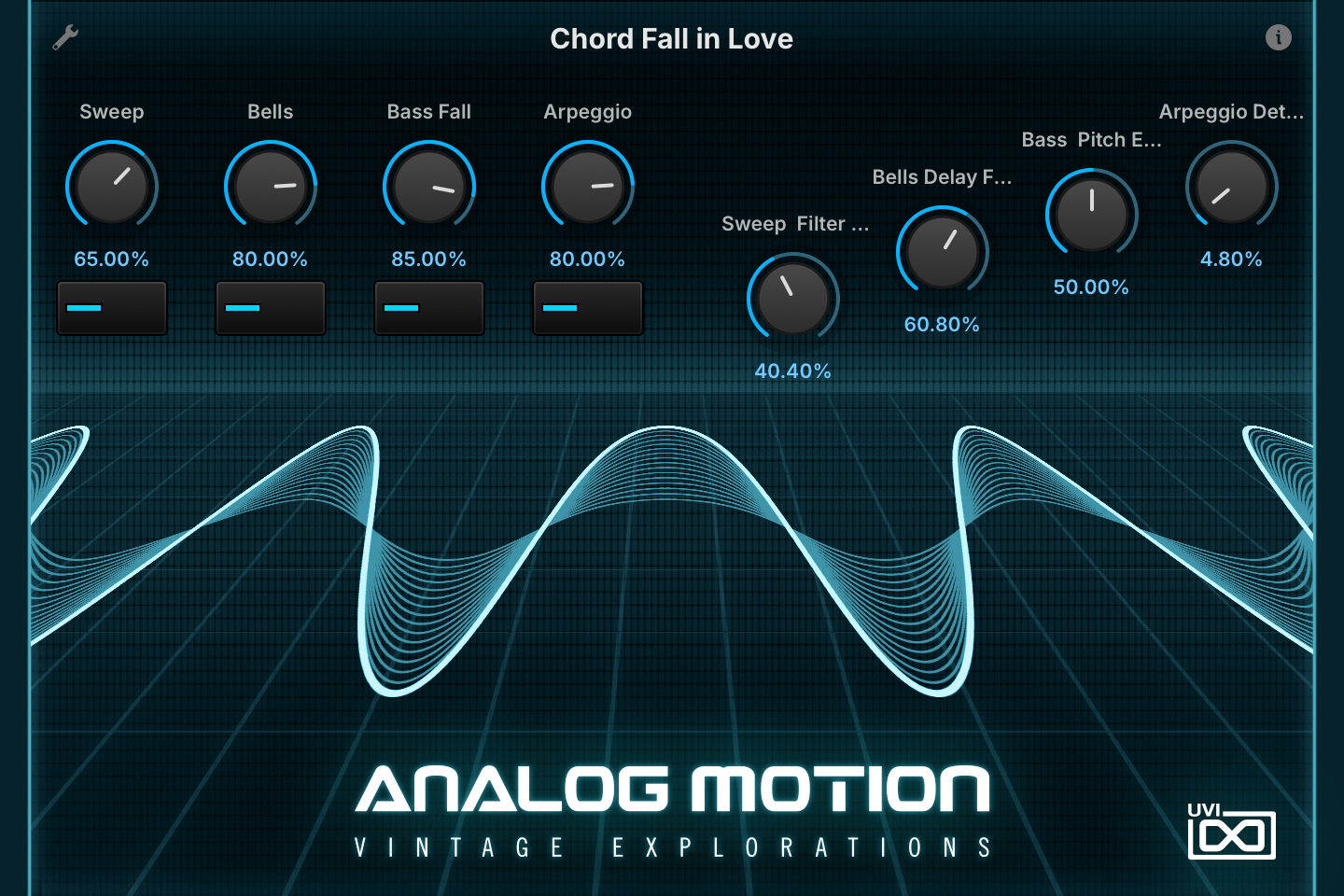
The Info tab provides an overview of the selected program, houses macro controls, and provides a location for custom text and images via the (i) view. This page is available in both Falcon and UVI Player.
- 1 Program Information
Shows the program information. Many presets include notes such as modwheel assignments, macro descriptions or playing tips, and you can add and save descriptions for your own programs.
- 2 Macros
The knobs and switches are the preset’s macros: their number, names and placement change from preset to preset. In Chord Fall in Love, the left four knobs set the levels of the Sweep, Bells, Bass Fall and Arpeggio layers, with a switch below each to turn that layer on or off; the other four set the Sweep filter LFO speed, the Bells delay feedback, the bass pitch-envelope speed and the Arpeggio oscillator detune.
Macros can be controlled via MIDI, OSC, host automation and Lua scripting.
Program Information
Press the (i) button in the upper right to display program information. Many factory presets contain details about the program such as modwheel assignments, macro descriptions or tips for playing it. You can add and save descriptions for your own programs as well.
EDIT Page
If you want more control over a sound than the macros provide, the EDIT tab gives you full access to all parameters. Patches in Falcon are built within a fixed hierarchy: at the very top is the Program, inside the Program are Layers, within each Layer are Keygroups, and inside the Keygroups are Oscillators. Audio effects, MIDI effects and modulators can be placed on any level.

- 1 Program Editor
Top-most level of the patch. Broad changes affecting the overall sound: add audio or MIDI effects, adjust volume, pan and pitch.
- 2 Layer Editor
Group and modify Keygroups. Same effect/modulation slots as the Program, plus velocity curve, polyphony modes and unison settings.
- 3 Keygroup Editor
Ground level of the patch — hosts oscillators, defines MIDI note and velocity ranges, and sets basic oscillator attributes like pitch and trigger modes. Effects instanced here run per-voice, with the extra CPU cost that implies.
The mapping, oscillator and modulation editors are described in Falcon’s software manual: see Hierarchy and Edit.
Preset List
111 presets organized into five categories — arpeggiated patterns, sequenced grooves, playable instruments, chordal keys and sound-design FX.
01 — Arpeggiated
24- Analog Cinematic
- Chord Fall in Love
- Crossmod Waves
- Eleventh Hour
- Evening Blue
- First Exploration
- High Energy
- Light Drops
- Multi Wave Arp
- Multiseq
- Night Flight
- Nocturn Escapade
- Park Central Park
- Pluck Pad Arp
- Raise n Resonance
- Red Sky
- Sixteen Step
- Slow Multipattern
- Sparkle Keys
- Spectral EDnergy
- Sunday Morning
- Tropic Digi Wheel
- Ultra Soft Arp Wheel
- Waverunning
02 — Sequence
33- A Jump Slide
- Brute Jumper
- Easy Play Tangerine
- Five Spot
- Hidden Agenda
- Inked Linked
- Line Panner
- Mac Arena
- Minor Energy
- Monoseq
- O Wawa N Again
- Octabass Groove
- Ominous Electro
- One Finger Arp
- SEQ Alpha One 95
- SEQ Introductory
- Sequence DAMotion 1
- Sequence DAMotion 2
- Sequence Stars
- Shifty Shifty
- Sonic Filament
- Space Vortex
- Thunder Meditation
- Trilateral Time
- Uber Space Driving
- Underwater Spain
- Upbeat Layers
- Valley People
- Vangel Slow Motion
- Vice Wheel 2000
- Villain
- Waverun Sequence
- X Analog Beat
03 — Playable
35- BL Nightshine 1
- BL Nightshine 2
- BR Brassy Rising
- BR Master Kanter
- BR Modson Platinum
- BR Osc Motion 1
- BR Osc Motion 2
- KB Hi N Ken
- KB Road in Space
- KB Shakeys Pluck
- KB Step Keys
- LD Ambient Modulator
- LD Elvish Violon
- LD Lightwaves
- LD Octaved Solo
- LD Soft Light
- LD Sync Fallead
- OR Wheel War Orchestra
- PD Cosmopolis X Pad
- PD Fantasy Ominous
- PD Hi N Ken
- PD Mist Rise
- PD Organic Ambient
- PD Scan Syn
- PD Soft Mover
- PD Table Flyer
- PD Venus Automod
- PL Filter Dirty Step
- PL Glide Rise Seq
- PL Kevin Stack
- PL Marimbanalog
- PL Sci Syn
- PL Spring Five
- PL Sync Fall
- SW Sweep Lag S&H
04 — Chords
8- Ange Analog Split
- Autochord Jam
- Creeper Chord
- Fantasy Chord White Keys
- Lag S&H Chord
- PAD Fairy Tail
- Slider Phase
- Suspect Usual
05 — FX
11- EDo You Read Me
- Encounters
- FX Alarma
- Heatbeat Galactic
- Jupiton Rise
- Noise Ramp
- Sometimes Pad
- Space Bubbles
- Speachy Froggy
- Thunderbolt
- Uno Mod Mayhem
Credits and Thanks
Sound Design — Louis Couka · Alain Etchart · Ed Ten Eyck · Damien Vallet · Kevin Guilhaumou
GUI & Graphics — Nathaniel Reeves · Anthony Hak
Documents — Nathaniel Reeves · Kai Tomita
UVI Team