

100 masterfully-designed presets venturing into darker, more mysterious sonic realms — luminous textures, evolving ambiences, brooding drones, organic motion and immersive atmospheres.
Introduction
Atmospherics 2 deepens and darkens the sonic journey first introduced by the original Atmospherics, offering 100 brand-new presets for Falcon. Venturing into more mysterious and shadowy sonic realms, this collection delivers luminous textures, evolving ambiences, brooding drones, organic motion, and immersive atmospheres.
Each sound has been carefully sculpted to provide instant depth and emotion, from subtle spatial beds to vast cinematic swells. Use them as ready-to-go backdrops, evolving tonal foundations, or inspiration for entirely new creations through Falcon’s advanced synthesis and effects.
INFO Page
The Info tab provides an overview of the selected program, houses macro controls, and provides a location for custom text and images via the (i) view. This page is available in both Falcon and UVI Player.
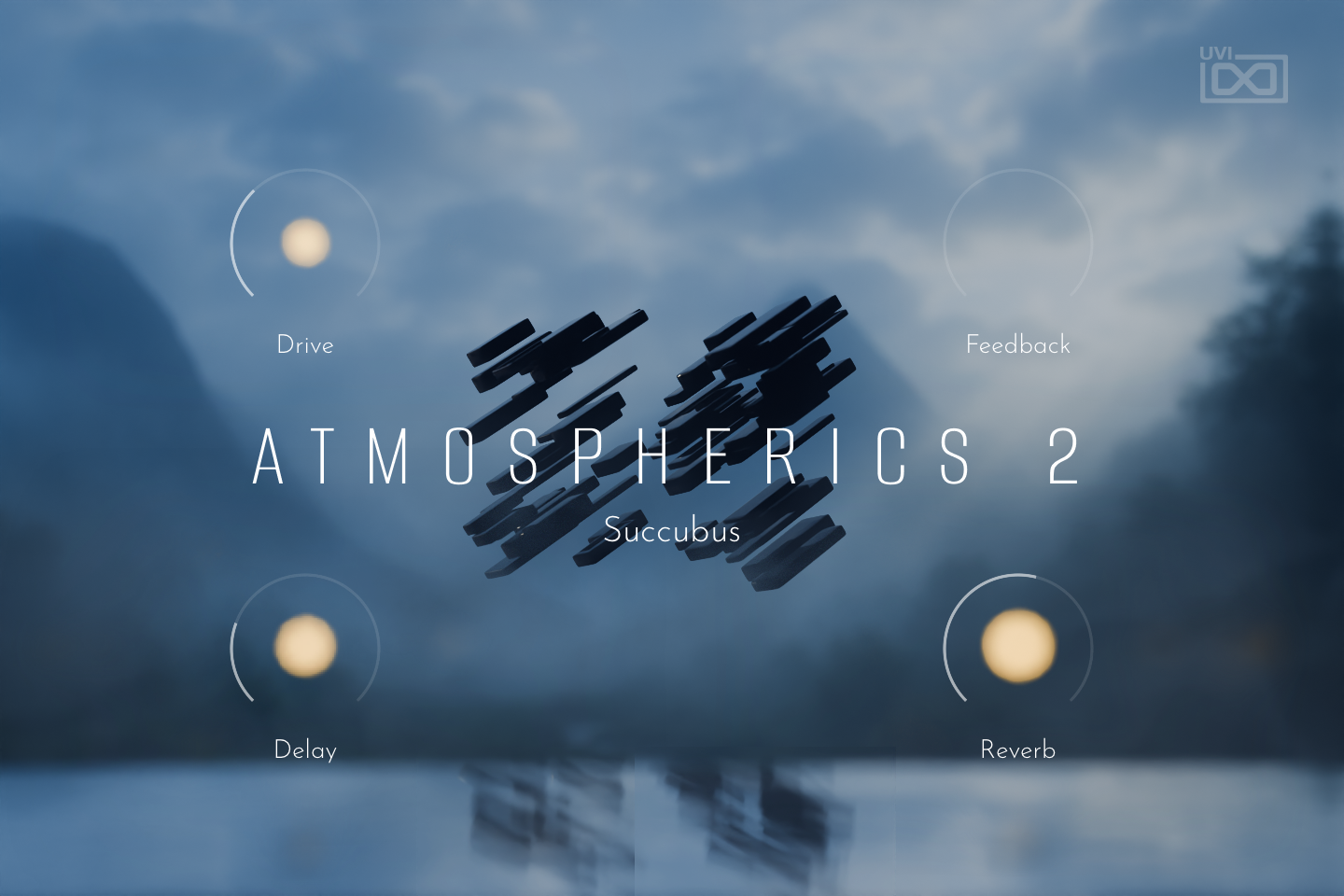
- 1 Macros
The four knobs are the preset’s Macros 1 to 4 and show their names, so labels change from preset to preset; the glow around each knob follows its value. In Succubus, Drive drives one layer harder while lowering its gain, Feedback brings in the Feedback Machine, and Delay and Reverb set the delay and reverb mix.
Macros can be controlled via MIDI, OSC, host automation and Lua scripting.
- 2 Level visualizer
The floating objects in the center and their reflection are level meters: they react to the program’s output level as you play.
- 3 Preset name
The name of the loaded preset.
Macros
Same as Falcon Factory Content, Atmospherics 2’s patches have been programmed with macros which provide users with easy access to the key parameters of each patch. Atmospherics 2 also has a custom front panel which is made with Falcon’s script feature. The parameters are connected with the macros and these may be controlled via MIDI, OSC, host automation and Lua scripting, allowing for easy customization and expressive performance capabilities.
For more details on macros, see Falcon’s software manual.
Program Information
Press the Script button above the panel to switch to Falcon’s macro view, then the (i) button in its upper right to display program information. Many factory presets contain details about the program such as modwheel assignments, macro descriptions or tips for playing it. You can add and save descriptions for your own programs as well.
EDIT Page
If you want more control over a sound than the macros provide, the EDIT tab gives you full access to all parameters. Patches in Falcon are built within a fixed hierarchy: at the very top is the Program, inside the Program are Layers, within each Layer are Keygroups, and inside the Keygroups are Oscillators. Audio effects, MIDI effects and modulators can be placed on any level.

- 1 Program Editor
Top-most level of the patch. Broad changes affecting the overall sound: add audio or MIDI effects, adjust volume, pan and pitch.
- 2 Layer Editor
Group and modify Keygroups. Same effect/modulation slots as the Program, plus velocity curve, polyphony modes and unison settings.
- 3 Keygroup Editor
Ground level of the patch — hosts oscillators, defines MIDI note and velocity ranges, and sets basic oscillator attributes like pitch and trigger modes. Effects instanced here run per-voice, with the extra CPU cost that implies.
The mapping, oscillator and modulation editors are described in Falcon’s software manual: see Hierarchy and Edit.
Preset List
100 presets organized across seven evocative categories — from animated tonal beds to experimental textures and cinematic soundscapes.
01 — Animated
14- Glass Strings
- Guerreiro
- Hollow Life
- Hologram Elvis
- Major Wrapped
- Pianolimba
- Polyfying
- Rabbit
- Shooting Stars
- Sonar 1K
- Takahi
- Tape Ensemble
- Tennessee
- Transval
02 — Dark
15- Abyss
- Cathedral
- Disturbia
- Lost Media
- Monstera
- Mysteriis
- Nightmare
- Ocean
- Odd Amp
- Plainchant
- Scene
- Sub Orchestra
- Suburbs
- Succubus
- Victus
03 — Drones
14- Ceremony
- Darling I
- Deep Breath
- Digital Vintage
- Lagoon
- Light Amp
- Little Bit
- No Name
- Ochd
- Red Mist
- Sunn
- The Keep
- Underground
- Voyager
04 — Experimental
14- Coin Spin
- Deefam
- Feedback
- Ghost Barrel
- Grains Wheel
- Meditation I
- Meditation II
- Mocking Bird
- Places
- Post Energy
- Rewind
- Session
- Spring Glitch
- Vivarium
05 — Granular
14- Celluloid
- Delta Breath
- Felt Hammer
- Lost Guitar
- Medley
- Meta Crumbs
- Monolith
- Piano Feel
- Rain Forest
- Soundwalk
- Tension Void
- Valley Found
- Vaulter
- Walmir
06 — Pads
15- Crumbs
- Explorer I
- Explorer II
- Fast Forward
- Fictions
- Maker
- Morning Dew
- Murmures
- Othello
- Radio Ghosts
- Repeat
- Species
- Stranger
- Strings Pad
- Symphonia
07 — Soundscapes
14- Blissing
- Enlightenment
- Figures
- Garden
- Generative I
- Generative II
- Generative III
- Lost In Space
- Mutable Set
- Opera
- Silver Morning
- Suspended Moment
- Trails
- Vimal
Credits and Thanks
Sound Design — Théo Gallienne
GUI & Graphics — Efflam Le Bivic
Documents — Nathaniel Reeves · Kai Tomita
UVI Team