
120 masterfully-designed presets from renowned sound designer Richard Devine, exploring Falcon's advanced synthesis capabilities — from animated pads and arpeggiated sequences to modular madness and percussive textures.
Introduction
Devinity is a deep-dive into Falcon with renowned Atlanta-based electronic musician and sound designer Richard Devine. One of the industry’s most cherished and recognizable figures, Richard has a profound love for sound and technology, writing and performing his own music and being called upon to design sound for many of the world’s most successful companies.
In Devinity, Richard shares 120 patches detailing his exploration of Falcon, showing off his unique style and approach to sound design. No one understands this better than the man himself, so to give us some insight to his process and inspirations Richard kindly agreed to sit down with us and talk shop.
Made for Falcon
The Devinity expansion leverages the advanced synthesis architecture of Falcon, featuring intuitive macro controls for instant playability.
Control your sound with MIDI, OSC, host automation, and Lua, or transform it with Falcon’s extensive library of oscillators, effects, modulators, and scripts.
Falcon’s versatility and pristine sound quality is evident throughout this collection, utilizing numerous synthesis and sound design techniques and a robust use of effects and modulators. Sounds can all be quickly previewed, edited, layered or performed with nearly limitless variation thanks to Falcon’s semi-modular architecture and rich component library.
INFO Page
The Info tab provides an overview of the selected program, houses macro controls, and provides a location for custom text and images via the (i) view.
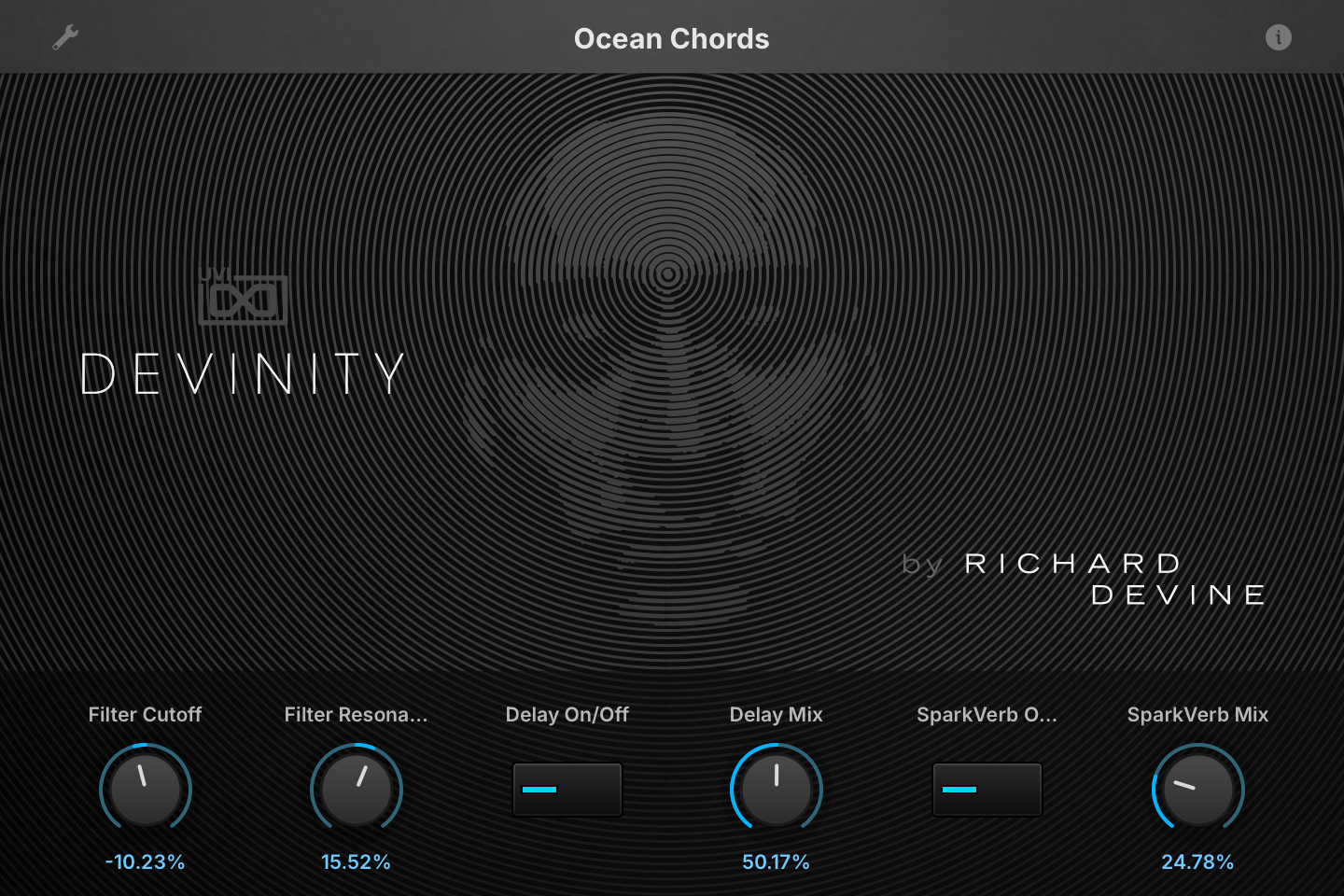
- 1 Program Information
Press the (i) button to display the program information. Many factory presets include notes such as modwheel assignments, macro descriptions or playing tips, and you can add and save descriptions for your own programs as well.
- 2 Macros
The knobs and switches are the macros of the loaded program: their number, names and layout change from preset to preset. In Ocean Chords, the most common set in the bank, Filter Cutoff and Filter Resonance drive the Xpander Filter’s frequency and resonance, Delay On/Off and Delay Mix switch the Dual Delay and set its mix, and SparkVerb On/Off and SparkVerb Mix do the same for the SparkVerb reverb.
Like any macro, each one can be assigned to MIDI CC, OSC or host automation from its right-click menu, or driven by Lua scripting.
Macros
Same as Falcon Factory Content, Devinity’s patches have been programmed with macros which provide users with easy access to the key parameters of each patch. The Info tab shows them as knobs and switches over the Devinity artwork; their number and names change from preset to preset. Macros may be controlled via MIDI, OSC, host automation and Lua scripting, allowing for easy customization and expressive performance capabilities.
For more details on macros, see Falcon’s software manual.
Program Information
Press the (i) button in the upper right to display program information. Many factory presets contain details about the program such as modwheel assignments, macro descriptions or tips for playing it. You can add and save descriptions for your own programs as well.
EDIT Page
If you want more control over a sound than the macros provide, the EDIT tab gives you full access to all parameters. Patches in Falcon are built within a fixed hierarchy: at the very top is the Program, inside the Program are Layers, within each Layer are Keygroups, and inside the Keygroups are Oscillators. Audio effects, MIDI effects and modulators can be placed on any level.

- 1 Program Editor
Top-most level of the patch. Broad changes affecting the overall sound: add audio or MIDI effects, adjust volume, pan and pitch.
- 2 Layer Editor
Group and modify Keygroups. Same effect/modulation slots as the Program, plus velocity curve, polyphony modes and unison settings.
- 3 Keygroup Editor
Ground level of the patch — hosts oscillators, defines MIDI note and velocity ranges, and sets basic oscillator attributes like pitch and trigger modes. Effects instanced here run per-voice, with the extra CPU cost that implies.
The mapping, oscillator and modulation editors are described in Falcon’s software manual: see Hierarchy and Edit.
Preset List
120 presets across ten categories spanning animated textures, arpeggiated sequences, bass, bells, chords, sound effects, modular explorations, pads, percussive sequences, and plucks and leads — all crafted by Richard Devine.
01 — Animated
18- Bleepy Pad
- Blinking Lights
- Complex Web
- Delicate Dance
- Dream Time
- Drift & Pulse
- Emeralds
- Heaven's Gate
- Mountain Song
- Noise Picks
- Orbit Sequence
- Phase Pad
- Rez Pulser
- Sparkle Stars
- Spinning Spaces
- Stargazer
- Substrata
- Universe Pulses
02 — Arpeggiated
8- Abstract Lead
- Arps of Heaven
- Artikt Acid
- Cascade Arp
- Floating
- Random Flux
- Runner Bass
- Star Arp
03 — Bass
13- Bass Interia
- Bronze Bass
- Comber Bass
- Flutter Bass
- Liquid Bassline
- Plate Bass
- Pogo Bass
- Razor Bass
- Reptilian Bass
- Tack Bass
- Talking Bass
- Tumbler Bass
- Wave MorpherBass
04 — Bells
4- Chimes FM
- Clear Bells
- Noise Bell
- Piano Tines
05 — Chords
6- Berlin Chords
- Chord Heaven
- Ocean Chords
- Old Film
- Summer Chords
- Xlyo FM
06 — FX
14- Acid Rain
- Black Waters
- Glitter
- Harmonic Riser
- Haunting Drone
- PhyMod Hats
- Shooting Star
- Slow Risers Pad
- Space Travel
- Strange Place
- Tension Builder
- Wavetable Rain
- With Ghosts
- Worm Percs
07 — Modular Madness
24- Bass Errors
- Bell Helix
- Broken Echo
- Broken Glass
- Computer Thinking
- Cubic Beats
- Data Streams
- Etallic FM
- FM Blaster FX
- FM Clanks
- FM Gardens
- Gems SFX
- Glass Sprinkles
- Glimmer Pad
- Mad FM
- Morph-BP
- Multi Env FM
- Particle Fields
- Passage to Zion
- Plink Plonks
- PulseMod Pad
- Spectral FM
- Stekkar Beats
- Zap Crusher
08 — Pads
12- Bandpass Space
- Crystal Pad
- Harmonic Pad
- High Pulse Pad
- Island Pads
- Merrian Divide
- Noise Pads
- Slow Moss
- SoftLite Vowels
- Sperical Pad
- Tundra
- Winter Pad
09 — Percussive Sequences
7- ArcType
- Circa Seq
- Drum Core
- FM Perc Set
- FunkDR
- Hop Scotch
- IDM Beat
10 — Plucks - Leads
14- Air Plucks
- Dusk Tines
- Glade Percs
- Golden Pluck
- Guitar Like
- Harmony Plucks
- Ice Pick Lead
- Oregon Trail
- Pearly Falls
- Ping Space
- Pluck Sphere
- Poly Time
- S&H Lead
- Warm Plucks
Credits and Thanks
Sound Design — Richard Devine
GUI & Graphics — Anthony Hak · Nathaniel Reeves
Documents — Nathaniel Reeves · Kai Tomita
UVI Team