

100 masterfully-designed presets exploring the outer edges of sound design — evolving textures, shifting tonalities, and atmospheric soundscapes crafted through Falcon's deepest capabilities.
Introduction
Step into new sonic worlds with Escapism, a bold Falcon expansion from acclaimed sound designer Simon Stockhausen. Featuring 100 presets that defy convention, Escapism explores the outer edges of sound design, blending evolving textures, shifting tonalities, and atmospheric soundscapes that move and transform with time.
From immersive pads and haunting ambiences to expressive tones and dynamic sonic structures, each preset is crafted to inspire exploration and discovery. Whether you’re scoring film and games, shaping experimental music, or searching for sounds that set your productions apart, Escapism provides a rich palette of evocative and forward-thinking sound design.
INFO Page
The Info tab provides an overview of the selected program, houses macro controls, and provides a location for custom text and images via the (i) view. This page is available in both Falcon and UVI Player.
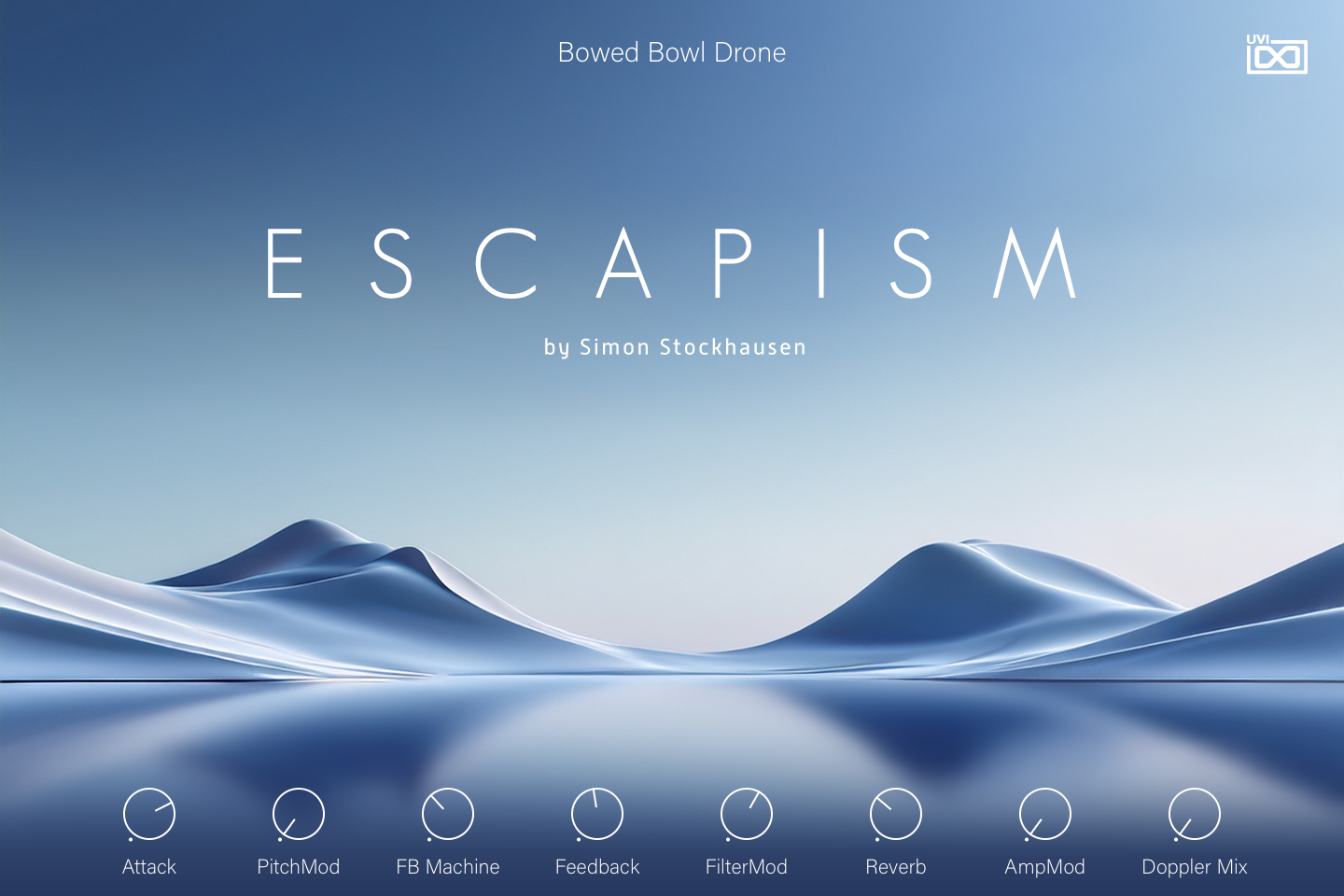
- 1 Program name
Shows the name of the loaded program.
- 2 Macros
The panel script builds this row from the program’s macros: one knob per macro (a switch for switch-type macros), labelled with the macro’s name, so the number and names of the controls change from preset to preset. In Bowed Bowl Drone, Attack lengthens the attack of the envelopes, PitchMod and AmpMod set the depth of LFO pitch and amplitude modulation, FB Machine and Feedback set the Feedback Machine’s mix and feedback, FilterMod changes the Xpander Filter’s cutoff, resonance, key tracking and envelope modulation depth, and Reverb and Doppler Mix set the Bloom reverb and Doppler mix.
Like any macro, each one can be assigned to MIDI CC, OSC or host automation from its right-click menu, or driven by Lua scripting. For more on macros, see Falcon’s software manual.
Program Information
Press the Script button above the panel to switch to Falcon’s macro view, then the (i) button in its upper right to display program information. Many factory presets contain details about the program such as modwheel assignments, macro descriptions or tips for playing it. You can add and save descriptions for your own programs as well.
EDIT Page
If you want more control over a sound than the macros provide, the EDIT tab gives you full access to all parameters. Patches in Falcon are built within a fixed hierarchy: at the very top is the Program, inside the Program are Layers, within each Layer are Keygroups, and inside the Keygroups are Oscillators. Audio effects, MIDI effects and modulators can be placed on any level.

- 1 Program Editor
Top-most level of the patch. Broad changes affecting the overall sound: add audio or MIDI effects, adjust volume, pan and pitch.
- 2 Layer Editor
Group and modify Keygroups. Same effect/modulation slots as the Program, plus velocity curve, polyphony modes and unison settings.
- 3 Keygroup Editor
Ground level of the patch — hosts oscillators, defines MIDI note and velocity ranges, and sets basic oscillator attributes like pitch and trigger modes. Effects instanced here run per-voice, with the extra CPU cost that implies.
The mapping, oscillator and modulation editors are described in Falcon’s software manual: see Hierarchy and Edit.
Preset List
100 presets organized across nine categories spanning bowls, chimes, chromatic percussion, electronic, flutes, gongs, pads, santur, and soundscapes.
01 — Bowls
7- Bowed Bowl Drone
- Bowed Bowl Quartet
- Bowed Bowl Spectral
- Bowed Bowl Synth
- Bowl Resonances
- Copper Meets Crystal
- Crystal Bowl
02 — Chimes
10- Chime Cloud
- Chime Meditation
- Chime Synth
- Doppler Chimes Split
- Drunken Chimes
- Morning Chimes
- Wonder Chimes 01
- Wonder Chimes 02
- Wonder Chimes 03
- Wonder Chimes 04
03 — Chromatic Percussion
15- Celestial Garlands
- Hang Finger Rain
- Hang Loop FX Split
- Hang Loops Straight Split
- Hang Ostinato Loops
- Hang Triplet Loops Split
- In Particular
- Kalimba Heaven
- Kalimba Loop Gamelan
- Kalimba Meets 808
- Kalimba Metro
- Kalimba Penta Particles
- Kalimba Slicer
- Kalimba Slides
- Mallet Hang V3 RR4
04 — Electronic
10- Attacker
- Ice Surfing
- Jingle Quencer
- Minor Sparkle
- Moon Phaser
- Orchestral Synth
- Seq Triplet Phase
- String Arp Synth
- String Machine
- Table Chimes
05 — Flutes
6- Flute Descender
- Flute Vibes
- Gliss Flute
- In The Woods
- Kill The Flutist
- Over The Hills
06 — Gongs
19- Gong A RR4
- Gong Ghosts 01
- Gong Ghosts 02 Split
- Gong Ghosts 03 Duet
- Gong Large V3 RR4
- Gong Mourning
- Gong Ominousity
- Gong Reso Swishes
- Gong Scenario
- Gong Scream
- Gong Squeak Trio
- Gongs Rubber Split
- Metallurgy
- Rubber Gong Scene
- Singing Gongs Spectrality
- Singing Gongs Trio
- Spectral Gong Drone
- Spinning Gong Drones
- Windgong Synth
07 — Pads
6- Cushion Pad
- Iceland Pad
- Norman Bates
- Pad For Life
- Rich And Mellow
- Supra Pad
08 — Santur
17- Future Santur
- Santur Bouncing Scape
- Santur Bouncing Strings
- Santur Cloud
- Santur Mystery
- Santur Oct Trem Dyn
- Santur Octaves
- Santur Ostinato Split
- Santur Phrases 01 Split
- Santur Phrases 02 Split
- Santur Split Sadness
- Santur String Pad
- Santur Sul Pont Split
- Santur Synth
- Santur V3 RR4
- Santur Workshop
- Santur World
09 — Soundscapes
10- Almost Frozen
- Ambient Motion
- Day And Night
- Gizeh Dawn
- Haunted
- Hazy Summer
- Ominous Drones Split
- Suspended Scape
- The Menace
- Tinkerland
Credits and Thanks
Sound Design — Simon Stockhausen
GUI & Graphics — Nathaniel Reeves
Documents — Nathaniel Reeves · Kai Tomita
UVI Team