

141 masterfully-designed presets capturing the vibes and soul of '80s Funk — synth basses, brass, leads, guitars, electric piano and a full acoustic GM drum kit with authentic old-school flavor.
Introduction
Lay the foundation for your own Funk records with the vibes and soul of ’80s classics. Eternal Funk delivers it all, from a wide selection of synth-based bass, leads, brass, guitar, electric piano and a full acoustic GM drum kit with authentic, old-school funk flavor.
The sounds of Eternal Funk were designed to replicate our favorite moments of ’80s Funk, with sounds designed from scratch using Falcon’s capable architecture. To deliver a complete and authentic sound we recorded a full drum kit in the classic way, ready for you to program in your own grooves or sequence with the included MIDI files covering timeless funk patterns.
Each of the sounds in Eternal Funk is designed to be expressive and playable, providing unique controls and macros allowing you to sculpt your sound and create dynamic performances.
The versatility and quality of Falcon is evident throughout this collection, utilizing numerous synthesis techniques including analog, FM and physical modeling, as well as robust use of effects and modulators. Sounds can all be quickly previewed, edited, layered or performed with nearly limitless variation thanks to Falcon’s semi-modular architecture.
INFO Page
The Info tab provides an overview of the selected program, houses macro controls, and provides a location for custom text and images via the (i) view. This page is available in both Falcon and UVI Player.
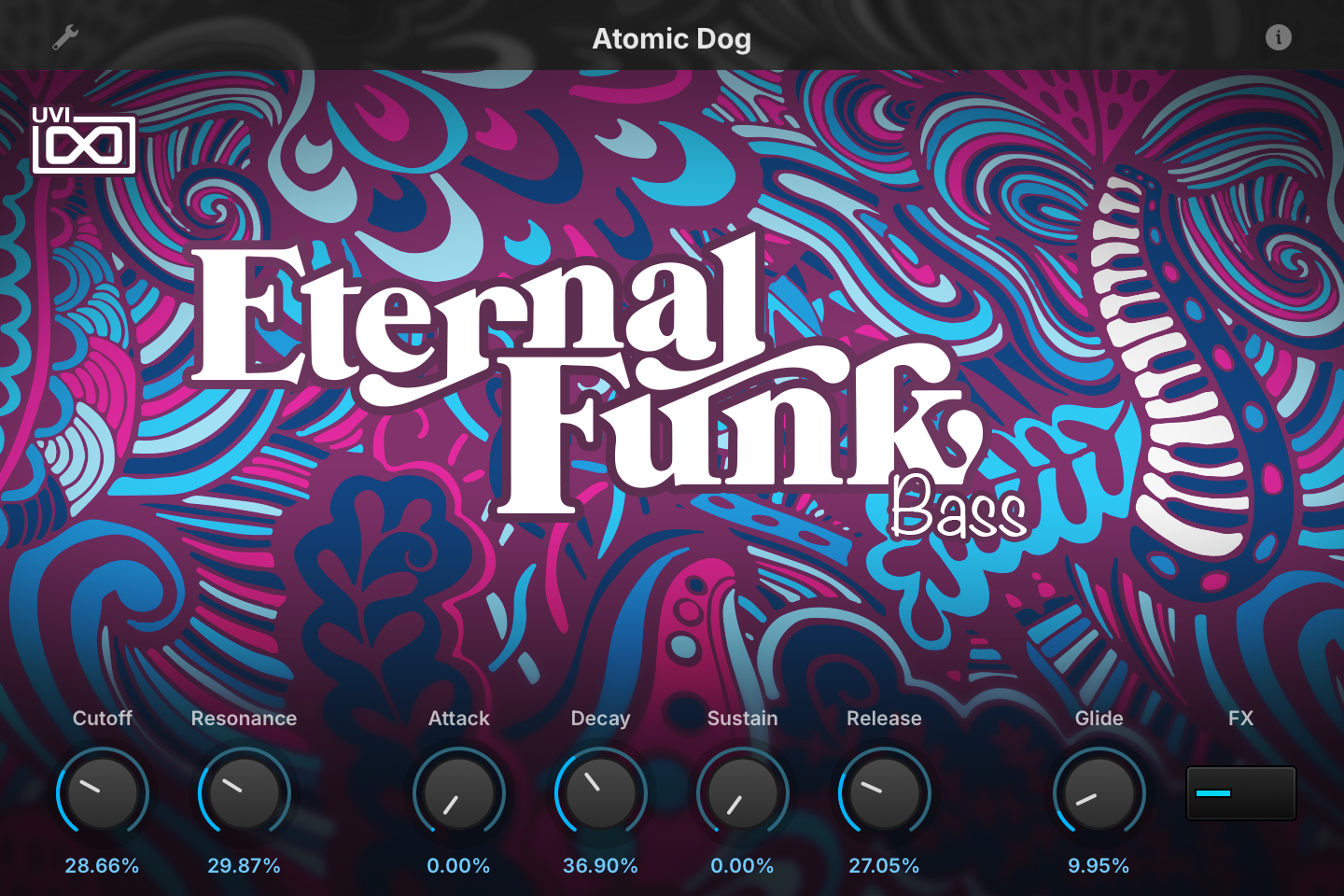
- 1 Program Information
Press the (i) button to display the program information. Many factory presets include notes such as modwheel assignments, macro descriptions or playing tips, and you can add and save descriptions for your own programs as well.
- 2 Macros
The knobs and switches are the macros of the loaded program: their number, names and layout change from preset to preset. In Atomic Dog, Cutoff and Resonance drive the Xpander Filter, Attack, Decay and Sustain shape the envelope that sweeps that filter, Release sets the amplitude envelope’s release, Glide sets the portamento time and the FX switch turns the Analog Chorus and Flanger on or off.
Like any macro, each one can be assigned to MIDI CC, OSC or host automation from its right-click menu, or driven by Lua scripting.
Program Information
Press the (i) button in the upper right to display program information. Many factory presets contain details about the program such as modwheel assignments, macro descriptions or tips for playing it. You can add and save descriptions for your own programs as well.
EDIT Page
If you want more control over a sound than the macros provide, the EDIT tab gives you full access to all parameters. Patches in Falcon are built within a fixed hierarchy: at the very top is the Program, inside the Program are Layers, within each Layer are Keygroups, and inside the Keygroups are Oscillators. Audio effects, MIDI effects and modulators can be placed on any level.

- 1 Program Editor
Top-most level of the patch. Broad changes affecting the overall sound: add audio or MIDI effects, adjust volume, pan and pitch.
- 2 Layer Editor
Group and modify Keygroups. Same effect/modulation slots as the Program, plus velocity curve, polyphony modes and unison settings.
- 3 Keygroup Editor
Ground level of the patch — hosts oscillators, defines MIDI note and velocity ranges, and sets basic oscillator attributes like pitch and trigger modes. Effects instanced here run per-voice, with the extra CPU cost that implies.
The mapping, oscillator and modulation editors are described in Falcon’s software manual: see Hierarchy and Edit.
Preset List
141 presets spanning eight categories — bass, brass, drum kits with MIDI files, effects, guitars, keys, leads and synths — each designed for expressive, playable funk performance.
01 — Bass
30- Atomic Dog
- Bomb On Me
- Charades
- Delegation
- Do It 1
- Do It 2
- Duke 1
- Duke 2
- DX Panda
- Fresh
- Funkadelic
- Glide Me
- Imagination
- Kays Bass
- Keep On
- Love You
- One Way
- Pleasure 1
- Pleasure 2
- Pleasure FX
- Pleasure Slap
- Plush 1
- Plush 2
- Shaka
- She Talk
- System
- Train D
- Yard
- Zapp 1
- Zapp 2
02 — Brass
12- Back And Stride
- Brass King
- Brass Skyy 1
- Brass Skyy 2
- Clinton Horns
- Do it Brass
- Fall Down
- Funkadel Brass
- Groove On
- Keep On Short Brass
- Kool and the Brass
- Midas Touch
03 — Drum Kits
16- Camea Kit
- Chavade Kit
- Chemise Kit
- Default Kit
- Delegate Kit
- EWF Kit
- Gina Kit
- Imagine Kit
- Kadence Kit
- Minuit Kit
- NoLimit Kit
- Shunk Funk Kit
- Sugarvalley Kit
- System Kit
- The Duke Kit
- Y&P Kit
04 — Effects
10- Bomb On Me
- Do It FX
- FX One
- Glide Bass
- Introduction
- Kays Falling
- Midnight Siren 1
- Midnight Siren 2
- Noise Sweep 1
- Noise Sweep 2
05 — Guitars
5- Classic Muted
- Muted 1
- Muted 2
- Muted 3
- Tjam Muted
06 — Keys
20- Analog Clavinet
- Back And Stride
- Con Funk
- Construction
- Duke EP
- EP Cameo
- EPiano Candy
- Live Keys
- Love Come Down 1
- Love Come down 2
- Midnight Keys
- Organ 777
- Plush Analorgan
- Rhodes Wave
- Saturday Love
- Stage
- Train Keys
- Wurli Phase
- Yard Organ Wet
- Yard Organ Wheel
07 — Leads
25- Angela
- Atomic Sync
- Charades
- Do It Short
- Duke Lead 1
- Duke Lead 2
- Find The One Seq
- Gino Lead
- Latelead
- Love You 1
- Love You 2
- Midnight Poly Lead
- Movin
- Plush Lead
- Propositions
- Rogbox
- Saturday Seq 1
- Saturday Seq 2
- Super Freak
- Talkbox
- This Love
- Train Lead
- Tripping Out
- Walk On
- Whistle Cameo
08 — Synths
23- Almost 2000
- Bell Candy
- Bell Shaka
- Bomb On Me
- Do It
- Down Filter
- Fifth King
- Find The One 1
- Find The One 2
- For You Bass Pad
- Kalimba Tree
- Kays Synth 1
- Kays Synth 2
- Love You
- Opening
- Plush
- Resonance
- Roger Pad Wheel
- String Atomic
- String Candy
- String Parliament
- Strings Love
- The Sweep
Credits and Thanks
Sound Design — Alain Etchart · Christian Laffitte · Emeric Tschambser
GUI & Graphics — Anthony Hak · Nathaniel Reeves
Documents — Nathaniel Reeves · Kai Tomita
UVI Team