
120 masterfully-designed presets mined from minimal techno and dark cinema — rhythmic arpeggios, moody textural pianos, deep bass sequences, analog leads, atmospheric pads, and shimmering noise fields.
Introduction
Mined from the shadowy halls of minimal techno and the introspective and surreal contrasts of dark cinema, Inner Dimensions delivers 120 patches ranging from unfolding rhythmic arpeggios to moody textural pianos, deep bass sequences and moving analog leads to tonal atmospheric pads and shimmering noise fields.
Inner Dimensions leverages Falcon’s wide range of oscillators, effects, and modulation to create spaces from stirring and dreamlike to cold and urban, with a wide range of timbres from dirty electronic to natural and melodic. Inner Dimensions offers an inspiring collection of reflective and brooding sounds perfect for minimal dance, scoring, and the darker sides of modern electronic.
Each of the instruments in Inner Dimensions is designed to be expressive and playable, providing helpful controls and macros allowing you to sculpt your sound and create dynamic, expressive performances. As with all Falcon expansions, you have the ability to dig beneath the surface into each sound’s patch structure, to manipulate and reshape it in any way you see fit.
The extraordinary sound quality of Falcon is evident throughout this collection, utilizing numerous synthesis and sound design techniques and a robust use of effects and modulators. Sounds can all be quickly previewed, edited, layered or performed with nearly limitless variation thanks to Falcon’s semi-modular architecture.
Made for Falcon
The Inner Dimensions expansion leverages the advanced synthesis architecture of Falcon, featuring intuitive macro controls for instant playability.
Control your sound with MIDI, OSC, host automation, and Lua, or transform it with Falcon’s extensive library of oscillators, effects, modulators, and scripts.
Falcon’s versatility and pristine sound quality is evident throughout this collection, utilizing numerous synthesis and sound design techniques and a robust use of effects and modulators. Sounds can all be quickly previewed, edited, layered or performed with nearly limitless variation thanks to Falcon’s semi-modular architecture and rich component library.
INFO Page
The Info tab provides an overview of the selected program, houses macro controls, and provides a location for custom text and images via the (i) view.
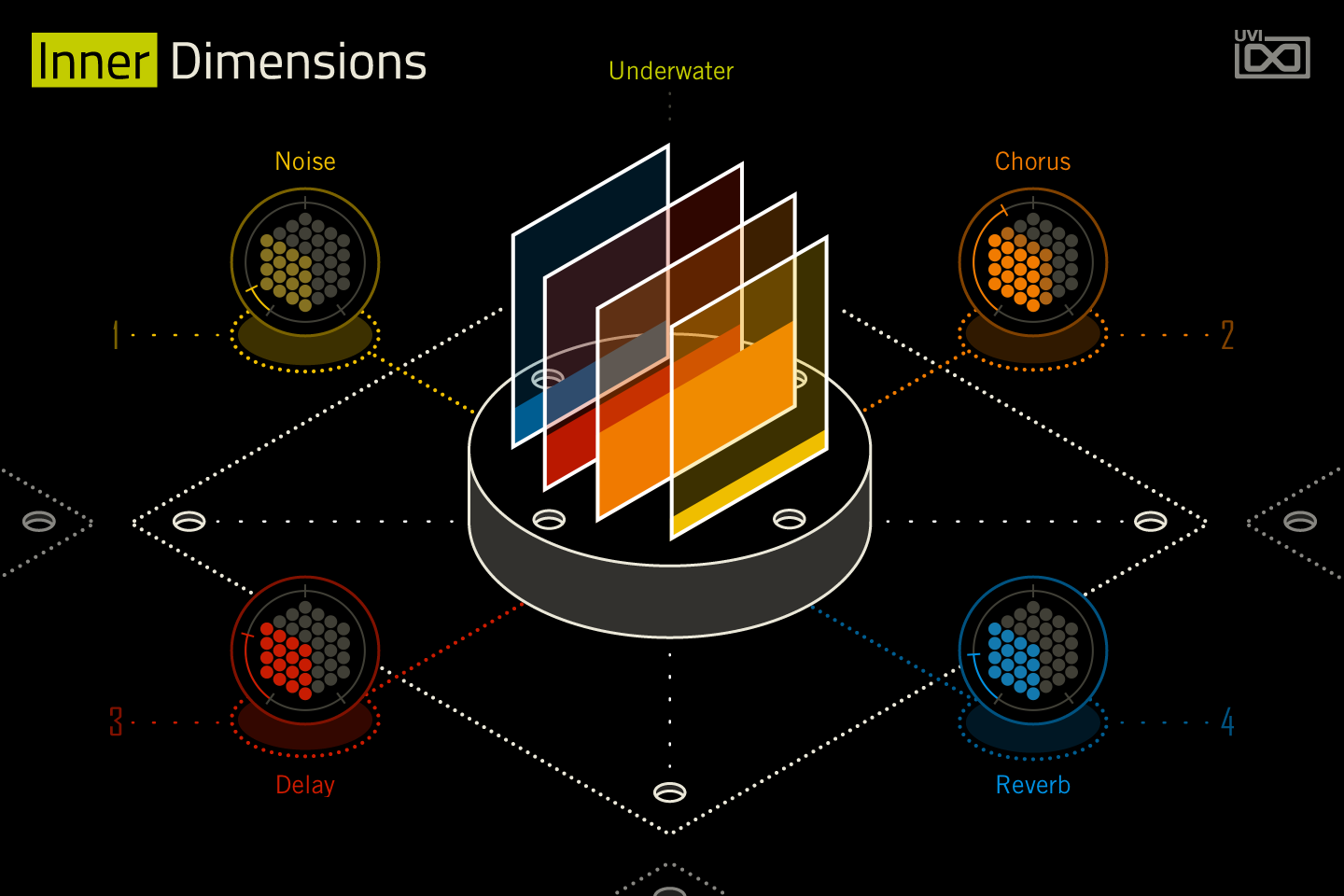
- 1 Program name
The name of the loaded program, written by the panel script.
- 2 Macros
The four knobs are the preset’s macros 1 to 4, in the corners numbered 1 to 4; their labels and targets change with the preset (3 and 4 are most often Delay and Reverb). In Underwater, Noise sets the level of the Noise layer, Chorus the WhiteChorus mix, Delay the DualDelay mix and Reverb the SampledReverb wet level.
Like any Falcon macro, they can be controlled via MIDI, OSC, host automation and Lua scripting. To show them as Falcon’s standard macro knobs, press Script above the panel; see Falcon's software manual.
- 3 Macro display
A display only: each coloured plate fills up with the value of the macro of the same colour (yellow 1, orange 2, red 3, blue 4). It cannot be dragged.
Program Information
Press the Script button above the panel to switch to Falcon’s macro view, then the (i) button in its upper right to display program information. Many factory presets contain details about the program such as modwheel assignments, macro descriptions or tips for playing it. You can add and save descriptions for your own programs as well.
EDIT Page
If you want more control over a sound than the macros provide, the EDIT tab gives you full access to all parameters. Patches in Falcon are built within a fixed hierarchy: at the very top is the Program, inside the Program are Layers, within each Layer are Keygroups, and inside the Keygroups are Oscillators. Audio effects, MIDI effects and modulators can be placed on any level.

- 1 Program Editor
Top-most level of the patch. Broad changes affecting the overall sound: add audio or MIDI effects, adjust volume, pan and pitch.
- 2 Layer Editor
Group and modify Keygroups. Same effect/modulation slots as the Program, plus velocity curve, polyphony modes and unison settings.
- 3 Keygroup Editor
Ground level of the patch — hosts oscillators, defines MIDI note and velocity ranges, and sets basic oscillator attributes like pitch and trigger modes. Effects instanced here run per-voice, with the extra CPU cost that implies.
The mapping, oscillator and modulation editors are described in Falcon’s software manual: see Hierarchy and Edit.
Preset List
120 presets spanning seven categories — from rhythmic sequences and deep bass to atmospheric keys, leads, pads, and plucks.
01 — Arp
20- Arp Chords
- Arp Ocean
- Chords and Notes
- Entropy
- Interference
- Money Layers
- Nightfall
- NoiseFall
- Pluck & Bass 1
- Pluck & Bass 2
- PluriChord 1
- PluriChord 2
- Re-Chordist
- Skin Single
- Skin
- SpaceSeq
- Thick
- Wandering Strings
- Wandering
- Way
02 — Bass
29- Back and Forth
- Bass and Wub
- Bass Swinger 1
- Bass Swinger 2
- Big Bad Ugly 1
- Big Bad Ugly 2
- Boundaries
- Counter
- Disto Bass Lead
- Double
- Graham
- Harduino
- Hot Tub
- I Can Punch
- Irregular Openings
- Legato
- Manimal
- Movements
- Odeporic
- Origami
- Shinto
- Sidechain Sub
- Simple Sine
- Three Lines
- Two Lines
- Wobbly
- Wub Wub 1
- Wub Wub 2
- WubSaw
03 — FX
5- Downslider
- Noise Tricks
- Noiseworx
- Ramp Noise
- Rising Jam
04 — Key
13- Klasm Piano
- Light Melodic
- Melodic Texture Piano
- Melodist
- Motion Key
- MoveChords
- Rhy
- Ruby 1
- Ruby 2
- Sand
- Space Piano
- Synth Guitar
- Underwater
05 — Lead
21- Analog Poly 1
- Analog Poly 2
- Atmospheric Siren
- Braam Metallism
- Brass
- Brothers
- Caveat
- Delay Line
- Flux 1
- Flux 2
- Fuzzy Sine Line
- Hertzeloid
- Irregular
- Lamenting Beast 1
- Lamenting Beast 2
- Roots
- Strong
- Tight Tritone
- Two Lines 1
- Two Lines 2
- WobbleVision
06 — Pad
16- Calm Wobble
- Cosmic
- Delicate
- Density
- Fast Move
- Finland 1
- Finland 2
- GrainVoices 1
- GrainVoices 2
- Guitar Feedback
- Hertzeloidic
- Keypad
- ModuSquares
- Orient Express
- Singer
- Solemnia
07 — Pluck
16- Arplucky
- Buzz Sanza
- Gambang
- Glass Guitary Movement
- Glass Guitary
- Melodic Picks
- Minimal
- Moving FM
- Multi Line
- Pulse And Repeat
- Riding
- Sanza
- Sine Ping
- Squarish
- Topaz 1
- Topaz 2
Credits and Thanks
Sound Design — Vincenzo Bellanova · Théo Gallienne
GUI & Graphics — Anthony Hak · Nathaniel Reeves
Documents — Nathaniel Reeves · Kai Tomita
UVI Team