
100 hand-crafted pads arranged in four expressive categories — Light, Dark, Mystical, and Nature — each featuring a performable XY morph section and custom macro controls.
Introduction
A beautifully crafted and expressive collection of sounds designed by John van der Lugt with the needs of modern production in mind, Organic Pads is a one-stop shop exploring the arena of sustained and evolving sounds within Falcon. Featuring 100 hand-crafted patches arranged in 4 categories including Light, Dark, Mystical, and Nature, Organic Pads gives you a diverse and wide-ranging palette of styles to explore.
Every patch in Organic Pads features a performable XY morphing section, letting you interactively blend and sculpt your sound from 4 discrete layers (sample, synthesis, noise, and texture). As well, each patch has been constructed with custom macros and top-level control over delay and reverb, allowing you to find the perfect mix for your track.
Explore evolving worlds of movement, texture, and color, and as with all Falcon expansions, feel free to dig beneath the surface into the very patch structure, where you can further fine-tune, augment, deconstruct, or completely reshape the included sounds in any way that your inspiration leads you.
Made for Falcon
The Organic Pads expansion leverages the advanced synthesis architecture of Falcon, featuring intuitive macro controls for instant playability.
Control your sound with MIDI, OSC, host automation, and Lua, or transform it with Falcon’s extensive library of oscillators, effects, modulators, and scripts.
Falcon’s versatility and pristine sound quality is evident throughout this collection, utilizing numerous synthesis and sound design techniques and a robust use of effects and modulators. Sounds can all be quickly previewed, edited, layered or performed with nearly limitless variation thanks to Falcon’s semi-modular architecture and rich component library.
INFO Page
The Info tab provides an overview of the selected program, houses macro controls, and provides a location for custom text and images via the (i) view.
- 1 ADSR
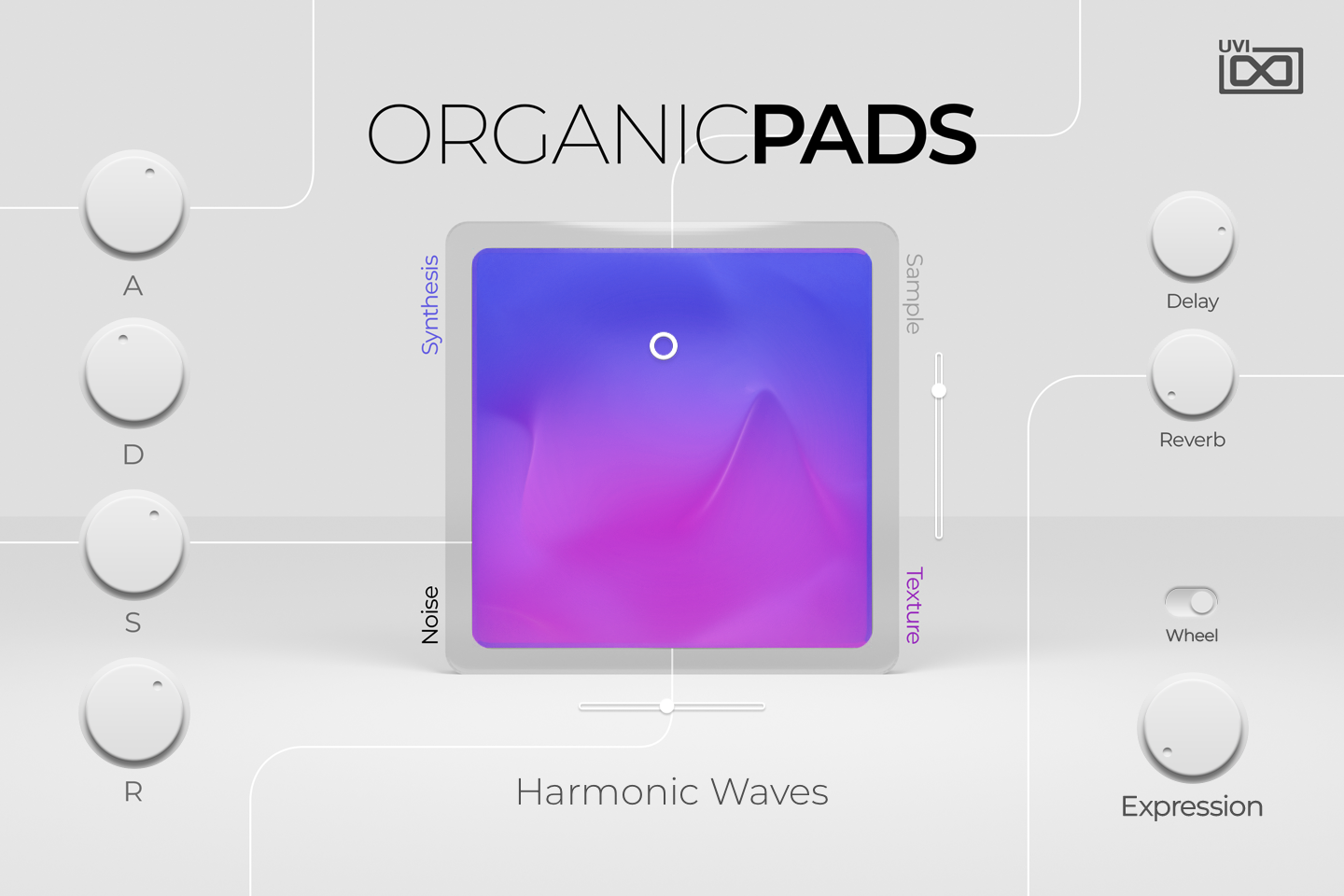
A, D, S and R set the Attack (0 to 10 s), Decay (0 to 30 s), Sustain and Release (up to 20 s) of the program’s amplitude envelope, which shapes the volume of all four layers.
- 2 XY Morph Pad
Blends the four layers named at its corners: Synthesis (top left), Sample (top right), Noise (bottom left) and Texture (bottom right). The puck position sets each layer’s level, the nearest corner being loudest; in the centre all four play at the same level.
By default MIDI CC 21 moves the pad horizontally and CC 22 vertically.
- 3 Vertical Axis Slider
Moves the pad’s puck vertically, balancing the upper pair (Synthesis / Sample) against the lower pair (Noise / Texture). It follows the puck when you drag the pad.
- 4 Horizontal Axis Slider
Moves the pad’s puck horizontally, balancing the left pair (Synthesis / Noise) against the right pair (Sample / Texture). It follows the puck when you drag the pad.
- 5 Preset Name
Name of the loaded preset.
- 6 Delay
Sets how much of every layer is sent to the program’s first aux effect. In most presets this is a delay chain (often with chorus or granular effects); in some, such as Harmonic Waves, it holds other effects instead.
- 7 Reverb
Sets how much of every layer is sent to the program’s second aux effect, a SparkVerb reverb in nearly every preset.
- 8 Wheel
Connects the modulation wheel to the Expression knob. When on, the wheel moves Expression; when off, the wheel is disconnected and the Expression knob is dimmed and disabled.
- 9 Expression
Sets the program’s Macro 1. In the factory presets it mainly opens the layers’ filters (cutoff, and the band-pass of the noise layer), sometimes with level or oscillator changes, so it acts as a brightness and intensity control. Like any macro it can be assigned to MIDI, OSC or host automation.
Program Information
Press the Script button above the panel to switch to Falcon’s macro view, then the (i) button in its upper right to display program information. Many factory presets contain details about the program such as modwheel assignments, macro descriptions or tips for playing it. You can add and save descriptions for your own programs as well.
EDIT Page
If you want more control over a sound than the macros provide, the EDIT tab gives you full access to all parameters. Patches in Falcon are built within a fixed hierarchy: at the very top is the Program, inside the Program are Layers, within each Layer are Keygroups, and inside the Keygroups are Oscillators. Audio effects, MIDI effects and modulators can be placed on any level.

- 1 Program Editor
Top-most level of the patch. Broad changes affecting the overall sound: add audio or MIDI effects, adjust volume, pan and pitch.
- 2 Layer Editor
Group and modify Keygroups. Same effect/modulation slots as the Program, plus velocity curve, polyphony modes and unison settings.
- 3 Keygroup Editor
Ground level of the patch — hosts oscillators, defines MIDI note and velocity ranges, and sets basic oscillator attributes like pitch and trigger modes. Effects instanced here run per-voice, with the extra CPU cost that implies.
The mapping, oscillator and modulation editors are described in Falcon’s software manual: see Hierarchy and Edit.
Preset List
100 presets organized in four thematic categories. Each patch features the XY morph section and custom macro controls.
01 — Dark
16- Fluent Pulses
- Abyssal Drift
- Alaska
- Angels
- Arcane Enchantment
- Disrupted
- Dreamy Moonlit Waves
- Enveloping Clouds
- Harmonic Waves
- Haunting Echoes
- Mysterious Descent
- Restless
- Scraped
- Tense Dreams
- Twisted Enchantment
- Whispering
02 — Light
31- Gentle Nebula
- Airflows
- Ambient Delight
- Angelic Bliss
- Celestial Mist
- Crystal Caves
- Deep Flows
- Eerie Resonant Strings
- Floating
- Gliding Vibrations
- Harmonic Horizon
- Hoarse Voices
- Hypnotic Oasis
- Littering Keys
- Morning Echoes
- Phantom Flicker
- Prayers
- Radiance
- Radiant Resonance
- Resonant Shimmers
- Restless Airwaves
- Reversed Reverberations
- Serene Reflections
- Shifting Shadows
- Shimmering Shores
- Soothing Sunset
- Space Talk
- Tectonic Ripples
- Tranquil Oscillations
- Vowels
- Whispers
03 — Mystical
37- Dreamscapes of Eternity
- Aetheric Delight
- Celestial Awakening
- Clear Sky
- Cosmic Synthesis
- Deflooded
- Disrupted Harmonies
- Distorted Radiance
- Echo
- Electric Dreams
- Enigmatic Illusions
- Ethereal Pulses
- Extraterrestrial Talk
- Harmonic Horizon
- Hypnotic Shimmers
- Luminous Illusions
- Mantras
- Moody Flute
- Morning Mist
- Moving Dimensions
- Mystic Ripples
- Pulsating Radiance
- Radio Waves
- Reflections
- Running Ghosts
- Seraphic Resonance
- Shadowed Harmony
- Shattered Dreams
- Soaring Strings
- Starry Heavens
- Synthetic Intrigue
- Tibetan Horns
- Tibetan Voyage
- Tranquil Trance
- Velvet Horizon
- Vibrations
- Wind Chimes
04 — Nature
16- Jungle Life
- Autumn Harmony
- Birds
- Breath of Spring
- Cold Waters
- Cool Winds
- Deep Forest Monkeys
- Fluttering Dragonflies
- Lush Landscapes
- Morning in the Woods
- Morning Walk in the Park
- Refreshing Air
- Rippling River
- Seashore Serenity
- Water Flow
- Whispering Waters
Credits and Thanks
Sound Design — John van der Lugt
GUI & Graphics — Anthony Hak
Documents — Nathaniel Reeves · Kai Tomita
UVI Team