
105 masterfully-designed presets exploring deep and atmospheric pads, lush ambient soundscapes, haunting strings, flutes, tonal percussions, and rich electronic arps — crafted by sound designer Simon Stockhausen.
Introduction
From the mind and ears of Simon Stockhausen comes Plurality, an essential collection of sounds for Falcon continuing the cinematic sonic explorations of Ether Fields. Created by one of the world’s most eminent minds in sound design, Plurality is a masterwork of deep and atmospheric pads, lush ambient soundscapes, haunting strings, flutes, tonal percussions, rich electronic arps, keys, and more. 105 sounds are included, perfect for adding depth, mystery and movement to your production.
Each of the sounds in Plurality is designed to be expressive and playable, providing unique controls and macros allowing you to sculpt your sound and create dynamic performances. Envelopes, filter and effect macros and more make it quick and easy to perfectly dial-in your sound by focusing on the essential controls.
The versatility and clarity made possible by Falcon is evident throughout this collection, utilizing numerous synthesis techniques including wavetable, sample-based and physical modeling, as well as robust use of effects and modulators. Sounds can all be quickly previewed, edited, layered or performed with nearly limitless variation thanks to Falcon’s semi-modular architecture.
Made for Falcon
The Plurality expansion leverages the advanced synthesis architecture of Falcon, featuring intuitive macro controls for instant playability.
Control your sound with MIDI, OSC, host automation, and Lua, or transform it with Falcon’s extensive library of oscillators, effects, modulators, and scripts.
Falcon’s versatility and pristine sound quality is evident throughout this collection, utilizing numerous synthesis and sound design techniques and a robust use of effects and modulators. Sounds can all be quickly previewed, edited, layered or performed with nearly limitless variation thanks to Falcon’s semi-modular architecture and rich component library.
INFO Page
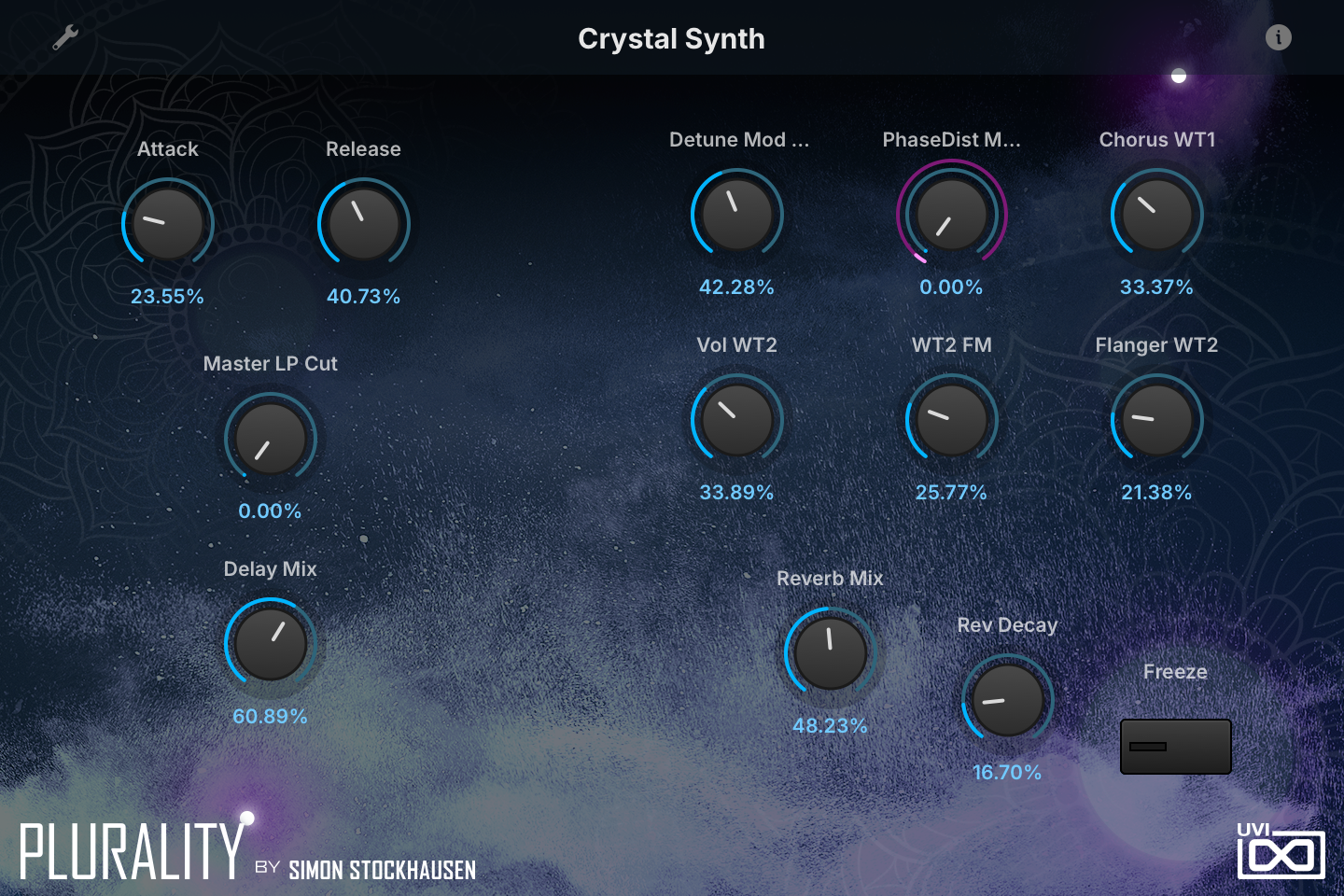
The Info tab provides an overview of the selected program, houses macro controls, and provides a location for custom text and images via the (i) view.
- 1 Program Information
Shows the program’s notes. Many factory presets describe their modwheel assignment, their macros or playing tips here, and you can add and save your own notes.
- 2 Macros
Each knob or switch is one of the preset’s macros, so the labels, the number of controls and their targets change from preset to preset. In Crystal Synth, Attack and Release set both layers’ amp envelopes, Detune Mod WT1 and PhaseDist Mod WT1 set how much LFOs move the first wavetable’s spread and phase distortion (the mod wheel drives the latter), Vol WT2, WT2 FM and Flanger WT2 set the second layer’s level, LFO-driven FM depth and flanger mix, Chorus WT1 the first layer’s chorus, Master LP Cut closes a master low-pass filter, and Delay Mix, Reverb Mix, Rev Decay and Freeze drive the DualDelay and SparkVerb.
Like any Falcon macro, they can be controlled via MIDI, OSC, host automation and Lua scripting. For more on macros, see Falcon's software manual.
Program Information
Press the (i) button in the upper right to display program information. Many factory presets contain details about the program such as modwheel assignments, macro descriptions or tips for playing it. You can add and save descriptions for your own programs as well.
EDIT Page
If you want more control over a sound than the macros provide, the EDIT tab gives you full access to all parameters. Patches in Falcon are built within a fixed hierarchy: at the very top is the Program, inside the Program are Layers, within each Layer are Keygroups, and inside the Keygroups are Oscillators. Audio effects, MIDI effects and modulators can be placed on any level.

- 1 Program Editor
Top-most level of the patch. Broad changes affecting the overall sound: add audio or MIDI effects, adjust volume, pan and pitch.
- 2 Layer Editor
Group and modify Keygroups. Same effect/modulation slots as the Program, plus velocity curve, polyphony modes and unison settings.
- 3 Keygroup Editor
Ground level of the patch — hosts oscillators, defines MIDI note and velocity ranges, and sets basic oscillator attributes like pitch and trigger modes. Effects instanced here run per-voice, with the extra CPU cost that implies.
The mapping, oscillator and modulation editors are described in Falcon’s software manual: see Hierarchy and Edit.
Preset List
105 presets organized into 8 categories spanning flutes, glass harp, hybrid sounds, pads, percussion, soundscapes, string instruments, and wavetable synthesis.
01 — Flutes
14- Aiolos Drones Split
- Clay Flute Chord Trill Split
- Clay Flute Grain Loop
- Clay Flute Lead Unison
- Clay Flute Pad RR4
- Clay Flute Pad XT
- Clay Flute Synced Tremolo
- Clay Flute Trills Granular Split
- Flute Phrases Granular Split Legato
- Flute Phrases Split
- Flutter Flutes
- Giant Flutes Split
- Spectral Shepherd Split
- Weeping Flute Pad
02 — Glass Harp
15- Frozen Glass
- Glass Ghosts
- Glass Harp Articulation Mix
- Glass Harp Granular Arp Maj7
- Glass Harp Major Cloud
- Glass Harp Meets Synth
- Glass Harp RR4
- Glass Mallet Loops High CPU
- Glass Mallet Loops Low CPU
- Glass Mallets FM
- Glass Meditation
- Glass Melancholy
- Glass Paradise
- Glissando Clouds
- Transparent Pulsation
03 — Hybrid
6- Bright Morning Split
- Evil Combs
- Granite
- Incense Harmonics
- SweepQuencer
- Table Drops
04 — Pads
9- Accordion Pad
- Flautato Warmth
- Hybrid Cello Pad
- Hypnotic Pad
- Mellow Chord
- Octaeder
- Pad Enlightment
- Penta Sunrise Split
- Synth Expression
05 — Percussion
16- Bowldrum Granular
- Grains Of Stone
- Granular Penta Tubes
- Litho Glass FM Mallet Mix
- Litho Quencer
- Lithophone Chromatic Tempered
- Lithophone Glissandos Split
- Lithophone Granular Glissandos
- Lithophone Loops High CPU
- Lithophone Loops Low CPU
- Lithophone Repetitions Granular
- Lithophone Repetitions Sampling
- Lithophone RR4 4Vel 9 Pitches
- Octave Tube Sequence Split
- Penta Tubes Granular Gliss Split
- Sky Bells
06 — Soundscapes
8- Blossom Chimes Split
- Glory Grains
- Lydian Lady
- Nepal Valley
- Purity Stream
- Pythagoras Descends
- StoneVerse
- Surreal Bamboo
07 — String Instruments
21- Beijing Morning
- Granular Strum Stick E-Bow
- Lyre E-Bow 01
- Lyre E-Bow 02
- Lyre E-Bow Darkness Split
- Lyre RR5 3VEL Art Switch
- Lyre Spider
- Lyre Synth
- Ostinato Zither
- Physical Stick
- Rotating Stick
- Twang String
- Zither Cosmos
- Zither Distinatos XT
- Zither Distinatos
- Zither E-Bow Scapes Split
- Zither Meets PM
- Zither Resonances
- Zither Sad Seq
- Zither Synth
- Zither Unison
08 — Wavetable
16- Crystal Synth
- Formantia
- Frank Machine
- Glass Mandala
- Glistener
- Lyre Stab Synth
- Lyre Table
- Metropolis
- Rampage
- Spectral Organ
- Stone Table
- Submerger
- Sweeper Drones Split
- Table Koto
- World Clock
- Zither Stab
Credits and Thanks
Sound Design — Simon Stockhausen
GUI & Graphics — Anthony Hak · Nathaniel Reeves
Documents — Nathaniel Reeves · Kai Tomita
UVI Team