
Savage 2 delivers 109 hard-hitting electronic presets — arps, atmospheres, bass, effects, hybrid acoustic, pads, sequences and synths — for DnB, Neurofunk, 2step, Halftime Bass, Dubstep and Mainroom Techno.
Introduction
Continuing where the standout original left off, Savage 2 delivers a relentless sonic arsenal for modern electronic music production. Built on UVI’s 20+ year heritage, this expansion brings together 109 masterfully crafted presets: arpeggiated sounds, atmospheres, bass, effects, hybrid acoustic, pads, sequences and synths. Every element of this intricately designed toolkit has been thoughtfully crafted so sounds interlock into cohesive, powerful arrangements.
Focusing heavily on playability and compositional ease, the interface houses comprehensive macro controls that drive multiple engine parameters simultaneously, allowing you to dive in and quickly twist, morph and bend patches into a unique sonic footprint. Whether you need a subtle tonal shift or a radical transformation, the custom controls keep the inspiration flowing.
Inspired by DnB, Neurofunk, 2step, Halftime Bass, Dubstep and Mainroom Techno, Savage 2 gives producers a connected palette for modern electronic tracks. The sounds can be combined across a production, then pushed apart through macros to create unique sonic features.
Load these hard-hitting presets into Falcon to play them right away, or deconstruct the patches and reshape them into your own designs.
Made for Falcon
The Savage 2 expansion leverages the advanced synthesis architecture of Falcon, featuring intuitive macro controls for instant playability.
Control your sound with MIDI, OSC, host automation, and Lua, or transform it with Falcon’s extensive library of oscillators, effects, modulators, and scripts.
Falcon’s versatility and pristine sound quality is evident throughout this collection, utilizing numerous synthesis and sound design techniques and a robust use of effects and modulators. Sounds can all be quickly previewed, edited, layered or performed with nearly limitless variation thanks to Falcon’s semi-modular architecture and rich component library.
INFO Page
The Info tab provides an overview of the selected program, houses macro controls, and provides a location for custom text and images via the (i) view.
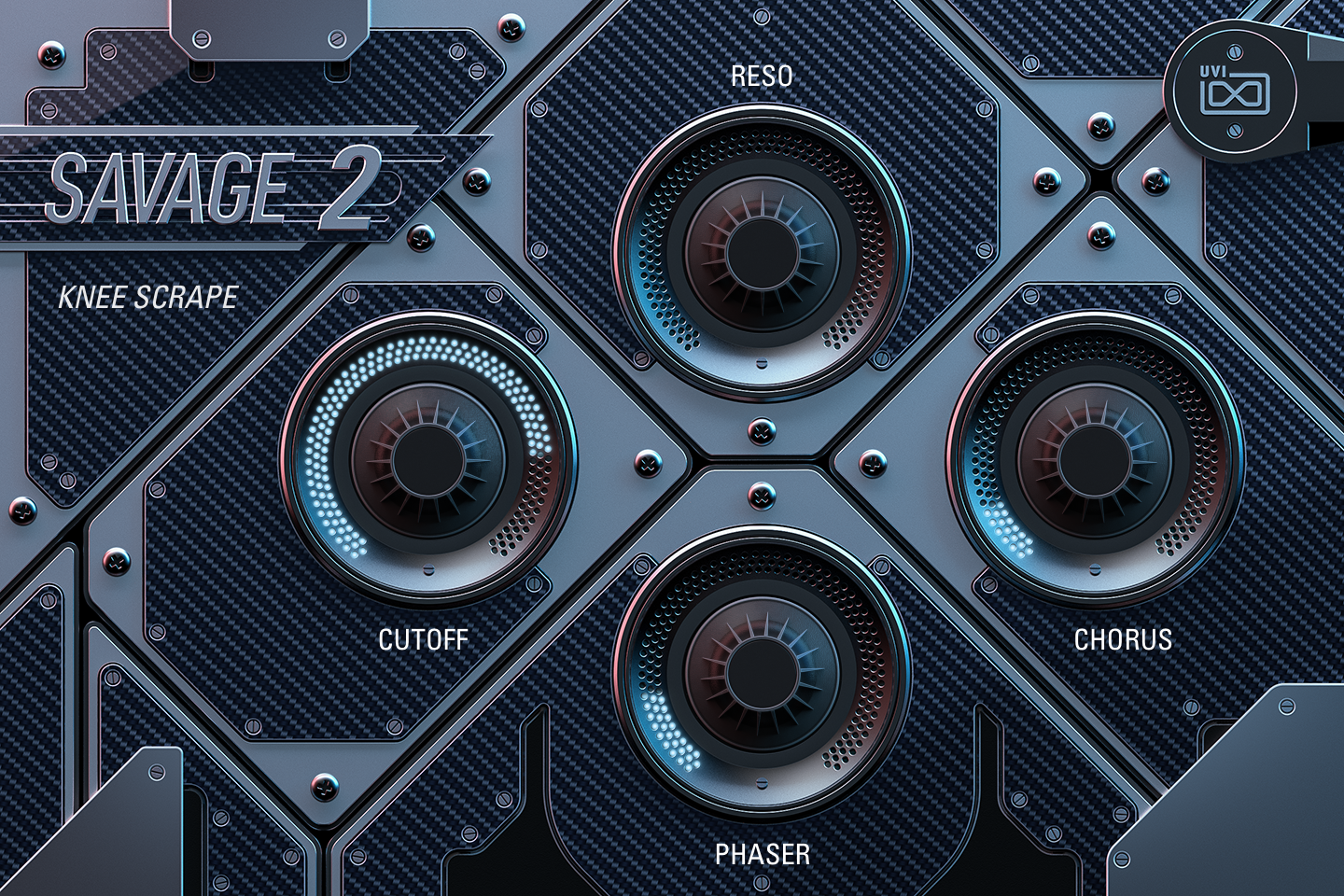
- 1 Preset name
The name of the loaded preset, shown under the SAVAGE 2 logo.
- 2 Macros
The four knobs, set in a diamond (left, top, right, bottom), are the preset’s Macros 1 to 4 and take their names, so labels and targets change from preset to preset. Each one moves one or several sound parameters at once; the ring of blue dots shows its position. In Knee Scrape, CUTOFF and RESO set the frequency and resonance of the voice’s Xpander filter, CHORUS raises the chorus depth and mix, and PHASER widens the frequency range swept by the phaser.
In a few presets a macro is bipolar: its centre position (12 o’clock) leaves the sound unchanged. Like any Falcon macro, the knobs can be controlled via MIDI, OSC, host automation and Lua scripting. For more on macros, see Falcon’s software manual.
Macros
As with Falcon Factory Content, Savage 2’s patches are programmed with macros that give quick access to the key parameters of each patch. Savage 2 also ships with a custom front panel built using Falcon’s Script feature: its four knobs are wired to Macros 1 to 4 and can be controlled via MIDI, OSC, host automation and Lua scripting for easy customization and expressive performance.
Some presets also use Falcon’s arpeggiator or event scripts such as Step Arp, Chorder, Rain Sequencer or MIDI CC LFO. The front panel has no controls for them: their settings are edited in Falcon’s EDIT page.
For more details on macros, see Falcon’s software manual.
Program Information
Press the Script button above the panel to switch to Falcon’s macro view, then the (i) button in its upper right to display program information. Many factory presets contain details about the program such as modwheel assignments, macro descriptions or tips for playing it. You can add and save descriptions for your own programs as well.
EDIT Page
If you want more control over a sound than the macros provide, the EDIT tab gives you full access to all parameters. Patches in Falcon are built within a fixed hierarchy: at the very top is the Program, inside the Program are Layers, within each Layer are Keygroups, and inside the Keygroups are Oscillators. Audio effects, MIDI effects and modulators can be placed on any level.

- 1 Program Editor
Top-most level of the patch. Broad changes affecting the overall sound: add audio or MIDI effects, adjust volume, pan and pitch.
- 2 Layer Editor
Group and modify Keygroups. Same effect/modulation slots as the Program, plus velocity curve, polyphony modes and unison settings.
- 3 Keygroup Editor
Ground level of the patch — hosts oscillators, defines MIDI note and velocity ranges, and sets basic oscillator attributes like pitch and trigger modes. Effects instanced here run per-voice, with the extra CPU cost that implies.
The mapping, oscillator and modulation editors are described in Falcon’s software manual: see Hierarchy and Edit.
Preset List
109 presets in eight categories.
01 — Arpeggiated
19- Atom
- Chima Motion
- Clamp
- Cracker
- Cruncha
- Cyber Sid
- Dank Patter 1K
- Floor Teeth
- Hammer Fist
- Lockjaw Smile
- Modonix
- Pandora
- Paper Cut
- Simple Head
- Skynet
- Stroba
- Threshold
- Underworld
- Wipeout
02 — Atmospheres
15- Anomaly
- Asphyx
- Asylum
- Encounter
- Erebus
- Frozen
- Ghost Particle
- Ion Shute
- Lost Soul
- Luminate
- Oracle
- Plasma
- Quanta
- Shadowfall
- Simulacrum
03 — Bass
21- Agro
- Brix
- Broken Diode
- Buzz Stomp
- Downfall
- Hyper
- Kill Tomorrow
- Knee Scrape
- Krypt
- Lazer Residue
- Moirai
- Prometheus
- Punch Sub
- Punish
- Puzzle Vomit
- Rascal Plastic
- Screamer
- Snarl
- Techa
- Thermal
- Tube Squash
04 — Effects
14- Armory
- Bifrost
- Charge
- Divergence
- Ghost Head
- Jaded
- Mirror Flair
- Parasite
- Portal
- Pyrophor
- Take Off
- Warning Signal
- Zapper
- Zipper
05 — Hybrid Acoustic
9- Anarch
- Augmenta
- Boiling Fragments
- Elysium
- Grain Rays
- Icarus
- Mysteria
- Ornamenta 1K
- Spectre
06 — Pad
10- Alpha Cluster
- Cave Diving
- Descent
- Dust Path
- Explorers
- Haunting
- Magnitude
- Optica
- Rave Cell
- Supra Shot
07 — Sequences
10- Apex
- Arrival
- Boids Droids
- Colour Slap
- Dust Groove
- Emitter
- River Code
- Slap Harvest
- Spring Drops
- Wires
08 — Synths
11- Dendrite
- Evoke
- Lazer Dot
- Morphine
- Node Sage
- Paddles
- Raspify
- Ruins
- Spoils
- Squash
- Swarm
Credits and Thanks
Sound Design — Carlo de Gregorio
GUI & Graphics — Nathaniel Reeves
Documents — Nathaniel Reeves · Kai Tomita
UVI Team