
120 masterfully-designed presets fusing the aesthetics of SubCulture with the lowest registers of the orchestra — dark cinematic strings, haunting brass, roaring taiko, and gritty hits.
Introduction
As an experiment we organized a number of specialized ensembles to capture a range of articulations and effects at the lowest octave possible. The recordings that resulted from these sessions express some of the most powerful and emotive sounds we’ve heard in an orchestral setting. This is the sonic foundation of SubCulture Orchestral.
Fusing the concept and aesthetics of SubCulture with the lowest registers of the orchestra, these incredible recordings were taken to the next level by our sound designers. SubCulture Orchestral delivers 120 unique and inspiring creations; delve into dark cinematic worlds while weaving shadowy string scapes, haunting brass sweeps, roaring taiko rhythms, gritty hits, and more. A perfect companion for anyone looking to add dark and unconventional orchestral sounds to their music, film, or game scores.
Each of the instruments in SubCulture Orchestral is designed to be expressive and playable, providing helpful controls and macros allowing you to sculpt your sound and create dynamic, expressive performances. As with all Falcon expansions, you have the ability to dig beneath the surface into each sound’s patch structure, to manipulate and reshape it in any way you see fit.
INFO Page
The Info tab provides an overview of the selected program, houses macro controls, and provides a location for custom text and images via the (i) view. This page is available in both Falcon and UVI Player.
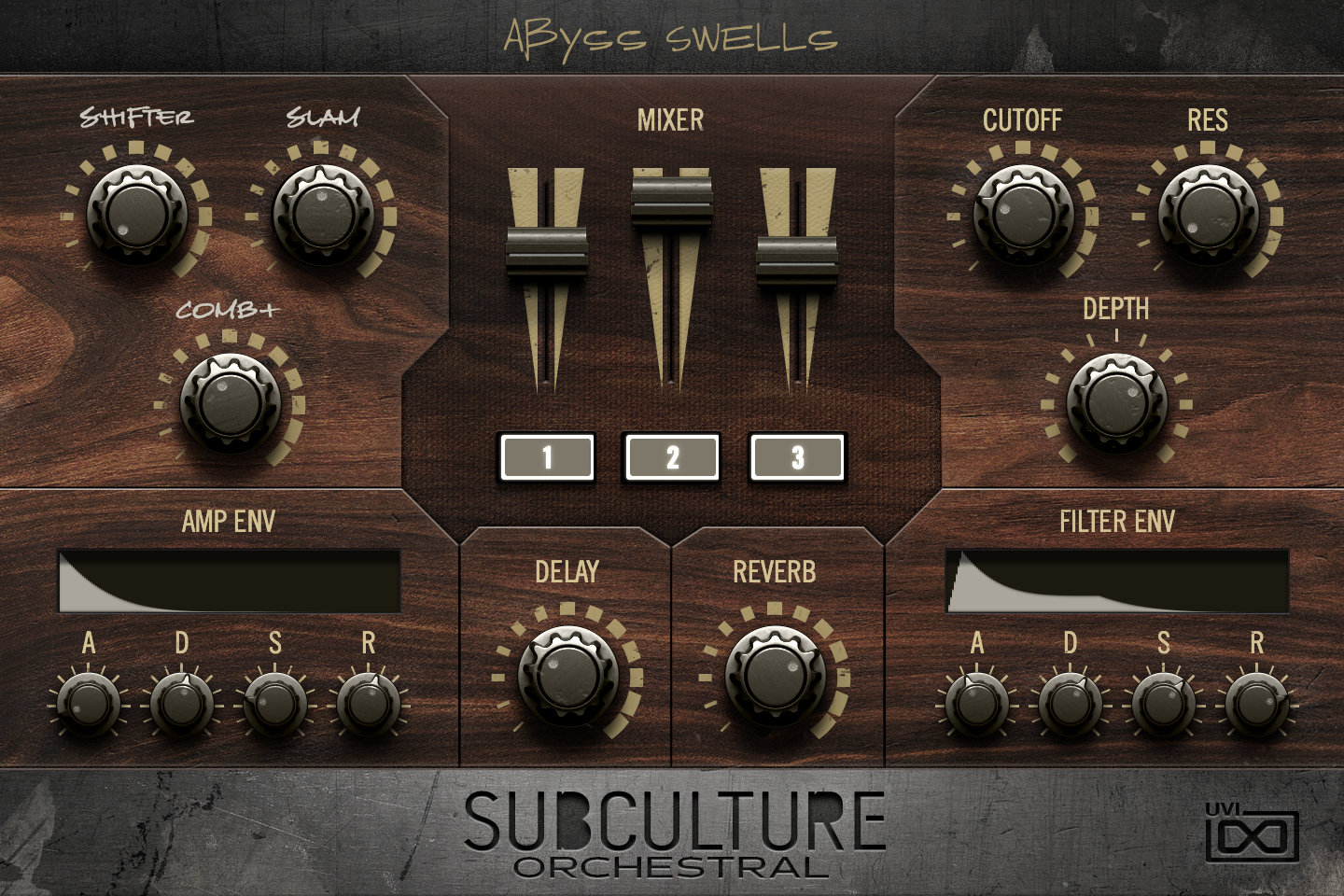
- 1 Preset Macros
Up to three knobs that are the program’s own macros: labels and assignments change from preset to preset. In Abyss Swells, SHIFTER sets the mix of a frequency shifter, SLAM lowers the threshold of a maximizer and COMB+ raises the resonance of a comb filter.
Macros can be assigned to MIDI, OSC or host automation, or driven from a Lua script.
- 2 MIXER
A level fader for each of the program’s layers, up to three; a program with fewer layers shows fewer faders. The numbered button under each fader mutes that layer.
- 3 CUTOFF / RES
Cutoff (20 Hz to 20 kHz) and resonance of the filter in every keygroup at once.
- 4 DEPTH
How far the FILTER ENV moves the cutoff, from −100 % to +100 %: negative values sweep it downward, zero disables the filter envelope.
- 5 AMP ENV
Amplitude envelope of the program: A (up to 10 s), D (up to 30 s), S and R (up to 20 s). The display above is read-only and redraws the resulting envelope shape.
- 6 DELAY / REVERB
Send level from every layer to the delay aux (Dual Delay in most presets) and to the reverb aux (SparkVerb or Sampled Reverb).
- 7 FILTER ENV
Envelope that modulates the filter cutoff, with the same A, D, S and R ranges as AMP ENV; DEPTH sets how far it moves the cutoff. The display shows the resulting shape.
Program Information
Press the Script button above the panel to switch to Falcon’s macro view, then the (i) button in its upper right to display program information. Many factory presets contain details about the program such as modwheel assignments, macro descriptions or tips for playing it. You can add and save descriptions for your own programs as well.
EDIT Page
If you want more control over a sound than the macros provide, the EDIT tab gives you full access to all parameters. Patches in Falcon are built within a fixed hierarchy: at the very top is the Program, inside the Program are Layers, within each Layer are Keygroups, and inside the Keygroups are Oscillators. Audio effects, MIDI effects and modulators can be placed on any level.

- 1 Program Editor
Top-most level of the patch. Broad changes affecting the overall sound: add audio or MIDI effects, adjust volume, pan and pitch.
- 2 Layer Editor
Group and modify Keygroups. Same effect/modulation slots as the Program, plus velocity curve, polyphony modes and unison settings.
- 3 Keygroup Editor
Ground level of the patch — hosts oscillators, defines MIDI note and velocity ranges, and sets basic oscillator attributes like pitch and trigger modes. Effects instanced here run per-voice, with the extra CPU cost that implies.
The mapping, oscillator and modulation editors are described in Falcon’s software manual: see Hierarchy and Edit.
Preset List
120 presets organized in 7 categories spanning atmospheric pads, cinematic effects, epic companion cues, percussive hits, motion textures, natural articulations, and rhythmic patterns.
01 — Atmospheric
20- Abyss Swells
- Atmosphere Atonal
- Babadook
- Bass Piano Panorama
- Count
- Dissonant Bassmaphere
- Diviners Mint
- Drama
- Dystopian Horizon
- Fall
- Lamenting
- Mist
- Oram
- Quake
- Space Ambient Drone Stab
- Spectres
- Voodoo Organ
- WarmItUp
- Wave Cluster
- Woly Mos
02 — Effects
11- Box of Bees
- Cluster Ruck
- Factory Machines
- Intoxicated Clown
- Jubilee
- Lunar Gravity
- OuterSpace
- Reconductor
- Slam & Run
- Slaughter Swells
- Witches Forest
03 — Epic Companion
10- Black Hole
- Boston
- Daimon
- Gladiators Arena
- Military Scene
- Miner
- Moby Glitch
- Rescue Team
- Still Wasser
- Tenno
04 — Hit
22- Blended Hell
- Brass Low
- Cluster Punch Strings
- Dark Hits
- Double String
- GrHitty
- Industrial Savage
- Load
- Loki
- Mammoth
- Mars
- Menacing
- Murder
- Power Stomp
- Prime Power
- Punctuate
- Shadow Texture
- Sledgehammer
- Statues
- Sub Brass Strings
- The Mobster
- Tower Knight
05 — Motion
17- Alarm
- Arsenal
- Granular Tuba
- Gritty Box
- Impact Crater
- Imprint
- In The Dark
- Noise Floor
- Noise Teeth
- Nozya
- Openings
- Screech
- Tensioner
- Two Handed
- Vigilation
- War Cry
- Weird Growl
06 — Natural
16- Arrivals
- Century
- Crescendo
- Decrescendo
- InBetween
- Orchestral FX
- Percussional
- Scuttling
- Staccato
- Stomp Hit
- Sustain Velocity
- Sustain Wheel
- Tremolo Velocity
- Tremolo Wheel
- Wheel Cluster 1
- Wheel Cluster 2
07 — Rhythmic
24- Accents
- Aggression
- Animated
- Bounds
- Dancing Waves
- Edge of Reason
- Enemy
- Lines
- Lithos
- Low Pulse Rhythm
- Motionist
- Ostinatum
- Oxford Whydah
- Paradigm
- Percs and Ping
- Primitive Skills
- Pulsate
- Repeating Pulse
- Slow Burn
- Smith
- Surfaceless
- Temple Run
- Vega
- Waiting
Credits and Thanks
Sound Design — Richard Gale · Carlo de Gregorio
GUI & Graphics — Anthony Hak · Nathaniel Reeves
Documents — Nathaniel Reeves · Kai Tomita
UVI Team