
Trek into the dark unknown with this hard-hitting collection of sounds created for producers of modern bass, post-EDM, DnB, garage and more.
Introduction
Trek into the dark unknown with this hard-hitting collection of sounds created for producers of modern bass, post-EDM, DnB, garage and more - perfect for anyone looking to add brutal, cutting-edge sound design to their music, film or game scores.
Meticulously designed, raw and powerful, SubCulture delivers a premier collection of subs, stabs, bass leads, atmospheres and FX developed by Richard Gale and Carlo de Gregorio. Their second Falcon expansion, this time delving into the underground, opens the gateway to a shadowy world of snarling basses, dark ambiances, rhythmic tempo-synced patches, emotive, cinematic textures and more.
With a diverse collection of expressive and musical patches, the sounds of SubCulture bristle with the movement and energy of analog but bite and tear with digital precision, ready to be played, tweaked and mangled to depths limited only by your imagination.
The versatility and clarity made possible by Falcon is evident throughout this collection, utilizing numerous synthesis techniques including wavetable, multi-granular and scrub, as well as robust use of effects and modulators. Sounds can all be quickly previewed, edited, layered or performed with nearly limitless variation thanks to Falcon’s semi-modular architecture.
Made for Falcon
The Subculture expansion leverages the advanced synthesis architecture of Falcon, featuring intuitive macro controls for instant playability.
Control your sound with MIDI, OSC, host automation, and Lua, or transform it with Falcon’s extensive library of oscillators, effects, modulators, and scripts.
Falcon’s versatility and pristine sound quality is evident throughout this collection, utilizing numerous synthesis and sound design techniques and a robust use of effects and modulators. Sounds can all be quickly previewed, edited, layered or performed with nearly limitless variation thanks to Falcon’s semi-modular architecture and rich component library.
INFO Page
The Info tab provides an overview of the selected program, houses macro controls, and provides a location for custom text and images via the (i) view.
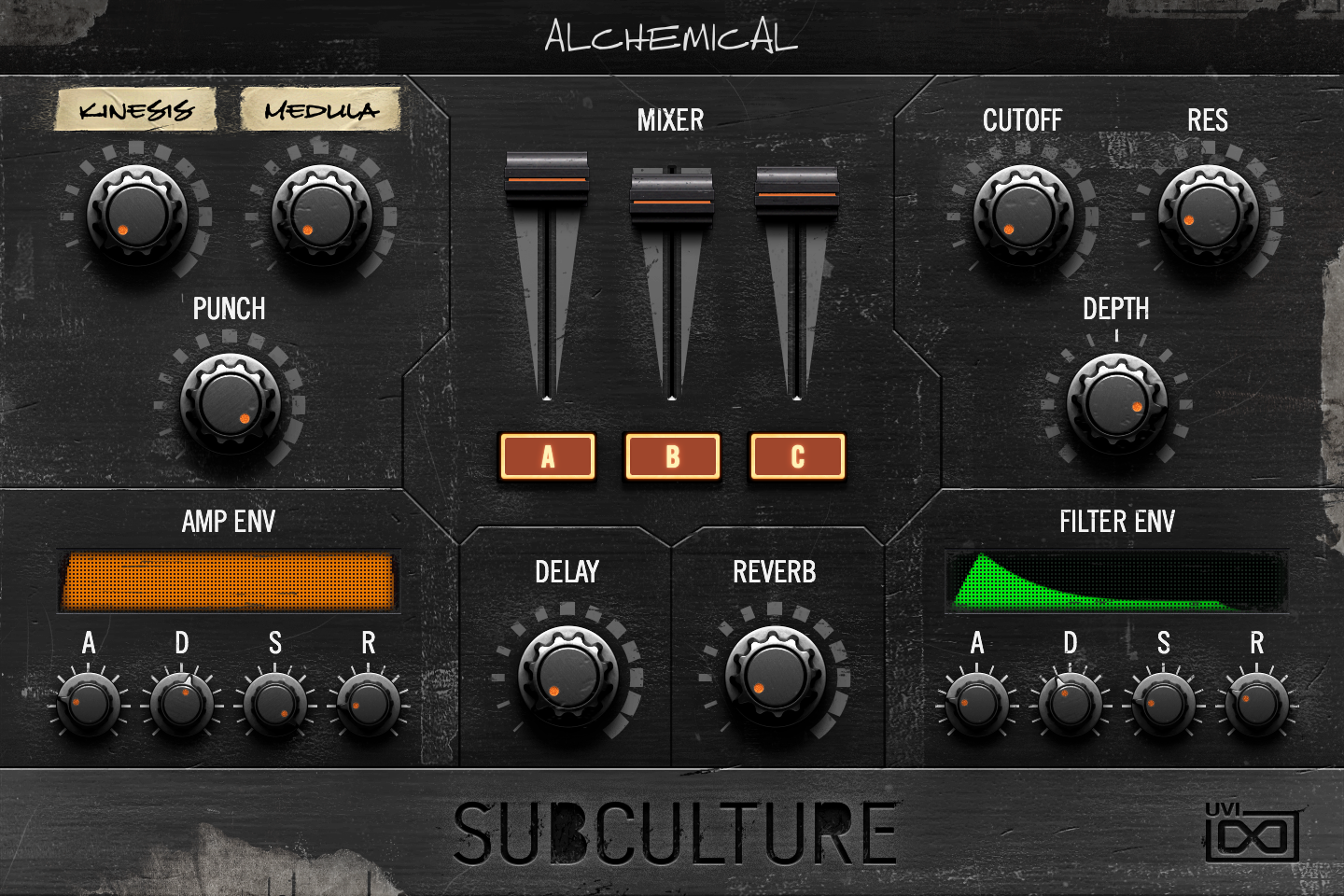
- 1 Preset Macros
Two to five knobs labeled and assigned by each preset: these are the preset’s own macros, and this is the only area of the panel that changes between presets (four or five macros use smaller knobs). In Alchemical, KINESIS sets the mix of a chorus and MEDULA the phase-distortion amount of the wavetable oscillators.
Every control on this panel is a program macro: macros can be assigned to MIDI, OSC or host automation, or driven from a Lua script. Script editing of Subculture’s panel is not allowed.
- 2 MIXER
One level fader for each of the three layers. The A, B and C buttons below switch each layer on or off.
- 3 CUTOFF / RES
Cutoff frequency and resonance of the filter in each layer (an Xpander filter in most presets).
- 4 PUNCH
Sends the layers to an aux bus with an EQ and a compressor, which plays alongside the dry signal: turning it up adds a compressed copy of the sound in parallel.
- 5 DEPTH
Amount by which the FILTER ENV moves the cutoff. At zero the filter envelope has no effect.
- 6 AMP ENV
A, D, S and R set the attack, decay, sustain and release of the amplitude envelope of every layer. The display above is read-only and redraws the resulting envelope shape.
- 7 DELAY / REVERB
Wet/dry mix of the program’s delay and reverb (SparkVerb) effects.
- 8 FILTER ENV
Attack, decay, sustain and release of the envelope that modulates the filter cutoff; DEPTH sets how far it moves it. The display shows the resulting shape.
Program Information
Press the Script button above the panel to switch to Falcon’s macro view, then the (i) button in its upper right to display program information. Many factory presets contain details about the program such as modwheel assignments, macro descriptions or tips for playing it. You can add and save descriptions for your own programs as well.
EDIT Page
If you want more control over a sound than the macros provide, the EDIT tab gives you full access to all parameters. Patches in Falcon are built within a fixed hierarchy: at the very top is the Program, inside the Program are Layers, within each Layer are Keygroups, and inside the Keygroups are Oscillators. Audio effects, MIDI effects and modulators can be placed on any level.

- 1 Program Editor
Top-most level of the patch. Broad changes affecting the overall sound: add audio or MIDI effects, adjust volume, pan and pitch.
- 2 Layer Editor
Group and modify Keygroups. Same effect/modulation slots as the Program, plus velocity curve, polyphony modes and unison settings.
- 3 Keygroup Editor
Ground level of the patch — hosts oscillators, defines MIDI note and velocity ranges, and sets basic oscillator attributes like pitch and trigger modes. Effects instanced here run per-voice, with the extra CPU cost that implies.
The mapping, oscillator and modulation editors are described in Falcon’s software manual: see Hierarchy and Edit.
Preset List
110 presets organized across five categories spanning classic bass tones, composite textures, effects-forward sound design, free-running pads and atmospheres, and sync-based rhythmic patches.
01 — Classic
22- Alchemical
- Axel
- Berto
- Blockchain
- Blotter
- CRS-13
- Fender Bender
- Future Pluck
- Garage FM
- Higgs Boson
- Inflatable Bassoon
- MDV
- Meta Physics
- Modern Metals
- Mosfet
- Psymatic
- Puncher
- Slumper
- Stinger
- String Theory
- Supercharged Upright
- Viking Frequency
02 — Composite
22- Alien Artifact
- Alpha Minus
- Blood & Concrete
- Calcination
- Creature
- Earth Mover
- Eden
- Equinox
- Foil Wrapped
- Inner City
- Machines
- Method
- Moody
- Ol' Dusty
- Paradise Lost
- Phantom Power
- Phase Space
- Polynomial
- Putrefaction
- Pyramind
- Sub Atomic
- Twisted
03 — Effects
21- Bass Scape
- Biotech
- Creeper
- Demogorgon
- Diffractor Horn
- Displacement Field
- Flat Line
- Gateway
- Graphite Spring
- Impending Doom
- Mars Attack
- Metallurgical Engineering
- Particle Accelerator
- Portal
- Sonic Boom
- Spinner
- Sub Quake
- The Abyss
- Threshold Dose
- Wavelength
- Wormhole
04 — Free
23- Alignment
- Bad Attitude
- Bats
- Chronos
- Crosswaves
- Demonoid
- Dome Driver
- Drainage
- Dyson
- Element 115
- Face Melter
- Gravitational
- Kingdom
- Revenge
- Robins
- Rugged
- Samurai
- Simulation Theory
- Sinister
- Square Peg
- Stigmatised
- Streamer
- Warped
05 — Sync
22- Amazed
- Crick
- Crunk Step
- Epsilon
- Industrial Revolution
- Juno Horror
- Lazer Cycle
- Life Signs
- Magnatron
- Mech
- Mutant
- Neuro Soup
- Reactor
- Slayer
- Snakebite
- Soul Consumption
- Spacecraft
- Tech Waves
- Tides
- Uncle Hubert
- Watery Grave
- Watson
Credits and Thanks
Sound Design — Richard Gale · Carlo de Gregorio
GUI & Graphics — Anthony Hak · Nathaniel Reeves
Documents — Nathaniel Reeves · Garrett DeMartinis · Kai Tomita
UVI Team