
127 masterfully-designed vocal presets — from undulating granular environments and shimmering pads to arps, drones, FX transitions, and expressive voice instruments.
Introduction
A powerful collection of sounds ready to add atmosphere, emotive weight, and movement to your music and scores. Using the human voice as its inspiration and basis, Voklm makes use of the powerful sampling and granular oscillators of Falcon to create rich and expressive pads, textures and more.
The sounds of Voklm are deep, detailed, evolving and evocative. A wide range of organic instruments and soundscapes range from undulating granular environments to shimmering pads and more, divided into categories such as arps and sequences, atmospheres, drones, FX transitions, pads and voice instruments.
The extraordinary sound quality of Falcon is evident throughout this collection, utilizing numerous synthesis and sound design techniques and a robust use of effects and modulators. Sounds can all be quickly previewed, edited, layered or performed with nearly limitless variation thanks to Falcon’s semi-modular architecture.
Made for Falcon
The Voklm expansion leverages the advanced synthesis architecture of Falcon, featuring intuitive macro controls for instant playability.
Control your sound with MIDI, OSC, host automation, and Lua, or transform it with Falcon’s extensive library of oscillators, effects, modulators, and scripts.
Falcon’s versatility and pristine sound quality is evident throughout this collection, utilizing numerous synthesis and sound design techniques and a robust use of effects and modulators. Sounds can all be quickly previewed, edited, layered or performed with nearly limitless variation thanks to Falcon’s semi-modular architecture and rich component library.
INFO Page
The Info tab provides an overview of the selected program, houses macro controls, and provides a location for custom text and images via the (i) view.
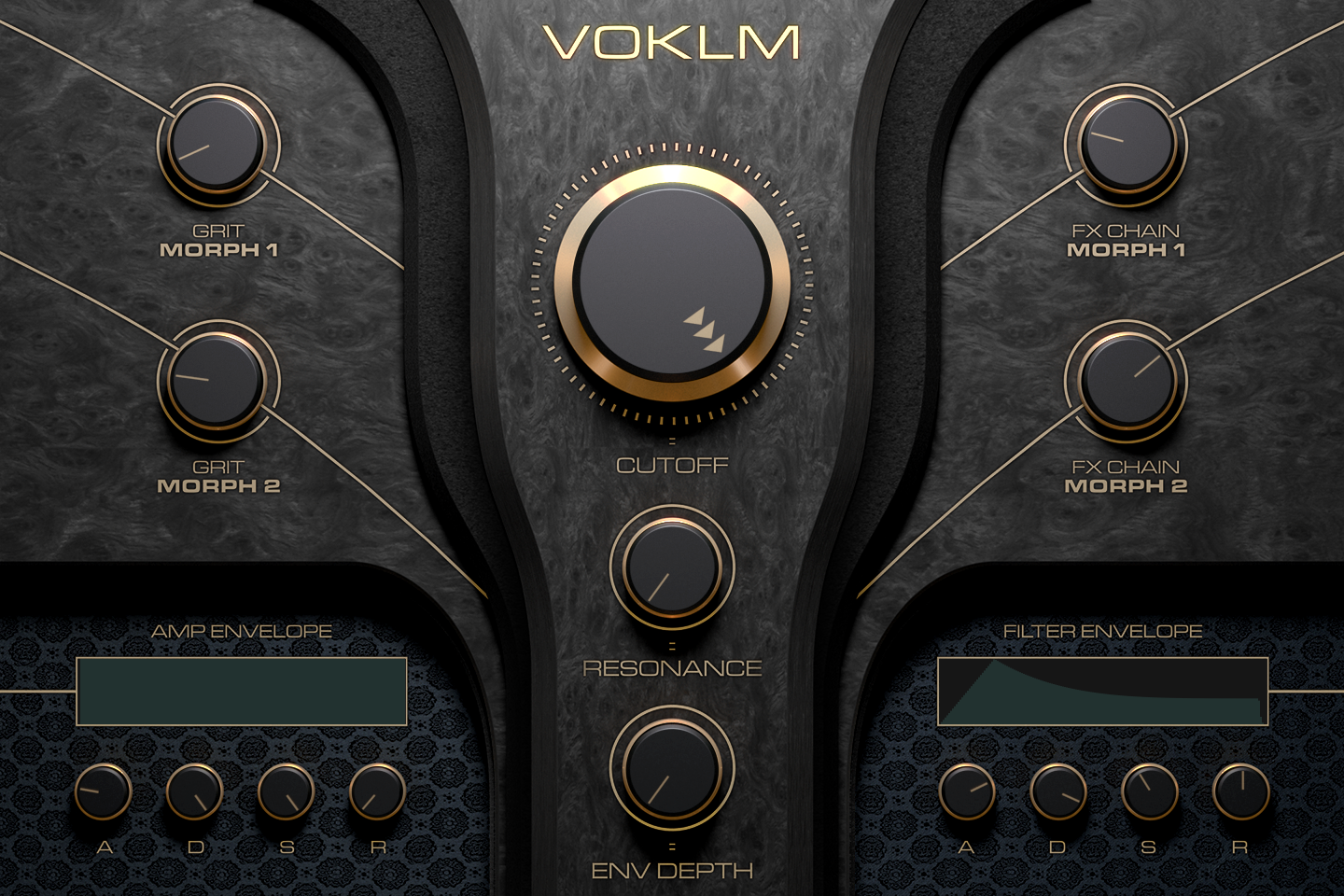
- 1 GRIT MORPH 1 / 2
Two morph knobs on the program’s drive stage; in most presets they push the overdrive and trash of a Garage Fuzz while trimming its output. In A Minor Breath, MORPH 1 sets the amount of a wave shaper and MORPH 2 the overdrive, trash and mix of a Garage Fuzz. On presets whose panel reads just MORPH 1 and MORPH 2, these knobs are preset-specific morphs instead.
Every knob on this panel is a program macro: macros can be assigned to MIDI, OSC or host automation, or driven from a Lua script.
- 2 CUTOFF
Cutoff of the program’s filters; the filter type depends on the preset (Digital, SVF, Retro, Xpander…). Twenty presets use a different panel, with DIFFUSION, PITCH RISE, DELAY, FEEDBACK, TIME, REVERB, DECAY and DAMP knobs around CUTOFF and RESONANCE.
- 3 FX CHAIN MORPH 1 / 2
Two morph knobs on the effects chain. In most presets MORPH 1 moves the high and mid bands of a three-band shelving EQ, and in about half of them also brings in a phaser; MORPH 2 brings in a chorus. On presets whose panel reads SPACE and TIME, the first sets the reverb (or delay) mix and the second the delay mix, plus its feedback in some presets.
- 4 RESONANCE
Resonance of the same filters as CUTOFF.
- 5 AMP ENVELOPE
A, D, S and R set the attack, decay, sustain and release of each layer’s amplitude envelope. The display above is read-only and redraws the resulting shape.
- 6 ENV DEPTH
How far the FILTER ENVELOPE moves the cutoff. At zero, as in A Minor Breath, the filter envelope has no effect.
- 7 FILTER ENVELOPE
Attack, decay, sustain and release of the envelope that modulates the filter cutoff; ENV DEPTH sets how far it moves it. The display shows the resulting shape.
Program Information
Press the Script button above the panel to switch to Falcon’s macro view, then the (i) button in its upper right to display program information. Many factory presets contain details about the program such as modwheel assignments, macro descriptions or tips for playing it. You can add and save descriptions for your own programs as well.
EDIT Page
If you want more control over a sound than the macros provide, the EDIT tab gives you full access to all parameters. Patches in Falcon are built within a fixed hierarchy: at the very top is the Program, inside the Program are Layers, within each Layer are Keygroups, and inside the Keygroups are Oscillators. Audio effects, MIDI effects and modulators can be placed on any level.

- 1 Program Editor
Top-most level of the patch. Broad changes affecting the overall sound: add audio or MIDI effects, adjust volume, pan and pitch.
- 2 Layer Editor
Group and modify Keygroups. Same effect/modulation slots as the Program, plus velocity curve, polyphony modes and unison settings.
- 3 Keygroup Editor
Ground level of the patch — hosts oscillators, defines MIDI note and velocity ranges, and sets basic oscillator attributes like pitch and trigger modes. Effects instanced here run per-voice, with the extra CPU cost that implies.
The mapping, oscillator and modulation editors are described in Falcon’s software manual: see Hierarchy and Edit.
Preset List
127 presets across six categories, each designed to be expressive and playable with dedicated macro controls.
01 — Atmospheres
28- A Minor Breath
- Air Pump
- Angelique
- Apart Geek
- Beauty Drone
- Dark Angel
- Duophonics Wheel
- Ethereal Awakening
- Excited Flutters
- Formant Rhythm
- Journey Alarm
- Jumping Lah
- Long Time
- Lullaby Shimmer
- Lung Motion
- Map in the Sand
- Neck Stretchy
- Populi
- Rock and Hole
- Sand
- Sliding Drama
- Slow Sprinkles
- Sunset Prayer
- The Dome
- Tor Chant
- Vowel Ice
- Warm Winter
- Wheel SeCuban
02 — Drones
27- AbstracTension
- AnaCloud
- Awash Grain
- Awell Voice
- Binaural
- Bomber Net
- Breathscaping
- Crooner Lung
- Density
- Dystopie
- Enchantress
- Far Out Eeh
- Flavours of East
- Horror Cave
- Hot Mic
- Indian Glitch
- Mantra
- Mind Control
- Random Skin
- Sea Foam
- Soft VoWheel
- Spectrally Distant
- Subturrian C'mon
- Templular
- True North
- Velvet
- Wonky Platter
03 — Seq-Arp
8- Afternight Tropics
- Bouncing Vox
- Breathy Projection
- Cookie Cutter
- Downer Repeats
- Jumping Toy
- Yeah Taps
- Zig Zag Root
04 — Synth Choirs
23- Breath Five
- Dischoird
- FairTwo X
- FSOne Lights
- FSOne Vox 1
- FSOne Vox 2
- In Da Box
- Monk Choirs 1
- Muted Voice 1
- Muted Voice 2
- No Name Vox
- Sanctuaire
- Soft Choirs
- Tender Bend
- The Big One
- Toy Story
- Ultra Soft 1
- Ultra Soft 2
- Unfair Child
- Vocaloud
- Vox Keys
- VP 2020
- Xtron
05 — Vocal Risers
20- Arabian Mood 2 Bar
- Arabian Mood 4 Bar
- Awaken 4 Bar
- Distance Travel 4 Bar
- Easy Riser 4 Bar
- Ego Escapes 4 Bar
- Egyptian Cresc 2 Bar
- Ethnic Electric 4 Bar
- Fresh Roots 2 Bar
- High Dry Riser 2 Bar
- Jungle Faller 1 Bar
- Khamaj 2 Bar
- Khamaj 4 Bar
- Light Riser 2 Bar
- Megaphone 4 Bar
- Modernity Rise 2 Bar
- Raise the Bar 2 Bar
- Short Crazy 1 Bar
- Slight Drip Faller 1 Bar
- Yeah Up 1 Bar
06 — Vox Instruments
21- Amiralty
- Asphalte
- Beauty Ice
- Chant World
- Chest Register
- Clean Singer Keys
- Deep Ethnic Warm
- Deeper Sweeper
- Delayed Spark
- Electro Vox
- Face Lift
- Five For Life
- Pizzi Vox
- Pluchoirs
- Poly Duo
- Reign Sustain
- Slow Attack
- Soft Creatine
- Space Rise
- Trap Soul
- Voice Thing
Credits and Thanks
Sound Design — Louis Couka · Alain J Etchart · Carlo de Gregorio · Kevin Guilhaumou
GUI & Graphics — Anthony Hak · Nathaniel Reeves
Documents — Nathaniel Reeves · Kai Tomita
UVI Team