

A sonic journey through celestial auras, evolving pads and rich, unfolding tonal soundscapes — ready-to-play atmospheres, drones and textures for Falcon.
Introduction
Take a sonic journey through celestial auras, evolving pads and rich, unfolding tonal soundscapes. Instantly fill your productions with mood, texture and atmosphere as you take your listeners through slowly rolling fog banks, dense futuristic landscapes and deeper into elevated states of consciousness. A diverse collection of expertly crafted presets provide a multitude of sound destinations, ready to be plugged in, layered or manipulated in near infinite ways within the powerful Falcon environment. Whether you’re looking to fill the void with ominous drones, add a delicate harmonic breeze or simply reinforce your tracks with subtle gravity, Atmospherics delivers rich sonic environments perfect for all modern musical styles.
The depth and sophistication of Falcon can be felt through this premium collection of patches. Employing numerous synthesis techniques including FM, analog modeling and granular, Atmospherics provides rich, dense and evolving multi-part sounds, animated soundscapes, tempo-synced instruments, brooding drones and experimental ambiences. Quickly preview and stack sounds, perform them with macro controls and make them your own with vast effect and modulation options available in Falcon.
INFO Page
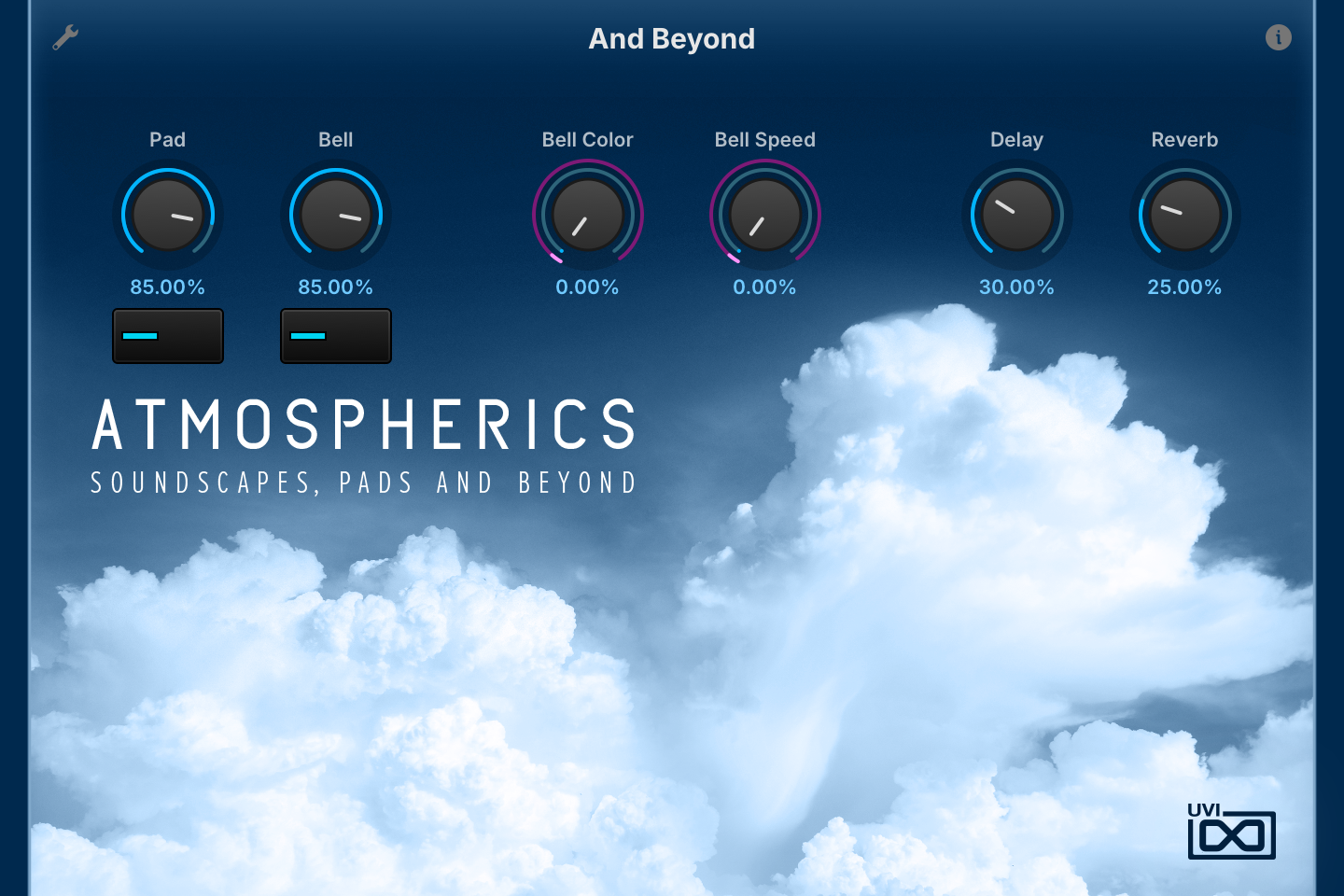
The Info tab provides an overview of the selected program, houses macro controls, and provides a location for custom text and images via the (i) view. This page is available in both Falcon and UVI Player.
- 1 Program Information
Shows the program information. Many presets include notes such as modwheel assignments, macro descriptions or playing tips, and you can add and save descriptions for your own programs.
- 2 Macros
The knobs and switches are the preset’s macros, so names and layout change from preset to preset. In And Beyond, Pad and Bell set the levels of the two layers, each with a switch below to turn it on or off; Bell Color sets the phase distortion of the bell wavetable, Bell Speed the rate of an LFO in the bell layer, and Delay and Reverb the effects mix.
Macros can be controlled via MIDI, OSC, host automation and Lua scripting.
Macros
Like Falcon Factory Content, Atmospherics’ patches have been programmed with macros which provide easy access to the key parameters of each patch. Macros may be controlled via MIDI, OSC, host automation and Lua scripting, allowing for easy customization and expressive performance.
For more details on macros, see Falcon’s software manual.
Program Information
Press the (i) button in the upper right to display program information. Many factory presets contain details about the program such as modwheel assignments, macro descriptions or tips for playing it. You can add and save descriptions for your own programs as well.
EDIT Page
If you want more control over a sound than the macros provide, the EDIT tab gives you full access to all parameters. Patches in Falcon are built within a fixed hierarchy: at the very top is the Program, inside the Program are Layers, within each Layer are Keygroups, and inside the Keygroups are Oscillators. Audio effects, MIDI effects and modulators can be placed on any level.

- 1 Program Editor
Top-most level of the patch. Broad changes affecting the overall sound: add audio or MIDI effects, adjust volume, pan and pitch.
- 2 Layer Editor
Group and modify Keygroups. Same effect/modulation slots as the Program, plus velocity curve, polyphony modes and unison settings.
- 3 Keygroup Editor
Ground level of the patch — hosts oscillators, defines MIDI note and velocity ranges, and sets basic oscillator attributes like pitch and trigger modes. Effects instanced here run per-voice, with the extra CPU cost that implies.
The mapping, oscillator and modulation editors are described in Falcon’s software manual: see Hierarchy and Edit.
Preset List
Over 120 presets organized into six evocative categories — from animated tonal beds and motion pads to drones, soundscapes and experimental textures.
01 — Animated
18- Bender Groove
- Can Of Worms
- Creepy Grains
- Digital Catch
- Drenched In Space
- Escaping Sines
- FM Movement
- Fred Falke One Key
- Lonely Prix
- Magic Finger
- Melting Glass
- Metallic Rain
- Multigroove Pad
- One Key Ethereal
- RIP Josh
- Synced Groove
- Vintage Waves
- Wheel Pulsator
02 — Motion Pads
23- A Fair Hush
- Ambient Master
- And Beyond
- Anklungs Pad
- Confused Glitches
- Cotton Dream
- Dancing Snippets
- Digi Sparkle
- Digilogue
- Dripper
- Filterwheelz
- Fluid Glass
- Fragile Dreams
- Ghost Players
- Great Barrier Reef
- Hommage to Jarre
- Merry Potter
- Prismic Motions
- String Traveller
- Superdrifter
- The Whistler
- Velo Glitter Swell
- Winterland
03 — Pure Pads
23- Analog Choir Fake
- Analog String Machine
- Ancient Growheel
- Baked Table
- Basic 90's Digital
- Cotton Wheel
- Fairlight Hiss
- Hushy Synth Choir
- K5K Godess
- Matrix Silk
- Metallic Shimmer
- Multisweep
- Ocatve Saw
- Padull
- Processed Mello
- Rain Falls
- Shiny Glass
- Simple Saw Pad
- Superphase
- Thick Noise Pad
- Thick Vintage Stack
- Warmth
- Wheel Ghost
04 — Soundscapes
29- A Moonnight
- BT Ghosts
- Diamond Cave
- Driven Sines
- Ethereal
- Exoplanetial Orbit
- FM On Wheels
- Funny Creeps
- Glibbery When Wet
- Hush Grains
- Lonely Syncer
- Lost Orbiter
- LSD Glowflies
- Metal Morpher
- Occasionally
- Orions Rain
- Pris Waiting
- Public Enlightenment
- Rain On Saturn
- Stutter Move
- Table Jumper
- The Snake
- Unicorns
- Use Wheel
- Wedding Bells
- Wheel Needles
- Wheel Twister w Samples
- Wheel Twister
- Wheelmorphing Ghosts
05 — Synth Drones
18- A Nightscape
- Baby Quasar
- Black Dream
- Carbon 14
- Chaining
- Cirrocumulus
- Frontier
- Glitter On The Snow
- Heat Shimmer
- Last Prayer
- Lead Harsh
- Metallic Afterimage
- Seven Lights
- Sinequanone
- Synthetic illusion
- The Prophet
- Time Slip
- Valley Of Deer
06 — Xperimental and more
23- Busy Bells
- Cats n Bells
- Chime Chiffer
- Crispy Granule
- Decelerator
- Disunited Harmonics
- Fluttering Bells
- Heated Sines
- Ice Chiffer
- Mighty 90s
- No Filter
- Offshore
- Pitchwheel Motion
- Rachel Seduction
- Redux Ion
- Shivering Charmeur
- Skinny Ghost
- Space Crickets
- Splatter FM Pad
- Superdrifter
- Tourette Harmonics
- Wave Saws
- Wizzard Glass
Credits and Thanks
Sound Design — BigTone · WeatherM · Alain Etchart · Damien Vallet · Kevin Guilhaumou
GUI & Graphics — Anthony Hak · Nathaniel Reeves
Documents — Nathaniel Reeves · Garrett DeMartinis · Kai Tomita
UVI Team