
120 masterfully-designed presets exploring the themes of movement, light, and shadow — divided into sounds of The Sun and The Moon across Ambient, Motion, and Rhythm categories.
Introduction
A deep and complex collection of sounds exploring the themes of movement, light, and shadow. Divided into sounds of The Sun, and sounds of The Moon, patches are provided in categories of Ambient, Motion, and Rhythm, giving you everything from subtle and spacious modulated environments to complex rhythmic soundbeds, and chaotic glitch-inspired madness.
Inspired by the sounds of modular synthesis, Kinetics leverages the powerful sequencers and modulators of Falcon to create animated sounds with rich timbres and a high degree of customization. The sounds of Kinetics are elegantly crafted, instantly inspiring, and suitable for producers and musicians of any background.
Each of the instruments in Kinetics is designed to be expressive and playable, providing helpful controls and macros allowing you to sculpt your sound and create dynamic, expressive performances. As with all Falcon expansions, you have the ability to dig beneath the surface into each sounds patch structure, to manipulate and reshape it in any way you see fit.
The extraordinary sound quality of Falcon is evident throughout this collection, utilizing numerous synthesis and sound design techniques and a robust use of effects and modulators. Sounds can all be quickly previewed, edited, layered or performed with nearly limitless variation thanks to Falcon’s semi-modular architecture.
Made for Falcon
The Kinetics expansion leverages the advanced synthesis architecture of Falcon, featuring intuitive macro controls for instant playability.
Control your sound with MIDI, OSC, host automation, and Lua, or transform it with Falcon’s extensive library of oscillators, effects, modulators, and scripts.
Falcon’s versatility and pristine sound quality is evident throughout this collection, utilizing numerous synthesis and sound design techniques and a robust use of effects and modulators. Sounds can all be quickly previewed, edited, layered or performed with nearly limitless variation thanks to Falcon’s semi-modular architecture and rich component library.
INFO Page
The Info tab provides an overview of the selected program, houses macro controls, and provides a location for custom text and images via the (i) view.
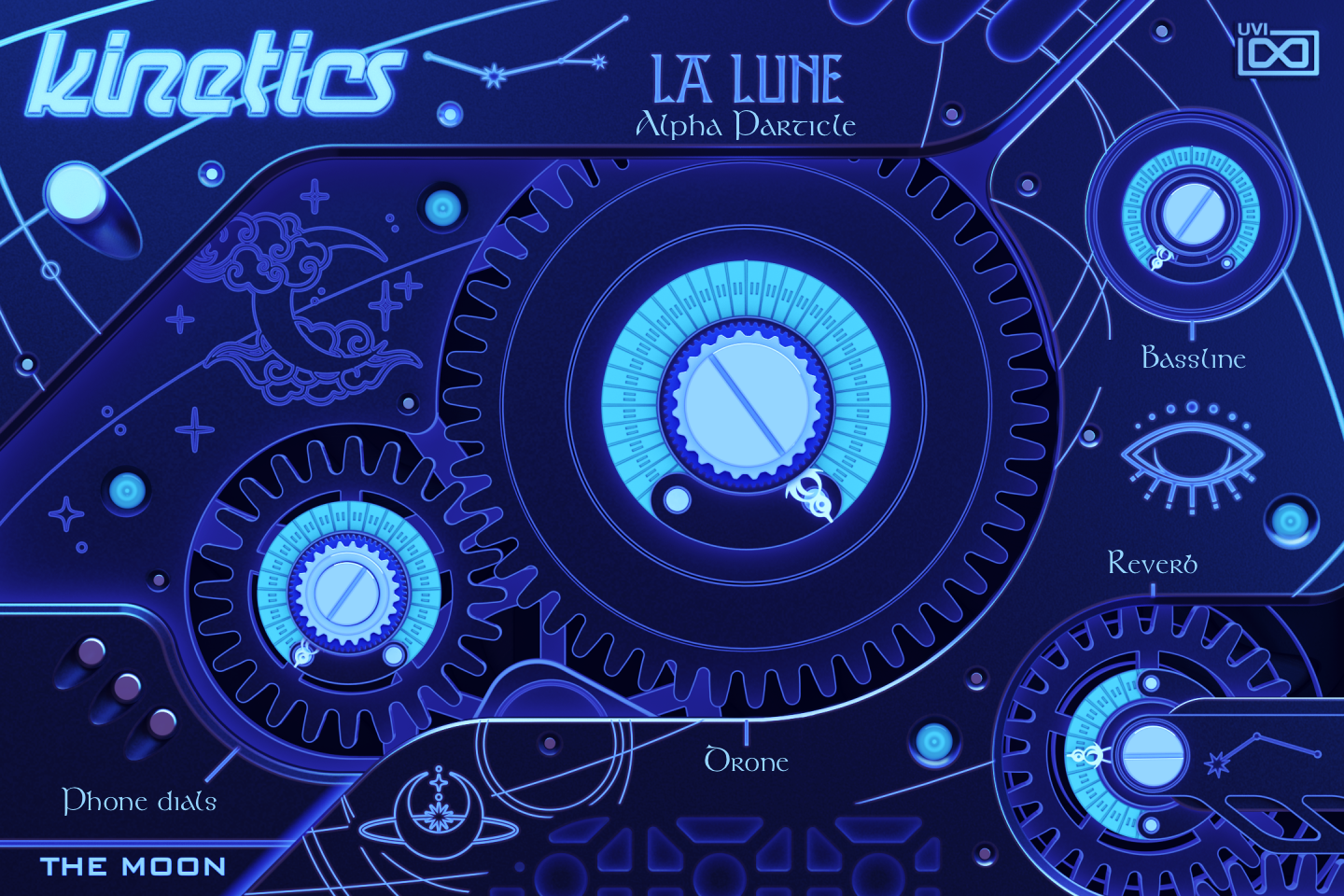
- 1 Program name
The name of the loaded program, written by the panel script.
- 2 Macros
The four knobs are the preset’s macros: their labels and what they drive change with the preset, and one macro often moves several layers at once. In Alpha Particle, Reverb raises the Diffusion and SparkVerb mix across the layers, and Phone dials brings in the drum oscillator of the R2D2 layer while reshaping its filters.
Like any Falcon macro, they can be controlled via MIDI, OSC, host automation and Lua scripting. Press Script above the panel to show them as Falcon’s standard macro knobs; see Falcon's software manual.
- 3 THE MOON
Kinetics presets belong to The Moon or The Sun; the panel shows the matching artwork (here the Moon panel, for a MOON Ambient preset).
Program Information
Press the Script button above the panel to switch to Falcon’s macro view, then the (i) button in its upper right to display program information. Many factory presets contain details about the program such as modwheel assignments, macro descriptions or tips for playing it. You can add and save descriptions for your own programs as well.
EDIT Page
If you want more control over a sound than the macros provide, the EDIT tab gives you full access to all parameters. Patches in Falcon are built within a fixed hierarchy: at the very top is the Program, inside the Program are Layers, within each Layer are Keygroups, and inside the Keygroups are Oscillators. Audio effects, MIDI effects and modulators can be placed on any level.

- 1 Program Editor
Top-most level of the patch. Broad changes affecting the overall sound: add audio or MIDI effects, adjust volume, pan and pitch.
- 2 Layer Editor
Group and modify Keygroups. Same effect/modulation slots as the Program, plus velocity curve, polyphony modes and unison settings.
- 3 Keygroup Editor
Ground level of the patch — hosts oscillators, defines MIDI note and velocity ranges, and sets basic oscillator attributes like pitch and trigger modes. Effects instanced here run per-voice, with the extra CPU cost that implies.
The mapping, oscillator and modulation editors are described in Falcon’s software manual: see Hierarchy and Edit.
Preset List
120 presets organized across two collections — The Moon and The Sun — each divided into Ambient, Motion, and Rhythm categories.
01 — MOON Ambient
17- Alpha Particle
- Dark Matter
- Darkness
- Dusk Till Dawn
- Edges
- Fahrenheit
- Gloom
- Graveyard
- Haunted
- Mansion
- Neutrons
- Nuclear Fission
- Obscurium
- Pendulum
- Positron
- Sorrow
- Spooky
02 — MOON Motion
20- Asmodai
- Blasphemy
- Breathless
- Diskophrenia
- Glitchy Circuit
- Hightek
- Hurricane
- Machinery
- Mechanics
- Modular Engine
- Pandemonium
- Panic
- Powereese
- Pragma
- Punisher
- Rattling Device
- Slenderboy
- Smokestack
- Tornado
- Zeus
03 — MOON Rhythm
23- Blizzard
- Bronson
- Chaos
- Circuit Bent
- Crater
- Descent
- Drunk
- Dubworm
- Frenzy
- Goth
- Havoc
- Hullabaloo
- IslandDoom
- Kraus
- Maelstorm
- Runes
- Slomo
- Spaceship
- Stone
- Vampire
- Wasser
- Yorubai
- Zombie
04 — SUN Ambient
14- Aqueous Koto
- Biomimicry
- Celestial
- Cellular
- Divination
- Dreamster
- Dusk Shamisen
- Microscopy
- Peaceful Zither
- Seabreeze JawHarp
- Translucent
- Up Above
- Windy Cymbalum
- Zen
05 — SUN Motion
22- Aerial
- ArabianNights
- Daydream
- Eclipse
- ElecField
- Ethereal
- Garnier
- Glassy
- Hypnotic
- Irisation
- Isolate
- Liquid
- LydianAdventures
- Moonlight
- Mysterious Woods
- Odd Cycles
- Order From Chaos
- Reverie
- Running Series
- Shamanism
- SloneGreen
- Tinted
06 — SUN Rhythm
24- Bold Runs
- Capsule
- Crystalline
- Dadra
- Daze
- DeepBlue
- Free Rotations
- Fukusa
- Glazed
- Hawara
- Haze
- Jhaptal
- Jiwari
- MetaColors
- Mountain
- Okinawa
- Organism
- Ritual
- River
- Rupaktal
- Sola
- Sygmatic
- Totem
- Vaporous
Credits and Thanks
Sound Design — Julien Cautru · Théo Gallienne
GUI & Graphics — Anthony Hak · Nathaniel Reeves
Documents — Nathaniel Reeves · Kai Tomita
UVI Team