

A boutique collection of stylized instruments, drums and textures perfectly suited for the more chill and introspective sides of hip-hop, lo-fi, and downtempo music production.

Introduction
A boutique collection of stylized instruments, drums and textures perfectly suited for the more chill and introspective sides of hip-hop, lo-fi, and downtempo music production. Covering all the hallmark sounds and taking it further, LoFi Dreams delivers smooth acoustic pianos, soulful guitars, vibey keys, charactered drums, lo-fi textures and more.
Inspired by the sounds of early ’00s lo-fi chill and hip-hop, LoFi Dreams offers a wide range of expressive instruments delivering both classic and modern aesthetics. Paired with the extensive sound-shaping capabilities of Falcon, musical inspiration awaits for producers and musicians of any background.
Each of the instruments in LoFi Dreams is designed to be expressive and playable, providing helpful controls and macros allowing you to sculpt your sound and create dynamic, expressive performances. As with all Falcon expansions, you have the ability to dig beneath the surface into each sounds patch structure, to manipulate and reshape it in any way you see fit.
The extraordinary sound quality of Falcon is evident throughout this collection, utilizing numerous synthesis and sound design techniques and a robust use of effects and modulators. Sounds can all be quickly previewed, edited, layered or performed with nearly limitless variation thanks to Falcon’s semi-modular architecture.
Made for Falcon
The LoFi Dreams expansion leverages the advanced synthesis architecture of Falcon, featuring intuitive macro controls for instant playability.
Control your sound with MIDI, OSC, host automation, and Lua, or transform it with Falcon’s extensive library of oscillators, effects, modulators, and scripts.
Falcon’s versatility and pristine sound quality is evident throughout this collection, utilizing numerous synthesis and sound design techniques and a robust use of effects and modulators. Sounds can all be quickly previewed, edited, layered or performed with nearly limitless variation thanks to Falcon’s semi-modular architecture and rich component library.
INFO Page
The Info tab provides an overview of the selected program, houses macro controls, and provides a location for custom text and images via the (i) view.
Same as Falcon Factory Content, LoFi Dreams’ patches have been programmed with macros which provide users with easy access to the key parameters of each patch. LoFi Dreams also has a custom front panel which is made with Falcon’s script feature. The parameters are connected with the macros and these may be controlled via MIDI, OSC, host automation and Lua scripting, allowing for easy customization and expressive performance capabilities.
For more details on macros, see Falcon’s software manual.
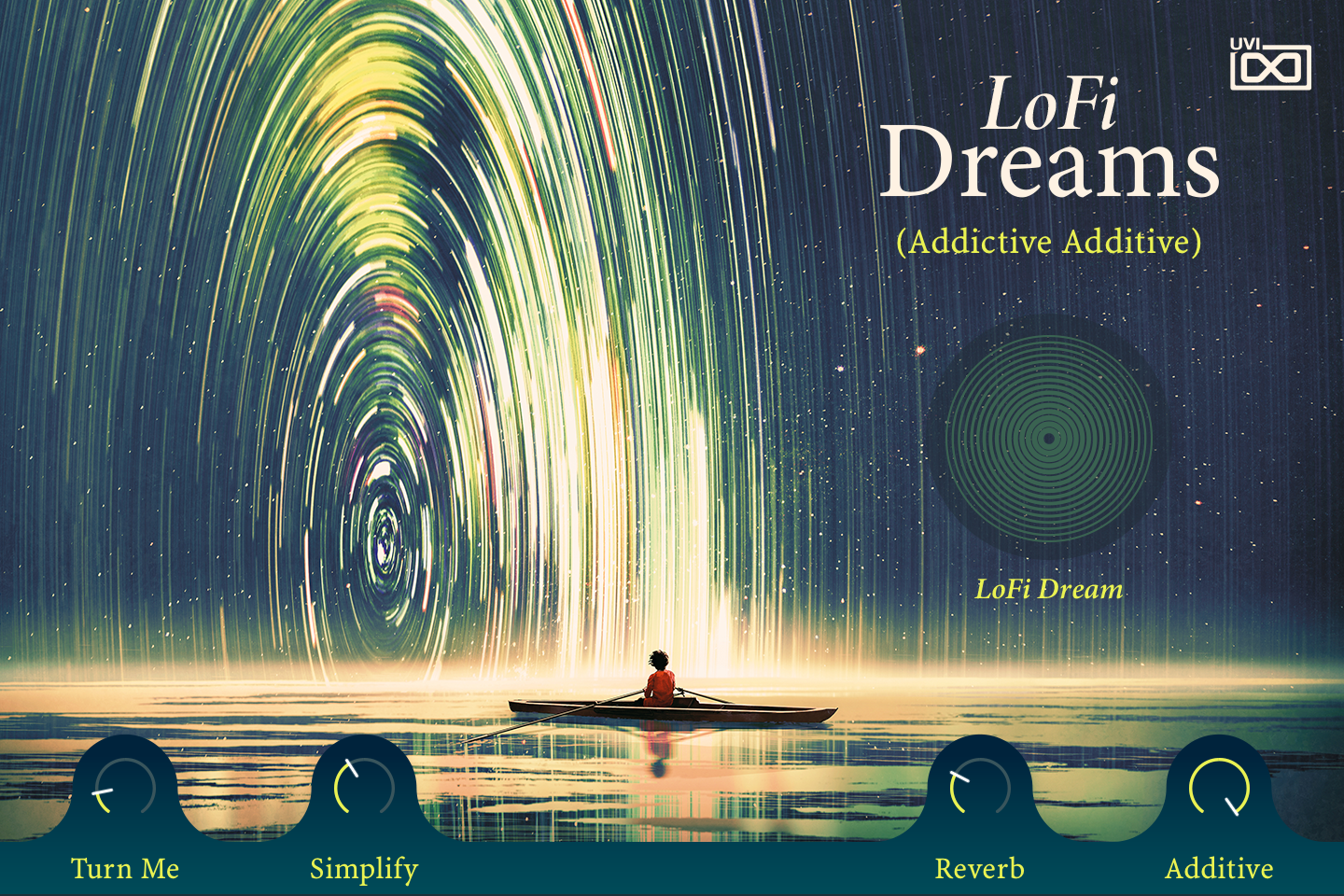
- 1 Program name
The name of the loaded program, in brackets, written by the panel script.
- 2 LoFi Dream
Present on every LoFi Dreams preset: it sets the amount of the Dreamizer effect rack at the end of the program’s effects. Turning it up deepens an analog chorus, blends in a Buzz delay whose time drifts randomly, and raises a parallel SparkVerb hall.
- 3 Macros
The four bottom knobs are the preset’s macros: their labels and targets change with the preset. In Addictive Additive, Turn Me shifts the harmonics of the Additive 2 layer’s oscillator, Simplify sets the even/odd harmonic balance of both additive oscillators, Reverb sets the wet level of a plate reverb, and Additive sets the level of the Additive 1 layer.
Like any Falcon macro, they can be controlled via MIDI, OSC, host automation and Lua scripting. For more on macros, see Falcon's software manual.
Program Information
Press the Script button above the panel to switch to Falcon’s macro view, then the (i) button in its upper right to display program information. Many factory presets contain details about the program such as modwheel assignments, macro descriptions or tips for playing it. You can add and save descriptions for your own programs as well.
EDIT Page
If you want more control over a sound than the macros provide, the EDIT tab gives you full access to all parameters. Patches in Falcon are built within a fixed hierarchy: at the very top is the Program, inside the Program are Layers, within each Layer are Keygroups, and inside the Keygroups are Oscillators. Audio effects, MIDI effects and modulators can be placed on any level.

- 1 Program Editor
Top-most level of the patch. Broad changes affecting the overall sound: add audio or MIDI effects, adjust volume, pan and pitch.
- 2 Layer Editor
Group and modify Keygroups. Same effect/modulation slots as the Program, plus velocity curve, polyphony modes and unison settings.
- 3 Keygroup Editor
Ground level of the patch — hosts oscillators, defines MIDI note and velocity ranges, and sets basic oscillator attributes like pitch and trigger modes. Effects instanced here run per-voice, with the extra CPU cost that implies.
The mapping, oscillator and modulation editors are described in Falcon’s software manual: see Hierarchy and Edit.
Preset List
200 presets across 11 categories spanning acoustic pianos, animated synths, bass, drums, guitars, keys, leads, pads, plucked instruments, synths and textures.
01 — Acoustic Pianos
6- Forgotten Piano
- Nordic Piano
- Old Grand Piano
- Piano Memories
- Tape Piano
- The Mellow Piano
02 — Animated
8- Arp Cloud
- Baba 1
- Baba 2
- Cosmic PWMs
- Hyrule Boosted
- Hyrule
- Sine Concert 1
- Sine Concert 2
03 — Bass
36- Addisub
- Additional
- Arp Noise 1
- Arp Noise 2
- Bounce
- Bow
- Ciao
- Detune Sub
- DigiDouble 1
- DigiDouble 2
- DigiRetro
- Double Bass
- Final
- Formant Sub
- Gameboy
- Gaming
- Lowender
- Mantine
- Mountain
- Murphy 1
- Murphy 2
- Nasty
- Nitty Gritty
- Noise
- Pipes
- Pulsefy
- Pyramid
- Reese Sub
- Retro Strong 1
- Retro Strong 2
- Retrograde
- Ruintendo
- Saw Reese
- Soft Bits
- Sub Limen
- Subjectum
04 — Drums
6- 11kHz
- Foley Kit
- Jazz Kit
- LoFi
- Mixed Kit
- Re Kit
05 — Guitars
6- Clean Soft Guitar 1
- Clean Soft Guitar 2
- Ethnic Dreams
- Garden
- Lazy
- Lonely Bowed Electric
06 — Keys
29- Addictive Additive
- Additive Chill
- Celestialis
- Chillhop Sine Piano 1
- Chillhop Sine Piano 2
- Chordalis
- Electrics
- FM Keys
- Glass Celestialis
- Keysuite
- Laminae
- Limbo
- Play Chords I Will Strum
- Play Short 7th Chords
- Racoon 1
- Racoon 2
- RuinPiano
- Sine Seas
- Sweet Dreams
- Sweet Soft
- Tape Metal
- The Electric Piano Smokey
- The Electric Piano
- Tines 1
- Tines 2
- Toy Xylo
- Use
- Vibes
- Wonder EP
07 — Leads
36- 8bit Homesick 1
- 8bit Homesick 2
- Ambience Voice
- Amor de Lonh
- Autumn
- Bamboo Solo
- Breeze
- Calm 1
- Calm 2
- Chirp
- Distant Voice
- DX
- Flutes
- Harbour
- Heard
- Hike
- Melancholic Horn
- Memories Motion
- Minion
- Ocarina 64
- Poly Yo Shi 1
- Poly Yo Shi 2
- PolyFlood 1
- PolyFlood 2
- Reflection Flute
- Set
- Smart Lead
- Smooth
- Sunshine Flute
- Sweetheart Flute
- Tinish
- Title
- Trumpet
- XIII
- XIV
- XV
08 — Pads
30- Chillin
- Cloud Pads
- CreamSea
- Drift
- Elegy
- Enchant
- Fluffy
- Ignis
- Just A Single Sine
- Laputa 1
- Laputa 2
- Lavender
- MeinHerzBrennt
- Mikonos
- Organelle
- Pathways
- Quartal Sines
- Rain
- Rest
- Rhubharb 1
- Rhubharb 2
- Scatter
- Sentiment 1
- Sentiment 2
- SineSauce
- Sloppy
- Tibet 1
- Tibet 2
- Underwater Feeling
- Upper
09 — Plucked
32- Alpine Zither
- Anywhere
- Carillon 1
- Carillon 2
- Castle
- Clouds
- Complex
- CreamSpace
- Delayed ADSRs
- Dreams
- Dungeon
- Forest
- Glass Morphy 1
- Glass Morphy 2
- Harp
- Kalimba
- Lost Zither
- Mana 1
- Mana 2
- Mbira
- MeditationDrums
- Memoir Guitar
- Play Chords I Will Strum
- Sanctuary
- Sanza
- School
- Sleep
- Snowflake 1
- Snowflake 2
- SynthCarillon
- Xylo Glass 1
- Xylo Glass 2
10 — Synths
9- Analog Noise
- Clouds
- Kiss
- Loop Saw
- Movement Saws
- On
- Opening
- Red 1
- Red 2
11 — Textures
2- Ambiences
- Noises
Credits and Thanks
Sound Design — Vincenzo Bellanova
GUI & Graphics — Anthony Hak · Nathaniel Reeves
Documents — Nathaniel Reeves · Kai Tomita
UVI Team