
A deep and futuristic collection of sounds perfect for modern electronic producers, composers and sound designers — powerful bass, electrifying leads, sunken atmospheres, otherworldly pads, effects and more.
Introduction
A deep and futuristic collection of sounds perfect for modern electronic producers, composers and sound designers - Pulsar delivers powerful bass, electrifying leads, sunken and winding atmospheres, otherworldly pads, effects and more.
Designed and developed by Richard Gale and Carlo de Gregorio, the sounds of Pulsar are rich, detailed and unabashedly modern with electronic timbres ranging from flowing analog-inspired leads to immersive granular soundscapes. Pulsar delivers powerful fundamentals and charactered sounds in categories including atmospheres, bass, effects, leads, pads, plucks, sequences and arps.
Each of the sounds in Pulsar is designed to be expressive and playable, providing unique controls and macros allowing you to sculpt your sound and create dynamic performances. Dedicated ADSR envelopes, filter and effect macros and more make it quick and easy to perfectly dial-in your sound.
The versatility and clarity made possible by Falcon is evident throughout this collection, utilizing numerous synthesis techniques including wavetable, virtual analog and physical modeling, as well as robust use of effects and modulators. Sounds can all be quickly previewed, edited, layered or performed with nearly limitless variation thanks to Falcon’s semi-modular architecture.
Made for Falcon
The Pulsar expansion leverages the advanced synthesis architecture of Falcon, featuring intuitive macro controls for instant playability.
Control your sound with MIDI, OSC, host automation, and Lua, or transform it with Falcon’s extensive library of oscillators, effects, modulators, and scripts.
Falcon’s versatility and pristine sound quality is evident throughout this collection, utilizing numerous synthesis and sound design techniques and a robust use of effects and modulators. Sounds can all be quickly previewed, edited, layered or performed with nearly limitless variation thanks to Falcon’s semi-modular architecture and rich component library.
INFO Page
The Info tab provides an overview of the selected program, houses macro controls, and provides a location for custom text and images via the (i) view.
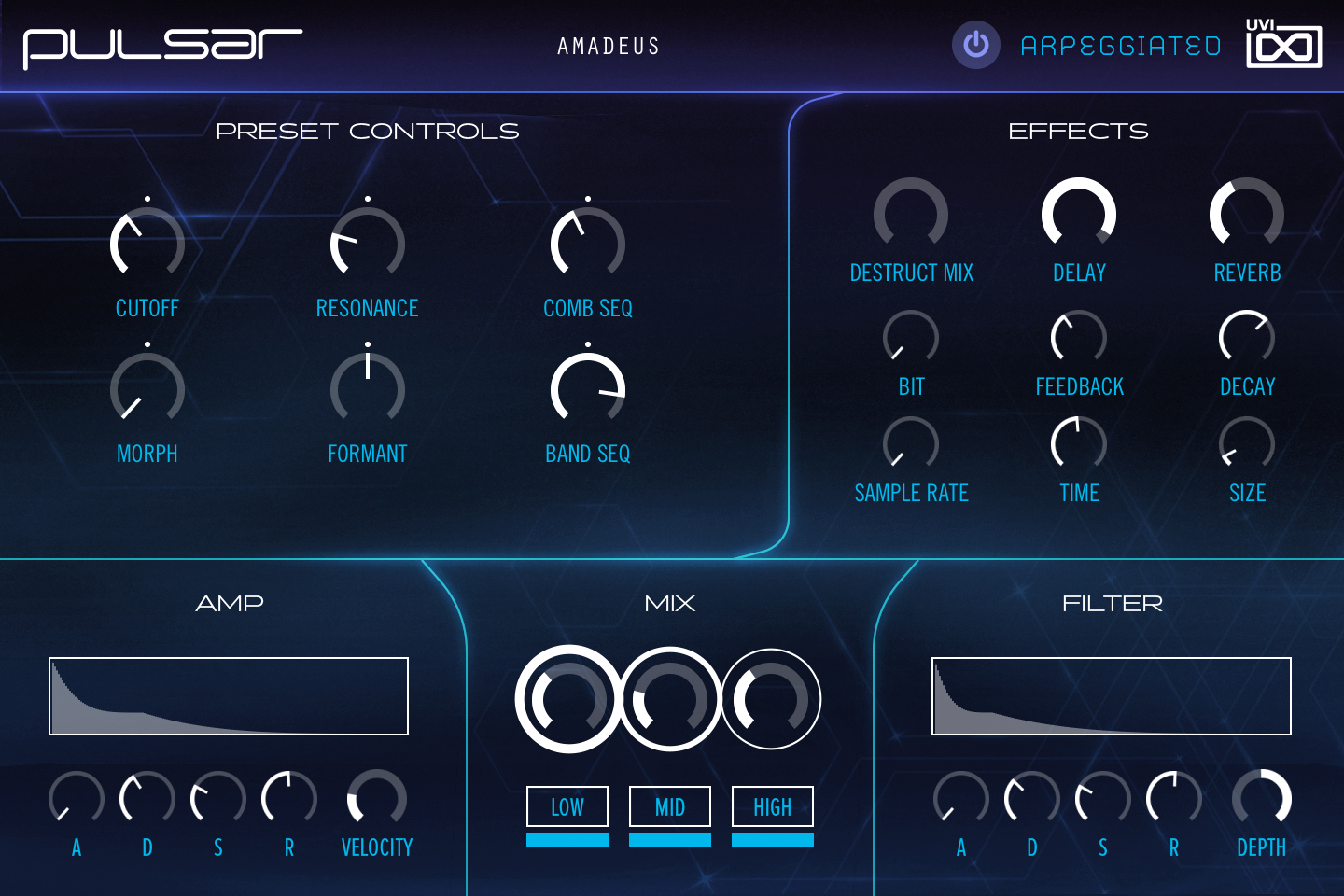
- 1 Arpeggiator On/Off
Switches the preset’s arpeggiators on and off. The button appears only in the Arpeggiated presets, and in the Sequences presets, where it switches the sequence.
- 2 PRESET CONTROLS
Five to eight knobs named after the preset’s macros, so labels and targets change with the preset; the first is usually the filter Cutoff. In Amadeus, CUTOFF and RESONANCE set the layers’ filter and a comb filter, MORPH and FORMANT move a vowel filter, and COMB SEQ and BAND SEQ set how much the comb and band filters are modulated.
- 3 EFFECTS
DELAY and REVERB set the send of every layer to the delay and the SparkVerb reverb, each with two settings below it (here FEEDBACK / TIME and DECAY / SIZE; the reverb pair varies with the preset). Some presets add a third effect column on the left; in Amadeus it is DESTRUCT MIX, a bit crusher with BIT depth and SAMPLE RATE reduction.
- 4 AMP
A, D, S and R set the attack, decay, sustain and release of the layers’ amp envelope, drawn in the display above. VELOCITY sets how much velocity affects the level.
- 5 MIX
The three knobs set the level of the LOW, MID and HIGH layers; the buttons below switch each layer on and off.
- 6 FILTER
A, D, S and R set the filter envelope, drawn in the display above, and DEPTH sets how far it moves the layers’ filter cutoff.
Program Information
Press the Script button above the panel to switch to Falcon’s macro view, then the (i) button in its upper right to display program information. Many factory presets contain details about the program such as modwheel assignments, macro descriptions or tips for playing it. You can add and save descriptions for your own programs as well.
EDIT Page
If you want more control over a sound than the macros provide, the EDIT tab gives you full access to all parameters. Patches in Falcon are built within a fixed hierarchy: at the very top is the Program, inside the Program are Layers, within each Layer are Keygroups, and inside the Keygroups are Oscillators. Audio effects, MIDI effects and modulators can be placed on any level.

- 1 Program Editor
Top-most level of the patch. Broad changes affecting the overall sound: add audio or MIDI effects, adjust volume, pan and pitch.
- 2 Layer Editor
Group and modify Keygroups. Same effect/modulation slots as the Program, plus velocity curve, polyphony modes and unison settings.
- 3 Keygroup Editor
Ground level of the patch — hosts oscillators, defines MIDI note and velocity ranges, and sets basic oscillator attributes like pitch and trigger modes. Effects instanced here run per-voice, with the extra CPU cost that implies.
The mapping, oscillator and modulation editors are described in Falcon’s software manual: see Hierarchy and Edit.
Preset List
143 presets in 8 categories spanning atmospheres, bass, effects, leads, pads, plucks, sequences and arpeggiated sounds.
01 — Arpeggiated
11- Amadeus
- Back & Forth
- Corrosion
- Douady
- Hawking
- Holomorph
- Maphive
- Sierpinski
- Spirals
- Teardrops
- Tokyo
02 — Atmospheres
20- Akasha
- Backwaters
- Bugs
- Circuit Vibration
- Concertina
- Cyberspace
- Drone Swarms
- Exhale
- Ghostwood
- Haute Tension
- Higher Vibrations
- Mandala
- Mandlebrot
- O-Mega
- Paradise
- Sigma
- Space Station
- Spectral Mallet
- Unknown Again
- Woodland
03 — Bass
20- Caffeine
- Chaser
- Deep Bass 9
- Flipmode
- Fuzz Factory
- Gentle Giant
- Glurple
- Kick Sub
- Moonshot
- Neuron
- Optimus
- Paranoid Penguin
- Raz3r
- Rebound
- Scraper
- Spike
- Stacked
- Subsonix
- Tides
- Warped
04 — Effects
20- Aurora
- Disturbance
- Down The Tubes
- Drift
- Eating Static
- Falling Springs
- Fibonacci Droplets
- Fire Sale
- Fragments
- Kortal
- Labyrinth Zone
- Malfunction Oxide
- Morphonic
- Orbit
- Overload
- Portal
- Rising Blips
- Squelcher
- Sub Reflections
- Vowela
05 — Leads
21- Autumn Rust
- Breathe
- Controlled Bubbles
- Decode
- Digiphase
- Drifter
- Force Field
- Fractured
- Impulse
- Incunabulator
- Korc
- Multishapes
- Propulsion
- Psyberphunk
- Pulsar
- Resistance
- Silk Road
- Slamming Minor
- Strobe
- Titan
- Variable Swell
06 — Pads
20- Brainwaves
- Champagne
- Contour
- Cosmic Elevator
- Digital Church
- Dusty Vinyl
- Horizons
- In The Strings
- Interference
- Kepler
- Lore
- Magnetic
- Nebula
- Offset Centre
- Phase Locked
- Planet Alpha
- Reverse Piano
- Spectral Menace
- Unstable Exponent
- Utopia
07 — Plucks
20- Constellation
- Elysian
- Ether
- Grain Scatter
- Illusion
- Immersion
- Korax
- Lighthouse
- Lucid Dreams
- Minorith
- Music Box
- Organical
- Popcorn
- Rattler
- Resonator
- Sewer Rats
- Sonar
- Tench
- The Fragile
- Tranquility
08 — Sequences
11- Brain Systems
- Future
- Haarp
- Khombs
- Modular Acid
- Romancer
- Sparkles
- Spirals at Dawn
- Squeller
- Stardusting
- Swan Song
Credits and Thanks
Sound Design — Richard Gale · Carlo de Gregorio
GUI & Graphics — Anthony Hak · Nathaniel Reeves
Documents — Nathaniel Reeves · Kai Tomita
UVI Team