
Hard-hitting and aggressive, Savage delivers a complete production toolkit of drums, bass, leads, arps and hits for producers working in DnB, Dubstep, Techno and related bass-centric styles.
Introduction
Hard-hitting and aggressive, Savage delivers a complete production toolkit of masterfully created and mixed drums, bass, leads, arps and hits for producers working in DnB, Dubstep, Techno and related bass-centric styles.
The sounds of Savage were designed to work together. Sequences, bass, drums, leads, pads, pulses, FX and more get together to help form powerful and cohesive mixes from the start. Over 130 patches in all, ready to instigate and inspire.
Each of the sounds in Savage is designed to be expressive and playable, providing unique controls and macros allowing you to sculpt your sound and create dynamic performances. And as with all Falcon expansions, you have limitless potential to dig beneath the surface to see how they were created and change any aspect of any patch.
The extraordinary sound quality of Falcon is evident throughout this collection, utilizing numerous synthesis and sound design techniques and a robust use of effects and modulators. Sounds can all be quickly previewed, edited, layered or performed with nearly limitless variation thanks to Falcon’s semi-modular architecture.
Made for Falcon
The Savage expansion leverages the advanced synthesis architecture of Falcon, featuring intuitive macro controls for instant playability.
Control your sound with MIDI, OSC, host automation, and Lua, or transform it with Falcon’s extensive library of oscillators, effects, modulators, and scripts.
Falcon’s versatility and pristine sound quality is evident throughout this collection, utilizing numerous synthesis and sound design techniques and a robust use of effects and modulators. Sounds can all be quickly previewed, edited, layered or performed with nearly limitless variation thanks to Falcon’s semi-modular architecture and rich component library.
INFO Page
The Info tab provides an overview of the selected program, houses macro controls, and provides a location for custom text and images via the (i) view.
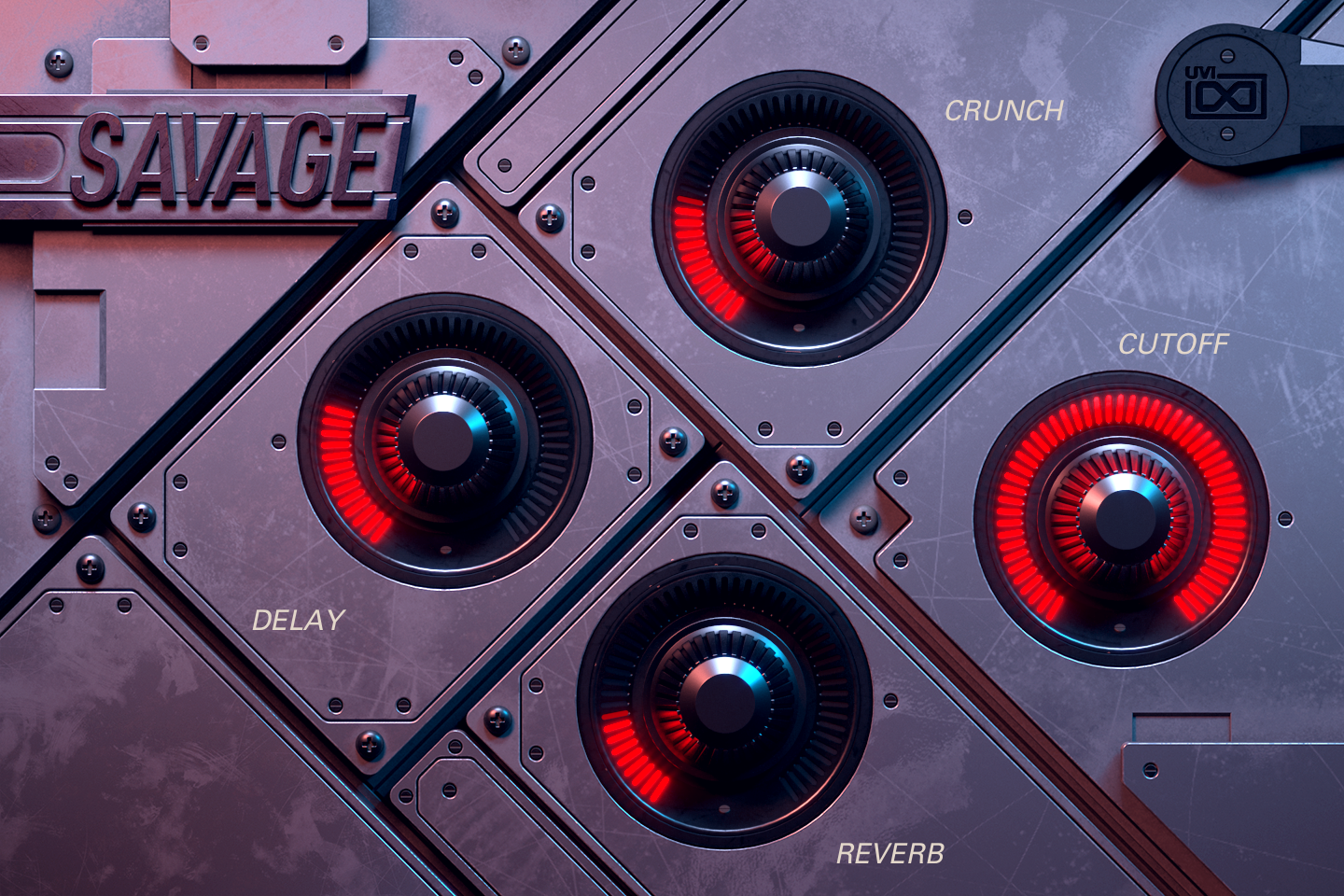
- 1 Macros
The four knobs are the preset’s macros and take their names, so labels and targets change from preset to preset. In Monster Truck, CRUNCH blends in a fuzz, DELAY and REVERB set the DualDelay and SparkVerb mix, and CUTOFF sets the layer’s Moog filter; the mod wheel adds wavetable FM. In presets with an arpeggiator, an on/off switch and a speed menu (x 1/4 to x 2) appear at the bottom left.
Like any Falcon macro, they can be controlled via MIDI, OSC, host automation and Lua scripting. For more on macros, see Falcon's software manual.
Program Information
Press the Script button above the panel to switch to Falcon’s macro view, then the (i) button in its upper right to display program information. Many factory presets contain details about the program such as modwheel assignments, macro descriptions or tips for playing it. You can add and save descriptions for your own programs as well.
EDIT Page
If you want more control over a sound than the macros provide, the EDIT tab gives you full access to all parameters. Patches in Falcon are built within a fixed hierarchy: at the very top is the Program, inside the Program are Layers, within each Layer are Keygroups, and inside the Keygroups are Oscillators. Audio effects, MIDI effects and modulators can be placed on any level.

- 1 Program Editor
Top-most level of the patch. Broad changes affecting the overall sound: add audio or MIDI effects, adjust volume, pan and pitch.
- 2 Layer Editor
Group and modify Keygroups. Same effect/modulation slots as the Program, plus velocity curve, polyphony modes and unison settings.
- 3 Keygroup Editor
Ground level of the patch — hosts oscillators, defines MIDI note and velocity ranges, and sets basic oscillator attributes like pitch and trigger modes. Effects instanced here run per-voice, with the extra CPU cost that implies.
The mapping, oscillator and modulation editors are described in Falcon’s software manual: see Hierarchy and Edit.
Preset List
01 — Arpeggiated
14- Arp Reactor 1
- Arp Reactor 2
- Dirt Legacy
- Distorted Motion
- Doom Arp
- Drama Pulse
- FM Motion
- Growl Motion
- Lead Pattern 1
- Lead Pattern 2
- Motion Poly
- Rhythm Tech 1
- Rhythm Tech 2
- Rhythm Tech 3
02 — Bass
18- 8bit Bass Pattern 1
- 8bit Bass Pattern 2
- Angry Seq
- Bass Modular Motion
- Bass Motion
- Bassliner Wheel
- Deep Bass Pattern
- Dirty Bass Wobble
- Dirty FM Stab
- Downer Fun
- Filthy Bass Pattern
- FM Bass Pulse 1
- FM Bass Pulse 2
- Hitech Bass Pattern
- Moore Loud Dist Bassline
- Sub Pulse
- Tech Fat Bass
- Thick Bass Pattern
03 — Dist And Co
8- Agression 1
- Agression 2
- Human Dirt Loop 1
- Human Dirt Loop 2
- Real Guitar Arp 1
- Real Guitar Arp 2
- Real Guitar Motion
- Stab Domino
04 — DubNstep
23- DnB Dub Mayhem
- DnB Dubstep 01
- DnB Dubstep 02
- DnB Dubstep 03
- DnB Dubstep 04
- DnB Dubstep 05
- DnB Dubstep 06
- DnB Dubstep 07
- DnB Dubstep 08
- DnB Dubstep 09
- DnB Dubstep 10
- DnB Dubstep Extra Fill fx
- DnB Melodic
- DnB Pattern 1
- DnB Pattern 2
- DnB Reese Pattern 1
- DnB Reese Pattern 2
- DnB Reese Pattern 3
- DnB Reese
- Dubstep Angry Pattern 1
- Dubstep Angry Pattern 2
- Freak Dubstep Triplet
- Freak Dubstep
05 — FX
10- Chainsaw Dubstep
- Chainsaw Master
- Cinematic Scary 1
- Cinematic Scary 2
- Metal Pipe
- Noise Transition
- Stab Growl
- Start the Engines Riser
- Wobblar 1
- Wobblar 2
06 — Leads
15- Angry Lead FM
- Dirty Lead 1
- Dirty Lead 2
- Evil Fire
- Fatest Lead
- Growling Talking
- Lead Saw WT
- Monster Truck
- Never Say Loud
- Plucker
- Saw Dirty
- Stab It
- The Hell
- Voc Rhythm 1
- Voc Rhythm 2
07 — Pads-Drones
14- Drone Atmo
- Film Drone
- Growling Foxes
- Lunar Nashi
- New Era Seq
- Pad Chord Ram
- Pad Requiem Mono
- Pulse Pad
- Reaching Outer Space
- Shimmer
- Soft Cloud
- The Chase Motion
- Voc Sidechain
- Wonder Land
08 — Rhythm Loops
14- Abstract HH Loop
- Abstract Perc Loop
- Cinematic HH
- Click Techno
- Noise Hit and Snare
- Noise Hit Rhythm
- Noise Hit SideChain
- Orch Metal Drums 1
- Orch Metal Drums 2
- Orchestral Drums 1
- Orchestral Drums 2
- Orchestral Drums 3
- Pulse Hihat
- The Chase Percs
09 — Sequences
20- Absolute 1
- Absolute 2
- Action Basic
- Action Hi Hats
- Agressive
- Angry HHs
- Complextro
- Crazy Motion
- Distorted Perc
- Modular Motion
- Orch Seq 1
- Orch Seq 2
- Productive 1
- Productive 2
- Productive 3
- Shepard 1
- Shepard 2
- Trance Progression 1
- Trance Progression 2
- Trance Progression 3
Credits and Thanks
Sound Design — Pandocrator
GUI & Graphics — Anthony Hak · Nathaniel Reeves
Documents — Nathaniel Reeves · Kai Tomita
UVI Team