
100 expressive, modular-inspired sounds built on Falcon’s West Folder engine — basses, keys, plucks, bells, percussion and textures with performable sequences.
Introduction
Drawing inspiration from ’70s West Coast synthesis, West Fold offers a modern take on the rich, harmonic unpredictability of the complex oscillator. The expansion is built around Falcon’s West Folder engine, leveraging its wavefolder, built-in AM and FM modulation, and lowpass gate. This approach yields a distinct tonal landscape, capturing the raw, woody resonance and plucky dynamics that define this beloved synthesis approach.
West Fold brings 100 expressive, modular-inspired sounds covering every foundational sound type, from deep basses and responsive keys to sharp plucks, bells, percussion and evolving textures. Most patches include a built-in sequence that can be instantly activated or bypassed, while custom macro controls let you tweak the fold depth, modulation or gate behavior on the fly, keeping the performance intuitive and highly musical.
Whether you’re producing driving electronic tracks or searching for unique, animated timbres to layer into your compositions, West Fold delivers a versatile toolkit of character-rich sounds. And in Falcon, you can explore, tweak or transform the core of every patch.
Made for Falcon
The West Fold expansion leverages the advanced synthesis architecture of Falcon, featuring intuitive macro controls for instant playability.
Control your sound with MIDI, OSC, host automation, and Lua, or transform it with Falcon’s extensive library of oscillators, effects, modulators, and scripts.
Falcon’s versatility and pristine sound quality is evident throughout this collection, utilizing numerous synthesis and sound design techniques and a robust use of effects and modulators. Sounds can all be quickly previewed, edited, layered or performed with nearly limitless variation thanks to Falcon’s semi-modular architecture and rich component library.
INFO Page
The Info tab provides an overview of the selected program, houses macro controls, and provides a location for custom text and images via the (i) view.
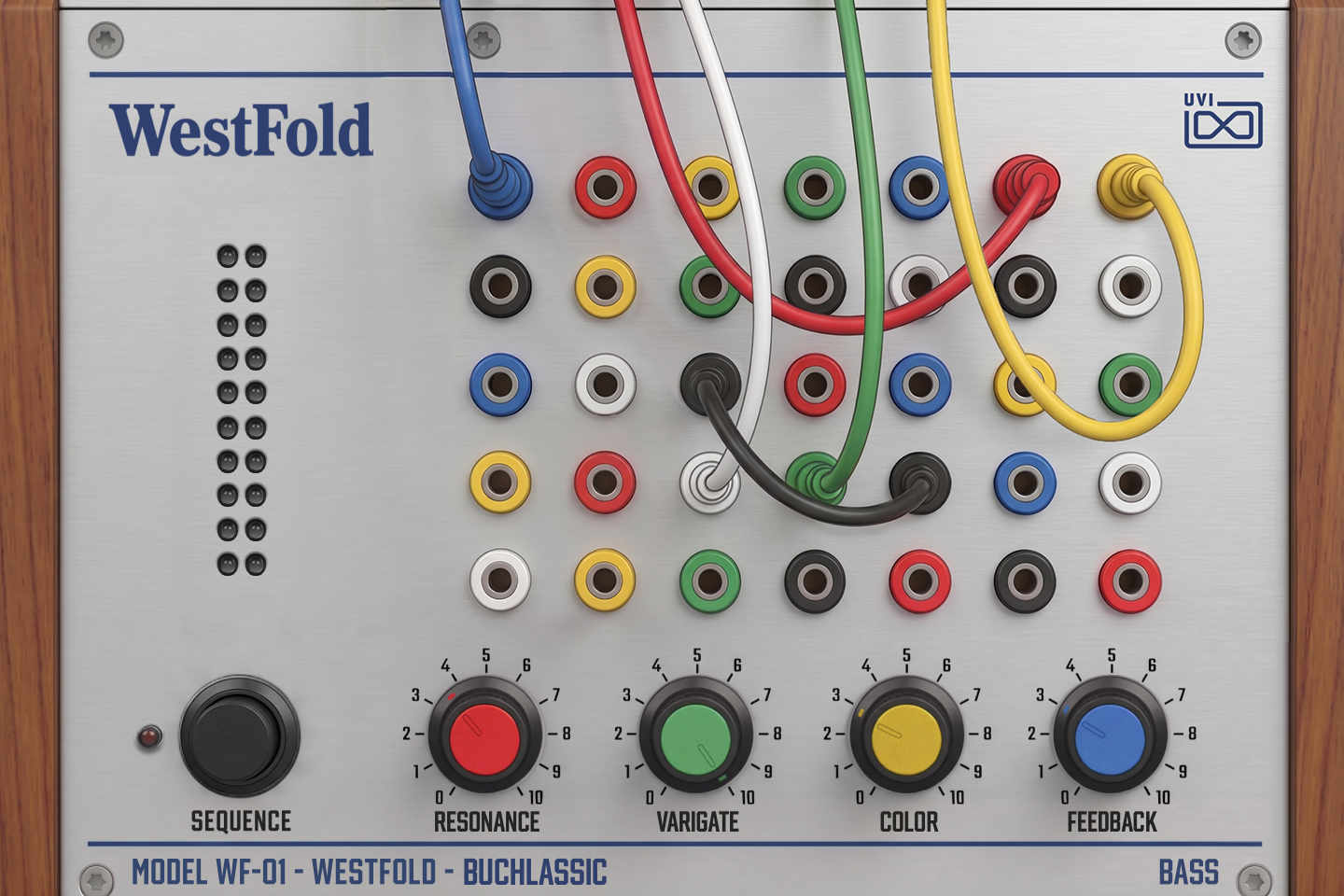
- 1 Macros
The four colored knobs are the preset’s Macros 1 to 4 and take their names, so labels and functions change from preset to preset. Frequent labels are COLOR (the timbre of the West Folder oscillator), GATE (how the lowpass gate or envelope opens and closes) and SPACE, REVERB, DELAY or ECHO (effect send levels). In Buchlassic:
- RESONANCE — resonance of the lowpass gate’s filter.
- VARIGATE — how much the lowpass gate’s opening varies at random from note to note; with SEQUENCE on, it also sets the depth of a slow LFO that lengthens and shortens the gate’s decay.
- COLOR — the fold order of the West Folder oscillator, which changes its harmonic color.
- FEEDBACK — the delay’s feedback, i.e. how long the repeats last.
The mod wheel sweeps a filter cutoff. Macros can be controlled via MIDI, OSC, host automation and Lua scripting.
- 2 SEQUENCE
Switches the preset’s built-in sequence on or off; the LED lights when it is on. On, held keys play the preset’s arpeggio or step pattern, often along with extra motion such as LFOs or random modulation; off, you play the plain sound. Each preset loads with its own setting: Buchlassic starts with it off, and turning it on plays a 16-step arpeggio from the held notes.
A few presets use the button differently:
- Stepped modulation — in Fourth of July, Modulo Grit, Carrier Modulator, Helios and Wandering Voltage it switches a stepped modulation pattern instead of a note sequence (SMOOTH SEQ smooths its steps in Fourth of July and Modulo Grit).
- Sustain — in the FX presets Audiorate Machine, Electric Burst, Noise Sweep, Ratio Cycle and Voltage Faller it makes the sound hold while the key is down instead of decaying; in FM Error it starts an LFO.
- Drum kits — in Ebmodular, Harmonic Beat, Hybrid Elektro, Rezstep and Technoid the sequencer plays the kit when it is on; turn it off to play the kit yourself from any octave of the keyboard.
- 3 Output meter
The two LED columns show the program’s output level, left and right, as you play.
- 4 Preset and category
The bottom strip shows the preset’s name after MODEL WF-01 - WESTFOLD (BUCHLASSIC) and, at the right, its category (BASS), which is the preset’s folder in the preset list. The panel artwork, including the patch-cable layout, changes with the category.
Macros
As with Falcon Factory Content, West Fold’s patches are programmed with macros that give quick access to the key parameters of each patch. West Fold also ships with a custom front panel built using Falcon’s Script feature: the four colored knobs drive the program’s Macros 1 to 4, and the SEQUENCE button drives Macro 5. The panel parameters can be controlled via MIDI, OSC, host automation and Lua scripting for easy customization and expressive performance.
Beyond the panel, the mod wheel is assigned in 99 of the 100 presets, most often to a filter cutoff, and pitch bend covers ±2 semitones in most presets. In many presets velocity also shapes the sound, most often how strongly the lowpass gate opens.
For more details on macros, see Falcon’s software manual.
Program Information
Press the Script button above the panel to switch to Falcon’s macro view, then the (i) button in its upper right to display program information. Many factory presets contain details about the program such as modwheel assignments, macro descriptions or tips for playing it. You can add and save descriptions for your own programs as well.
EDIT Page
If you want more control over a sound than the macros provide, the EDIT tab gives you full access to all parameters. Patches in Falcon are built within a fixed hierarchy: at the very top is the Program, inside the Program are Layers, within each Layer are Keygroups, and inside the Keygroups are Oscillators. Audio effects, MIDI effects and modulators can be placed on any level.

- 1 Program Editor
Top-most level of the patch. Broad changes affecting the overall sound: add audio or MIDI effects, adjust volume, pan and pitch.
- 2 Layer Editor
Group and modify Keygroups. Same effect/modulation slots as the Program, plus velocity curve, polyphony modes and unison settings.
- 3 Keygroup Editor
Ground level of the patch — hosts oscillators, defines MIDI note and velocity ranges, and sets basic oscillator attributes like pitch and trigger modes. Effects instanced here run per-voice, with the extra CPU cost that implies.
The mapping, oscillator and modulation editors are described in Falcon’s software manual: see Hierarchy and Edit.
Preset List
100 presets organized in eight categories. The category of the loaded preset is shown at the bottom right of the panel.
01 — Bass
13- Buchlassic
- Ciani Seq
- Click FM
- CV Pursuit
- Disco Bolinas
- Fourth of July
- Harsh Slap
- Modulo Grit
- Not a Moog
- Powerbass
- Pseudacid
- West Reese
- Whaler
02 — Bells
14- Alternating Current
- Bell Coast
- Bouncing Bell
- Drive Gate
- Felt Mute
- Ghost in the Bell
- Imsladris
- Moping
- Noice
- Padded Tones
- Probabellity
- Rotary Cell
- Sunny Sunday
- Vibrating Quartz
03 — Complex
14- Dubstage
- Feedback Resonators
- Formata
- Ground Zero
- Mixolydia
- Nasapunk
- Oak Woodland
- Pacific Ghosts
- Parallel Lines
- Reflection
- Resonant Bodies
- Silver Garden
- Slow Circuit
- Stereone
04 — Drums & Percs
14- Bleeps & Tones
- Cowbelt
- Ebmodular
- Harmonic Beat
- Hybrid Elektro
- Mispatch Kick
- Rando Bongo
- Rezstep
- Shady Congas
- Steam Hats
- Technoid
- Timpani
- West Block
- Zaps & Toms
05 — FX
10- Audiorate Machine
- Bleep Bleep
- Carrier Modulator
- Electric Burst
- FM Error
- Noise Sweep
- Ratio Cycle
- Subnautica
- Too Many Pings
- Voltage Faller
06 — Keys
10- Clair de Lune
- Funky Clav
- Harpsy
- Ivory Mist
- Mellochoir
- Old Circuit
- Playtime
- Rusty Organ
- String Machine
- West Stage
07 — Lead
14- Apogee
- Boardcast
- Easel Peasel
- Helios
- Horn of Beauty
- Orbital Ping
- Phat Juice
- Power Rock
- Rebound
- Simple Flute
- Slipstream
- Talking Fold
- Velvet Sine
- Wandering Voltage
08 — Pluck
11- Blobble
- Buzzing Bud
- Dog Chariot
- Drive Pizz
- Droplet
- Flango Ping
- Harpanet
- Metallic Stacc
- Plectrum
- Pop Scorn
- Simpluck
Credits and Thanks
Sound Design — Alix Labbé
GUI & Graphics — Nathaniel Reeves
Documents — Nathaniel Reeves · Kai Tomita
UVI Team