
Explore the possibilities of FM synthesis from vintage digital to visionary hybrid tones — hyper-detailed and expressive FM patches offering vivid, evolving and highly-musical visions.
Introduction
Explore the possibilities of FM synthesis from vintage digital to visionary hybrid tones. Made popular in the ’80s, FM synthesis continues to inspire artists and sound designers with it’s rich harmonic sounds and other-worldly timbres. Utilized within the modular architecture of Falcon, Digital Motion delivers a focused set of hyper-detailed and expressive FM patches offering vivid, evolving and highly-musical visions.
The sounds of Digital Motion are layered and massive, providing a range of possible tones within each patch. Mix and tweak 3 discrete layers of synthesis, a uniquely prepared “Morph” control providing instant movement and modulation, ADSR amplitude envelope, filter and sends for reverb and delay. Quickly find sounds within useful groupings including bells, pads, keys, organs, leads, basses, atmospheres and FX, then tweak them on the front panel to create variations, or dig deep and transform them into your own unique sonic expressions.
Made for Falcon
The Digital Motion expansion leverages the advanced synthesis architecture of Falcon, featuring intuitive macro controls for instant playability.
Control your sound with MIDI, OSC, host automation, and Lua, or transform it with Falcon’s extensive library of oscillators, effects, modulators, and scripts.
Falcon’s versatility and pristine sound quality is evident throughout this collection, utilizing numerous synthesis and sound design techniques and a robust use of effects and modulators. Sounds can all be quickly previewed, edited, layered or performed with nearly limitless variation thanks to Falcon’s semi-modular architecture and rich component library.
INFO Page
The Info tab provides an overview of the selected program, houses macro controls, and provides a location for custom text and images via the (i) view.
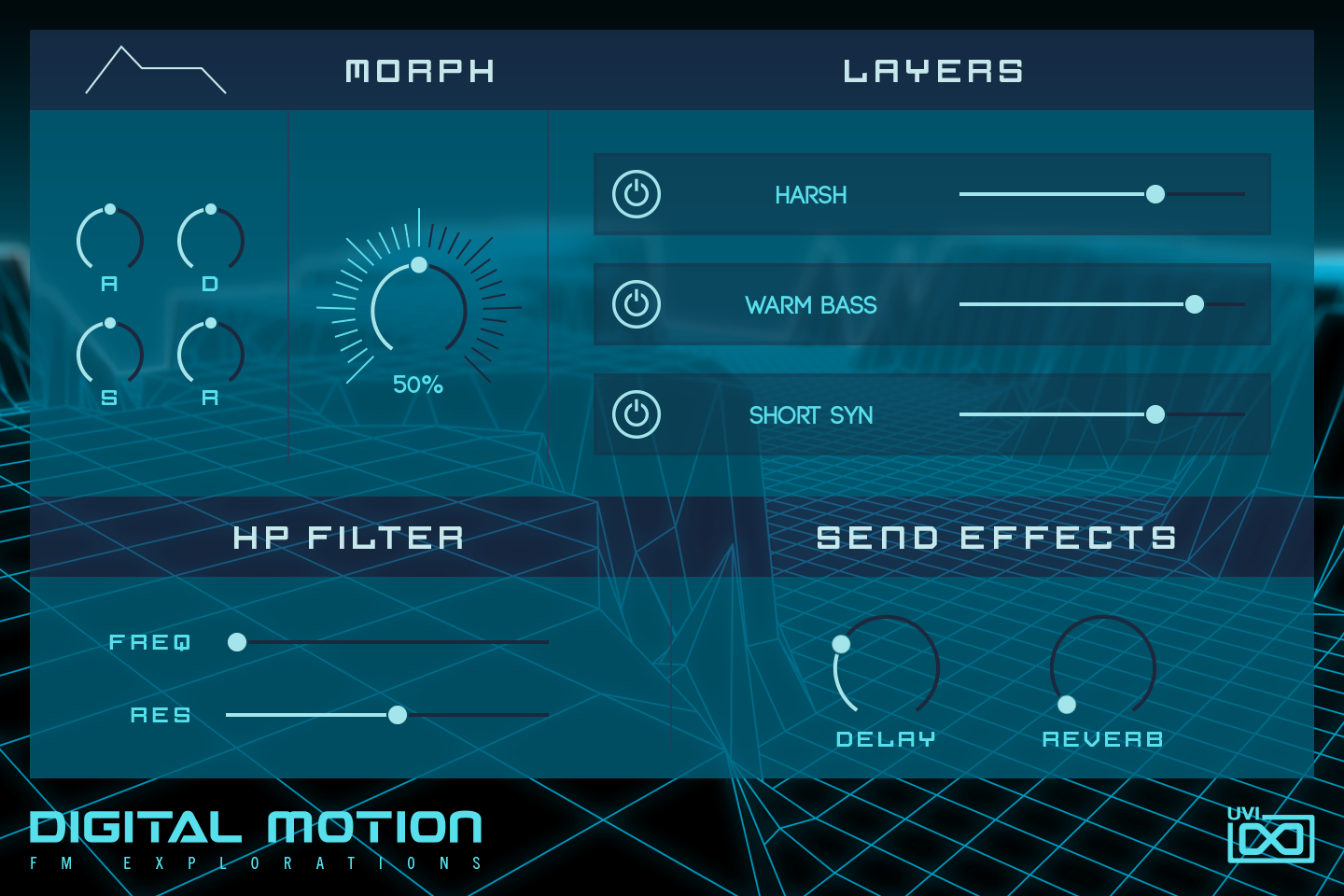
- 1 ADSR Envelope
A, D, S and R set the attack, decay, sustain and release of the amplitude envelope of all three layers at once. Like every control on this panel, each knob is linked to a macro of the program, so it can be assigned to MIDI CC, OSC or host automation.
- 2 MORPH
Changes the coefficients of the FM modulators (operator ratios or levels of the FM oscillator, depending on the program) to add instant movement to the sound. The value under the knob shows its position in percent.
- 3 LAYERS
The program’s three synthesis layers, each with a power button that mutes or unmutes it and a slider that sets its level. The layer names come from the program, so they change from preset to preset (Harsh, Warm Bass and Short Syn in Active Drive).
- 4 HP FILTER
High-pass filter on the program output: FREQ sets its cutoff frequency and RES its resonance.
- 5 SEND EFFECTS
DELAY sets the mix of the Dual Delay and REVERB the mix of the SparkVerb reverb.
Program Information
Press the Script button above the panel to switch to Falcon’s macro view, then the (i) button in its upper right to display program information. Many factory presets contain details about the program such as modwheel assignments, macro descriptions or tips for playing it. You can add and save descriptions for your own programs as well.
EDIT Page
If you want more control over a sound than the macros provide, the EDIT tab gives you full access to all parameters. Patches in Falcon are built within a fixed hierarchy: at the very top is the Program, inside the Program are Layers, within each Layer are Keygroups, and inside the Keygroups are Oscillators. Audio effects, MIDI effects and modulators can be placed on any level.

- 1 Program Editor
Top-most level of the patch. Broad changes affecting the overall sound: add audio or MIDI effects, adjust volume, pan and pitch.
- 2 Layer Editor
Group and modify Keygroups. Same effect/modulation slots as the Program, plus velocity curve, polyphony modes and unison settings.
- 3 Keygroup Editor
Ground level of the patch — hosts oscillators, defines MIDI note and velocity ranges, and sets basic oscillator attributes like pitch and trigger modes. Effects instanced here run per-voice, with the extra CPU cost that implies.
The mapping, oscillator and modulation editors are described in Falcon’s software manual: see Hierarchy and Edit.
Preset List
115 presets spanning six categories — from animated sequences and FM basses to bells, keys, pads and sound-design FX.
01 — Animated
22- Active Drive
- Base 80s
- Calm Down Siren
- Chaotic
- Chase
- Convolutions
- Dead Light
- Earth Planet
- Gate FM
- Groovy Body
- Jump N Run
- Pleasantries
- Poly Jammer
- Poly Short Arp
- Roving Seq
- Sister Bell
- Slide Step Keys
- The Bends
- Trank Circus
- Upbeater
- Weird Kissing
- Zephyr
02 — Bass and Leads
24- A Robot Slide
- Bite Attack
- Chubby Bass
- Clowner
- Dark FM Bass
- Doorstop Bass
- Finger One
- Formant Bass
- Growl Sustain
- Mean Mono
- Mean Wire
- Nervous Lead
- Octave Slide
- Oddmet
- Opto
- Phase Retro
- Silver Slide
- Sour Apple
- Sync Tab
- TriLayer Bass
- Wet Chord
- Wide Sustain Bass
- Wing Bass
- Zee Bass
03 — Bells
10- Andromeda
- Bell Wave
- Bright Chime
- Chimer
- Glass Bite
- Playmobells
- Species
- Thin Line
- Twilight Bell
- Wavy FM
04 — FX
11- Dark Fall
- Floating Chord
- Follow Me
- Green Gas
- Haze FM
- Ice Cavern
- Met Hit
- Pile Bone
- Sanitarium
- Signals Crossed
- The Void
05 — Keys
28- Add Keys
- Amber Dream
- Amusement
- Anthem
- Beauty FM
- Byzantine
- Chasm Keys
- Cloudy Keys
- Coin Keys
- Cool Keys
- Dirt Slide Keys
- Driven Chord
- Elastix
- Emote
- Flutter Keys
- Java Keys
- Memorize
- Metalide
- Octavized Keys
- Quirk
- Short And Bright
- Solemn Key
- Spring Keys FM
- Stratus Keys
- Super Bright Keys
- SynGlass Keys
- Velo Hollow
- Winter Keys
06 — Pads
20- Abel Pad FM
- Bell Texture
- Chrysalis
- Citrus Pad
- Cold Peace
- Cryogenic
- Drive Pad
- Dusk Pad
- Frigid Waters
- Greed Fields
- Hollow FM
- Lavasyn
- Midnight Chill
- Mirage
- Phase Dark
- Sky Organ
- Slither
- Soft Space
- Sunray
- Tri Pad
Credits and Thanks
Sound Design — Louis Couka · Alain Etchart · Ed Ten Eyck · Kevin Guilhaumou · Damien Vallet
GUI & Graphics — Anthony Hak · Nathaniel Reeves
Documents — Garrett DeMartinis · Nathaniel Reeves · Kai Tomita
UVI Team