
100 masterfully-designed drum kits built from modular synthesis — five essential elements per preset, a built-in sequence on C3, and five categories spanning Atmospheric, Glitch, Heavy, Minimal, and Textured.
Introduction
Each preset contains five essential drum elements; kick, snare, hi-hat, percussion, and cymbal, all playable in a standard GM layout. Every preset also features a built-in sequence, triggered with a single note (C3), providing instant rhythmic patterns that can be altered in realtime using a pitchwheel for instant beat-repeat madness, creative stutters, glitches, and more.
Organized into five categories, including Atmospheric, Glitch, Heavy, Minimal, and Textured, you will find a vast range of sonic possibilities, from abstract and glitchy textures to hard-hitting, minimalistic beats. With Falcon’s powerful macros and modulation options, each drum kit can be easily tweaked, morphed, or reshaped to fit your production style, whether you’re lacing together intricate IDM rhythms, experimental electronic beats, pulse-pounding electro, or beyond.
INFO Page
The Info tab provides an overview of the selected program, houses macro controls, and provides a location for custom text and images via the (i) view. This page is available in both Falcon and UVI Player.
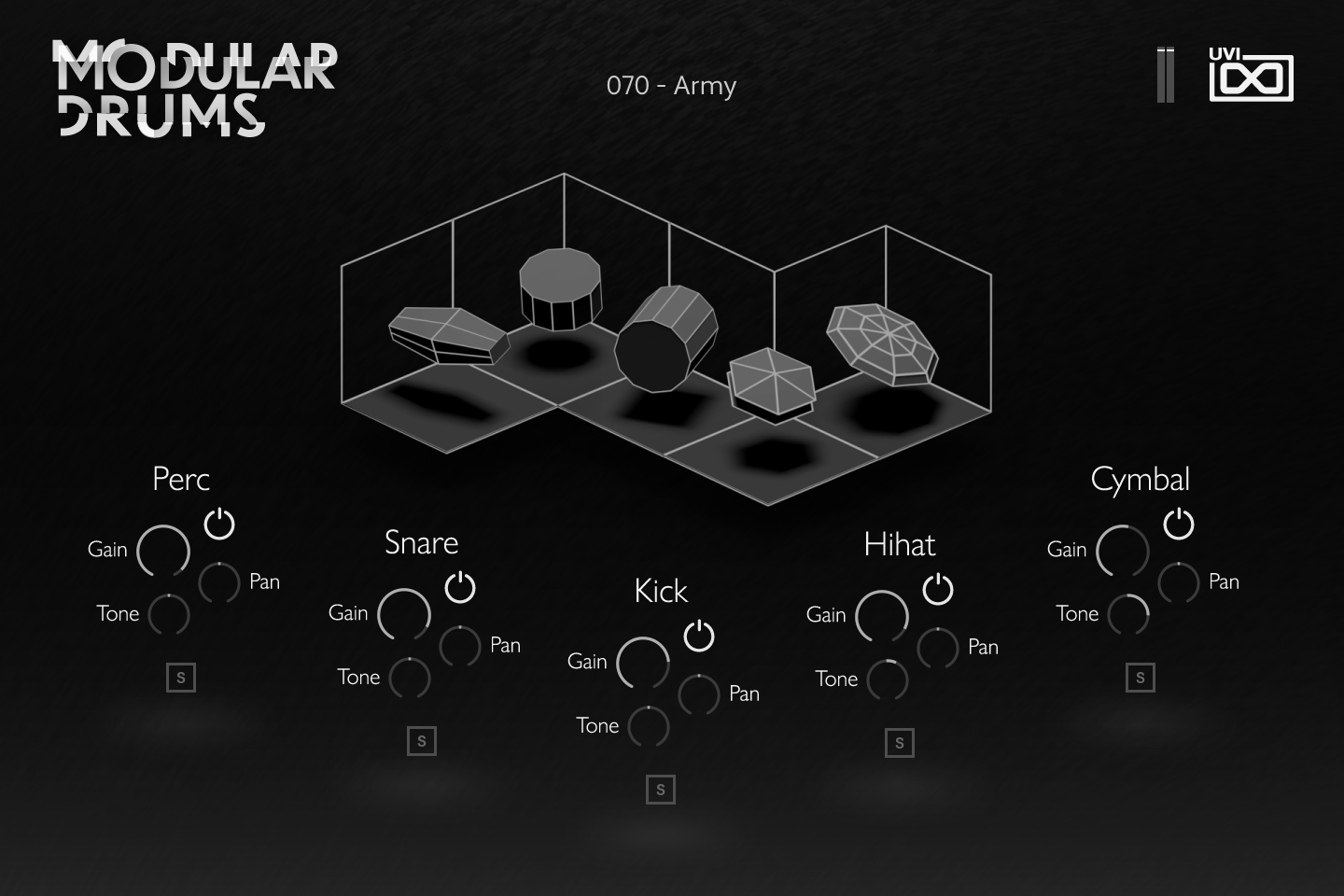
- 1 Output meter
Level meter of the whole program output.
- 2 Drum display
Each of the five drums is a level meter for its element: it lights up as the Kick, Snare, Hihat, Perc or Cymbal layer sounds, and is shown dimmed when that element is switched off.
- 3 Perc
Controls of the Perc layer. Gain sets its level (up to +6 dB), Pan its stereo position, and Tone tilts its spectrum by up to ±6 dB through the layer’s Tilt EQ.
The power button switches the element off (muted and dimmed, its solo released); S solos it. As script parameters, all panel controls can be assigned to MIDI and host automation.
- 4 Snare
The same strip for the Snare layer: Gain, Pan, Tone (Tilt EQ, ±6 dB), power button and S (solo).
- 5 Kick
The same strip for the Kick layer: Gain, Pan, Tone (Tilt EQ, ±6 dB), power button and S (solo).
- 6 Hihat
The same strip for the Hi Hat layer: Gain, Pan, Tone (Tilt EQ, ±6 dB), power button and S (solo).
- 7 Cymbal
The same strip for the Cymbal layer: Gain, Pan, Tone (Tilt EQ, ±6 dB), power button and S (solo).
Drum Panel
Every Modular Drums kit is built from the same five drum elements — Perc, Snare, Kick, Hihat and Cymbal — and the panel gives each element its own strip of controls:
- Gain — set the level of the element (up to +6 dB).
- Tone — tilt its spectrum darker or brighter, by up to ±6 dB.
- Pan — set its position in the stereo field.
- Power — switch the element on or off; a switched-off element is muted and shown dimmed.
- S — solo-monitor the element.
The panel’s script drives each element’s layer directly (its volume, pan, mute and solo, and the Tilt EQ behind Tone); these controls are not program macros.
Program Information
Press the Script button above the panel to switch to Falcon’s macro view, then the (i) button in its upper right to display program information. Many factory presets contain details about the program such as modwheel assignments, macro descriptions or tips for playing it. You can add and save descriptions for your own programs as well.
EDIT Page
If you want more control over a sound than the macros provide, the EDIT tab gives you full access to all parameters. Patches in Falcon are built within a fixed hierarchy: at the very top is the Program, inside the Program are Layers, within each Layer are Keygroups, and inside the Keygroups are Oscillators. Audio effects, MIDI effects and modulators can be placed on any level.

- 1 Program Editor
Top-most level of the patch. Broad changes affecting the overall sound: add audio or MIDI effects, adjust volume, pan and pitch.
- 2 Layer Editor
Group and modify Keygroups. Same effect/modulation slots as the Program, plus velocity curve, polyphony modes and unison settings.
- 3 Keygroup Editor
Ground level of the patch — hosts oscillators, defines MIDI note and velocity ranges, and sets basic oscillator attributes like pitch and trigger modes. Effects instanced here run per-voice, with the extra CPU cost that implies.
The mapping, oscillator and modulation editors are described in Falcon’s software manual: see Hierarchy and Edit.
Preset List
100 presets organized into five categories: Atmospheric, Glitch, Heavy, Minimal, and Textured. Each kit delivers five GM-mapped drum elements plus a built-in C3 sequence.
01 — Glitch
20- 070 - Army
- 075 - Chaos Order
- 080 - Sponge
- 086 - Pink Pistol
- 090 - Dean
- 090 - Insanity
- 095 - Desvelado
- 098 - Esben
- 098 - One Man
- 100 - Refugee
- 106 - Witchita
- 109 - Aktron
- 112 - Cavern
- 112 - Dorian
- 124 - Meta City
- 125 - Shootout
- 126 - Berlin Inch
- 140 - Sweet
- 140 - Tournament
- 154 - Venetian
02 — Heavy
20- 074 - Odd March
- 075 - Foldback
- 078 - Orchid
- 080 - JPEG
- 080 - Slowmo
- 083 - Down In
- 090 - Deep Club
- 092 - Fond Lada
- 095 - Over Clip
- 098 - Chelsea
- 100 - Colors
- 100 - Freundschaft
- 100 - Train Line
- 110 - Tentacles
- 115 - Sonar
- 118 - Death
- 120 - Translab
- 127 - Reptiles
- 150 - Burst Jungle
- 160 - Daytona
03 — Textured
20- 072 - Macareux
- 075 - Programma
- 088 - Paste
- 090 - Dooms Caps
- 090 - Pulsation
- 092 - Mount
- 094 - Clockwork
- 094 - Still Blunted
- 098 - ReLab
- 100 - Rails
- 104 - Melrose
- 105 - Chroma
- 115 - Cooks
- 120 - Carnival
- 120 - Signal
- 122 - Downward
- 125 - Greeep
- 128 - MK00
- 135 - Ivy
- 140 - Ocean
04 — Minimal
20- 075 - Hunting
- 080 - Euclidean
- 082 - Barefoot
- 095 - Mini Drum
- 100 - Backdoor
- 102 - Jaden
- 104 - Asphalt
- 105 - Subterranean
- 110 - Reflection
- 110 - Tamales
- 112 - Licker
- 112 - Patterns
- 114 - Dataflow
- 115 - Best Maus
- 115 - Heartclub
- 115 - North Club
- 120 - Minimal Matter
- 122 - Mumbai Groove
- 138 - Breaking
- 152 - Precious
05 — Atmospheric
20- 065 - Springs
- 070 - Avenue
- 075 - Thunder
- 080 - Lounge
- 080 - Silk Street
- 080 - Ternary Wood
- 082 - System
- 084 - Pulses
- 085 - Flores Dub
- 085 - Halmah
- 086 - Zushi
- 088 - Barrels
- 088 - Filtered Orchestra
- 090 - Capitals
- 092 - Submar
- 100 - Tunnel Batcha
- 105 - Spheric
- 106 - Tension
- 110 - Metal Groove
- 125 - Coda
Credits and Thanks
Sound Design — Théo Gallienne
GUI & Graphics — Tanguy Destré · Nathaniel Reeves
Documents — Nathaniel Reeves · Kai Tomita
UVI Team