Explore the amalgamation of software semi-modular and hardware modular with 100 Falcon presets covering Bass, Arps, Sequences, Drums and more.
Introduction
Explore the amalgamation of software semi-modular and hardware modular with 100 Falcon presets covering Bass, Arps, Sequences, Drums and more. A torrid exploration of charactered sound design, Modular Noise delivers a diverse and inspiring range of patches ready to take your productions into new sonic territory with the uncompromising sound of analog filters, plasma distortion, wavefolders, and Falcon’s own deep toolbox of oscillators, effects, modulators, and scripts.
Every patch in Modular Noise is constructed with custom macros giving you powerful top-level control over the sound, providing plenty of space for exploration and many sweet spots to discover. Dial-in reverb and delay to accentuate your sound, or crack open the Edit tab to expose the patch structure, where you can easily fine-tune or completely reshape the patch to follow your inspiration, wherever it may lead.
Made for Falcon
The Modular Noise expansion leverages the advanced synthesis architecture of Falcon, featuring intuitive macro controls for instant playability.
Control your sound with MIDI, OSC, host automation, and Lua, or transform it with Falcon’s extensive library of oscillators, effects, modulators, and scripts.
Falcon’s versatility and pristine sound quality is evident throughout this collection, utilizing numerous synthesis and sound design techniques and a robust use of effects and modulators. Sounds can all be quickly previewed, edited, layered or performed with nearly limitless variation thanks to Falcon’s semi-modular architecture and rich component library.
INFO Page
The Info tab provides an overview of the selected program, houses macro controls, and provides a location for custom text and images via the (i) view.
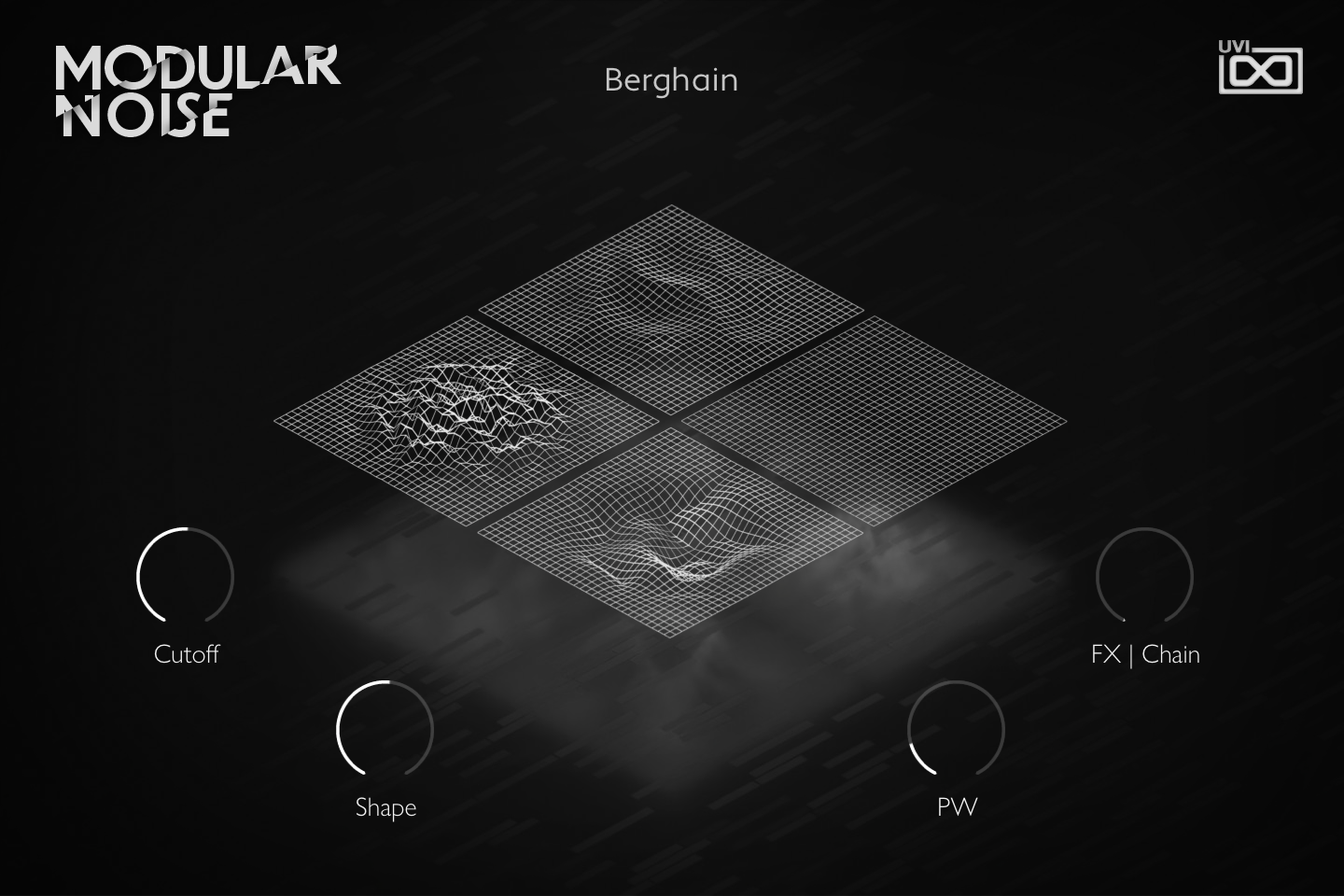
- 1 Noise visualizer
Animated display: each of the four grid tiles follows the value of one of the four macros and deforms as you turn its knob. It is display only.
- 2 Macros
The four knobs are the preset’s Macro 1 to 4, and their labels are the macro names, so they change from preset to preset. In Berghain, Cutoff opens the Retro and SVF filters, Shape and PW set the shape and pulse width of the Parametric LFOs in the keygroups, and FX | Chain raises the SparkVerb mix and decay.
Macros can be controlled via MIDI, OSC, host automation and Lua scripting. For more on macros, see Falcon’s software manual.
Program Information
Press the Script button above the panel to switch to Falcon’s macro view, then the (i) button in its upper right to display program information. Many factory presets contain details about the program such as modwheel assignments, macro descriptions or tips for playing it. You can add and save descriptions for your own programs as well.
EDIT Page
If you want more control over a sound than the macros provide, the EDIT tab gives you full access to all parameters. Patches in Falcon are built within a fixed hierarchy: at the very top is the Program, inside the Program are Layers, within each Layer are Keygroups, and inside the Keygroups are Oscillators. Audio effects, MIDI effects and modulators can be placed on any level.

- 1 Program Editor
Top-most level of the patch. Broad changes affecting the overall sound: add audio or MIDI effects, adjust volume, pan and pitch.
- 2 Layer Editor
Group and modify Keygroups. Same effect/modulation slots as the Program, plus velocity curve, polyphony modes and unison settings.
- 3 Keygroup Editor
Ground level of the patch — hosts oscillators, defines MIDI note and velocity ranges, and sets basic oscillator attributes like pitch and trigger modes. Effects instanced here run per-voice, with the extra CPU cost that implies.
The mapping, oscillator and modulation editors are described in Falcon’s software manual: see Hierarchy and Edit.
Preset List
100 presets organized across 8 categories spanning ambient textures, arpeggiated patterns, bass, chords, drums, effects, keys, and sequences.
01 — Ambience
14- Aleator
- Array
- Attractor
- Boreal
- Diffused
- Dissolution
- Factory
- Flow
- Folded
- Hyperion
- Index
- Nebule
- Quest
- Wings
02 — Arpeggiated
10- City
- Classic
- Delta
- Dust
- Gamma
- Hanging
- Heart
- Prism
- Proteus
- Strands
03 — Bass
13- Berghain
- Charge
- Iron
- Mech
- Neptune
- Onex
- Punish
- Rubba
- System
- Undulator
- Unstable
- Voltage
- Welt
04 — Chords
9- Askew
- Blotter (E)
- Buffers (F)
- Cascade (Slot C1)
- Charon
- Seeds (C#)
- Sky
- Storm (Slot C1)
- Strobes
05 — Drums
14- Anima
- Arup
- Bitnetics
- Borks
- Clangbox
- Cruncher
- Dasini
- Flocus
- Imep
- Muul
- Screl
- Spoir
- Zhei
- Zooq
06 — Effects
7- Bitghost
- Concertina
- Field
- Fusion
- Pour
- Shape
- Stretchy
07 — Keys
13- Ananoise
- Circuits
- Dampers
- Elliptical
- Fanfair
- Feathery
- Inscriptions
- Knife
- Luna
- Sing
- Skimming
- Tensioner
- Tether
08 — Sequenced
20- Ghanu
- Aquatic
- Bisco
- Calcula
- Camber
- Crank
- Dataloss
- Dispersion
- Excitation
- Fuse
- Mimas
- Oberon
- Pathways
- Pineal
- Portal
- Pulso
- Squarey
- Substance
- Tweakers
- Velvet
Credits and Thanks
Sound Design — Carlo De Gregorio
GUI & Graphics — Tanguy Destré
Documents — Nathaniel Reeves · Kai Tomita
UVI Team