
100 hand-crafted presets bringing the raw creativity of hardware modular synthesis into Falcon — expressive pads, powerful leads, animated arps, plucks, and complex evolving sequences drawn from real eurorack recording sessions.
Introduction
Modular Waves brings the raw creativity of hardware modular synthesis into Falcon with 100 hand-crafted presets ranging from expressive pads and powerful leads to animated arps, plucks, and complex evolving sequences. Built from recordings and design sessions with eurorack systems, this expansion captures the raw unpredictability and tonal richness that modular rigs are known for.
Each preset is ready for instant use, yet offers vast potential for customization through Falcon’s deep synthesis, modulation, and effects. Whether you’re looking for lush harmonic layers, razor-sharp leads, or evolving rhythmic textures, Modular Waves delivers an inspiring toolkit shaped by the spirit of modular sound design.
INFO Page
The Info tab provides an overview of the selected program, houses macro controls, and provides a location for custom text and images via the (i) view. This page is available in both Falcon and UVI Player.
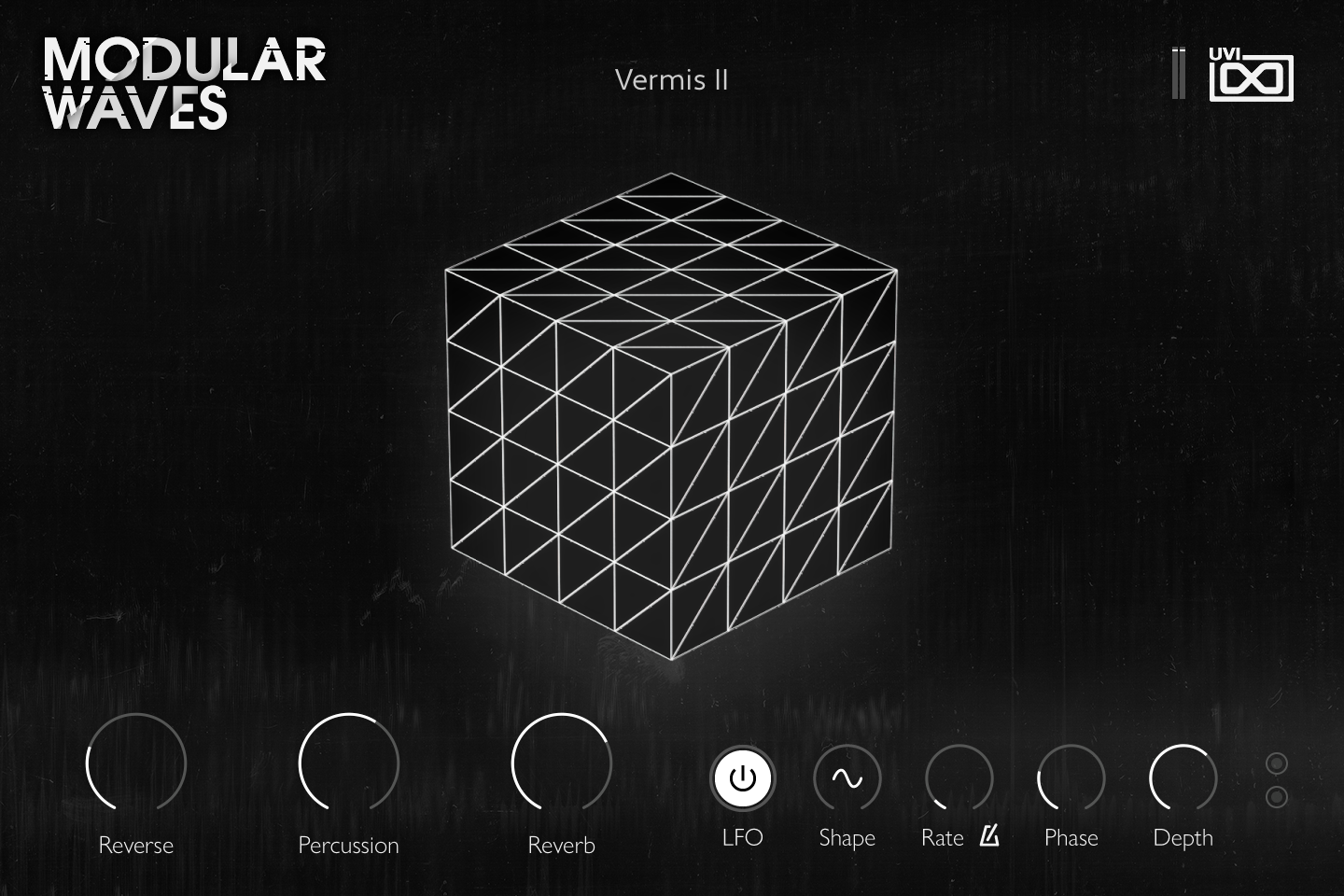
- 1 Output meter
Level meter of the program output.
- 2 Cube display
The cube is also a level meter of the program output: it lights up with the sound you play. It is display only.
- 3 Macros
One knob per macro of the preset, labelled with the macro name, so the knobs change from preset to preset. In Vermis II, Reverse sets the Granulizer mix, Percussion the gain of the Drum oscillator layer (Layer 4), and Reverb the SparkVerb mix.
Macros can be controlled via MIDI, OSC, host automation and Lua scripting. For more on macros, see Falcon’s software manual.
- 4 LFO
Switches the panel’s script LFO on or off. It drives two modulation outputs whose targets are set in each preset (in Vermis II: wavetable position, MS-20 filter cutoff, Vosim formant and pluck position on the first, phase distortion and tremolo depth on the second). The LFO runs only while notes are held and restarts from its start phase on the first note.
- 5 Shape
Selects the LFO waveform: sine, triangle, square or saw.
- 6 Rate
Sets the LFO speed. With the sync button (metronome icon) on, the rate follows the host tempo, from 4x to 1/16 including dotted and triplet values; with it off, it is free from 0.01 to 6 Hz.
- 7 Phase
Sets the start phase of the first LFO output; the second output starts at the mirrored phase, so the two move out of step.
- 8 Depth
Scales the amount of both LFO outputs.
- 9 LFO indicators
The two dots show the current value of the first and second LFO outputs. They are display only.
Program Information
Press the Script button above the panel to switch to Falcon’s macro view, then the (i) button in its upper right to display program information. Many factory presets contain details about the program such as modwheel assignments, macro descriptions or tips for playing it. You can add and save descriptions for your own programs as well.
EDIT Page
If you want more control over a sound than the macros provide, the EDIT tab gives you full access to all parameters. Patches in Falcon are built within a fixed hierarchy: at the very top is the Program, inside the Program are Layers, within each Layer are Keygroups, and inside the Keygroups are Oscillators. Audio effects, MIDI effects and modulators can be placed on any level.

- 1 Program Editor
Top-most level of the patch. Broad changes affecting the overall sound: add audio or MIDI effects, adjust volume, pan and pitch.
- 2 Layer Editor
Group and modify Keygroups. Same effect/modulation slots as the Program, plus velocity curve, polyphony modes and unison settings.
- 3 Keygroup Editor
Ground level of the patch — hosts oscillators, defines MIDI note and velocity ranges, and sets basic oscillator attributes like pitch and trigger modes. Effects instanced here run per-voice, with the extra CPU cost that implies.
The mapping, oscillator and modulation editors are described in Falcon’s software manual: see Hierarchy and Edit.
Preset List
100 presets organized across seven categories, spanning arpeggiated sequences, bass sounds, FX, keys, pads, sequenced patches, and soundscapes.
01 — Arpeggiated
17- A Crowl Analog
- Capaldi
- Chase Mood
- Don Dream
- Hyfen Patch
- Kreta
- Quarter Easel
- Reverse Hide
- Seventh Moon
- Shore
- Simple Coast I
- Simple Coast II
- Simple Coast III
- Ubahn
- Vermis I
- Vermis II
- Vermis III
02 — Bass
15- Dissection
- Distant Wave
- Features
- Groove Echo
- Henocq
- Jellyfish
- Modder
- Peacock
- Rob Beast
- Sand Burst
- Sarcophagus
- Stack
- Taiga
- Tempest
- Volture
03 — FX
13- Deep Planet
- Epsilon
- Liner
- Processor
- Spells
- Sub Maritime
- Transmissions
- UFO Call
- Valor
- Visualized
- Wanted
- Wofi
- Zeta
04 — Keys
13- Calm Sea
- Harper
- Infinity
- Manor
- MorphoPiano
- Painting
- Parasites
- Phantom
- Robo
- Shelling Ghost
- Strangeness
- Uturn
- Xhymn
05 — Pads
13- Albion
- Angled
- Gourou
- Monk
- Nightflight
- Solid Pad
- Synthetic
- Tanger
- Toro
- Tunnels
- Walnut
- Whispers
- Wizard
06 — Sequenced
18- Cave Loop
- Communications
- Haize
- Hart
- Improve
- Iridescent
- Mahogany
- Mars Filter
- MikInsen
- Mod Mist
- Mother of All
- Replay
- Solo Forest
- Some Dots
- Syncopation
- Tweedy
- Walkthrough
- Xerror
07 — Soundscapes
11- Culte
- Drexciyans
- Mahal
- Mockin Birds
- Moon Landing
- Nebulae
- Salvador
- Simple Drone
- Tools
- Warming
- Zeta
Credits and Thanks
Sound Design — Théo Gallienne
GUI & Graphics — Nathaniel Reeves
Documents — Nathaniel Reeves · Kai Tomita
UVI Team