
Particular explores the space where sound becomes dust and motion, with 100 evolving granular presets — each also available in MPE — played through three performable XY pads for grains, filter and effects.
Introduction
Built around the unpredictable beauty of granular synthesis, Particular explores the space where sound becomes dust and motion. By breaking audio into shifting clouds of texture, this collection delivers a rich palette of evolving tones, drifting atmospheres and rhythmic particles. Every preset is designed to breathe, bringing inherent organic movement and complex modulation to the foundation of your tracks.
The interface centers on three dedicated XY pads, providing tactile control over grains, filters and effects. You can interact with each pad directly to shape the sound in real time, or let them be modulated for hands-free evolution. This flexible layout allows you to gently scatter frequencies or aggressively morph the patch structure, introducing new ways to perform and manipulate the sonic dust.
Particular contains 100 presets across mallets, keys, plucks, strings, winds, voices, synths, soundscapes and FX, and every one of them is also available in an MPE version — 200 presets in all.
Created for producers of ambient, cinematic and experimental electronic music, this expansion provides a dynamic toolkit for adding depth and kinetic energy to any composition. Opening a preset in Falcon reveals its complete synthesis architecture, for those wishing to reshape its character entirely.
Made for Falcon
The Particular expansion leverages the advanced synthesis architecture of Falcon, featuring intuitive macro controls for instant playability.
Control your sound with MIDI, OSC, host automation, and Lua, or transform it with Falcon’s extensive library of oscillators, effects, modulators, and scripts.
Falcon’s versatility and pristine sound quality is evident throughout this collection, utilizing numerous synthesis and sound design techniques and a robust use of effects and modulators. Sounds can all be quickly previewed, edited, layered or performed with nearly limitless variation thanks to Falcon’s semi-modular architecture and rich component library.
INFO Page
The Info tab provides an overview of the selected program, houses macro controls, and provides a location for custom text and images via the (i) view.
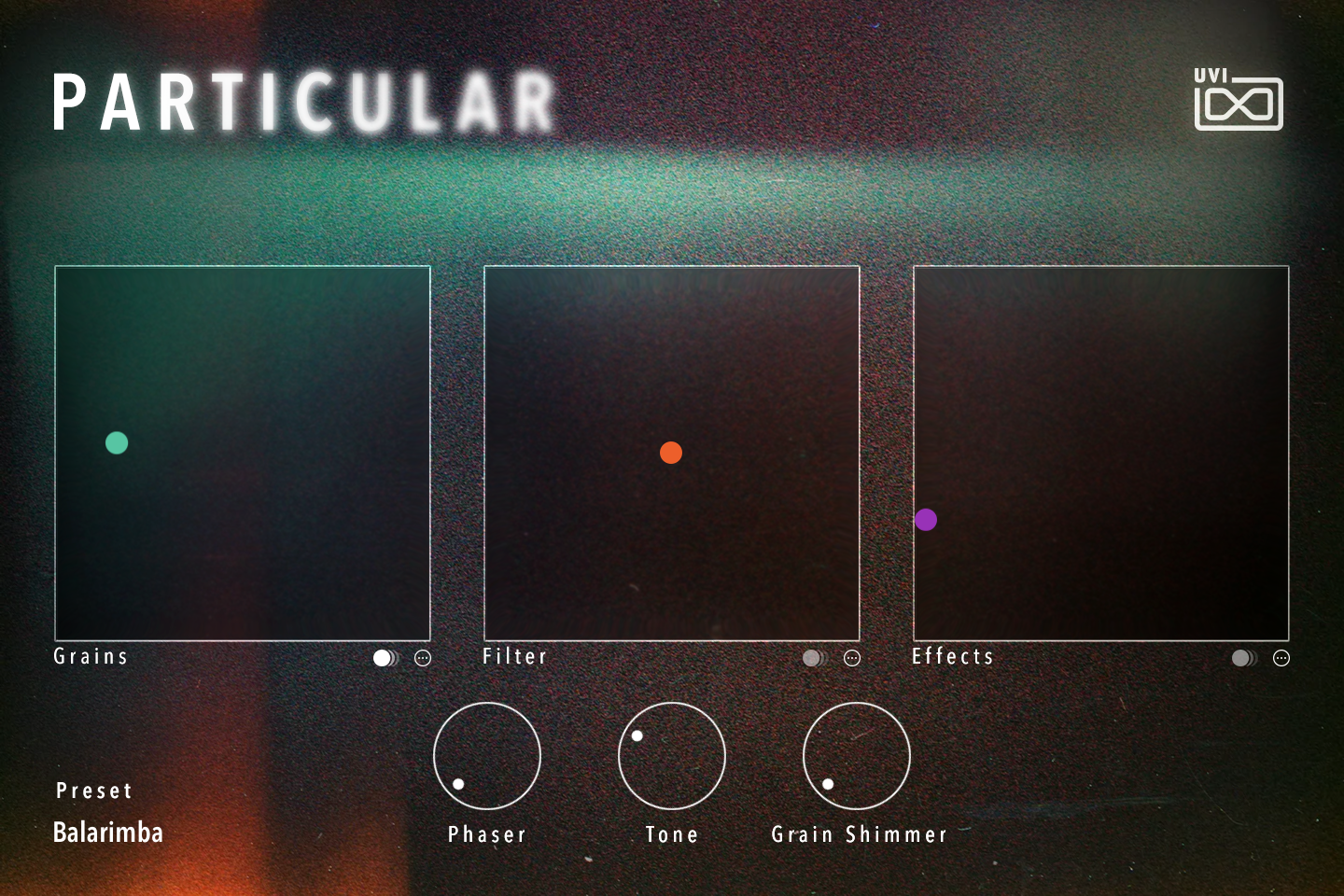
- 1 Grains pad
Drag the green handle to reshape the granular engine. In most presets, including Balarimba, both axes act on grain density, grain size and the position read in the source sample, in different amounts, so each corner gives a different grain cloud. Some presets use only part of these, or also the grain envelope shape, grain pitch or stereo spread.
- Grain size — short grains sound buzzy and glitchy, long grains smooth.
- Density — from sparse rhythmic particles to a dense cloud.
- Position — moves through the timbre of the recording.
The switch under the pad’s right corner starts its X/Y LFOs (on in Balarimba) and the ⋯ button opens the Grains Modulation window, described under Macros below.
- 2 Filter pad
The orange handle drives a steep band-pass filter.
- Y — moves the band up and down: low and dark at the bottom, high and bright at the top.
- X — reshapes the band: narrow and focused on the left; toward the right, wider, more resonant, with the left and right channels spread apart.
The switch and ⋯ button under the pad work as on the Grains pad and open the Filter Modulation window.
- 3 Effects pad
The purple handle blends in the program’s delay and reverb.
- X — from dry on the left to full delay on the right.
- Y — from dry at the bottom to full reverb at the top.
The delay and reverb settings differ from preset to preset. The switch and ⋯ button under the pad work as on the Grains pad and open the Effects Modulation window.
- 4 Phaser, Tone and Grain Shimmer
Three effect amounts, from 0 to 100 %, with the same labels in every preset:
- Phaser — blends in a chorus and deepens a phaser for swirling movement.
- Tone — crossfades into a device or speaker coloration (small speaker, cassette tape, car and so on, depending on the preset) with added compression, for a lo-fi, colored character.
- Grain Shimmer — adds a pitched grain cloud (an octave up in Balarimba) feeding a shimmer reverb, for a glittering halo.
Macros
Particular’s presets share a custom front panel built with Falcon’s Script feature. The three pads and three knobs are wired to the program’s macros and effect racks, and can be controlled via MIDI, OSC, host automation and Lua scripting. On most presets, raising the mod wheel darkens the sound by closing a final low-pass filter; pitch bend transposes the oscillators.
Pad modulation. Each pad has its own pair of LFOs, one moving the handle horizontally (X) and one vertically (Y); combining different shapes and rates on the two axes draws orbits and figures across the pad. The small switch under the right corner of a pad turns its LFOs on or off (the stored state differs per preset), and the ⋯ button next to it opens the pad’s modulation window — Grains Modulation, Filter Modulation or Effects Modulation — which shows a copy of the pad, the same on/off switch and one row of controls per axis:
- Shape — LFO waveform: sine, triangle, square or saw.
- Rate — LFO speed, from 0.01 to 6 Hz, or in note values from four bars down to an eighth note when Sync is on.
- Sync — locks the rate to the host tempo (on by default).
- Phase — where in its cycle the LFO starts.
- Depth — how far the LFO moves the handle around its position; at 100 % it sweeps up to half the pad’s width on either side.
The LFOs run only while notes are held: they start on the first note and stop on the last release, when the sound returns to the hand-set position. Overlapping notes keep them running without restarting. While they run, a white dot shows the modulated position and the colored handle stays where you placed it. Close the window with its × button or by clicking outside it.
MPE versions. Every preset has an MPE twin in the 10 MPE folder, set up for MPE controllers. Moving a finger sideways (X) bends the pitch, with a pitch-bend range of 48 semitones. Pressure mostly controls volume, filter cutoff and grain density or size; slide (Y) mostly controls filter cutoff and drive and grain density or size, with additional preset-specific targets. In the regular presets these expression routings are inactive.
For more details on macros, see Falcon’s software manual.
Program Information
Press the Script button above the panel to switch to Falcon’s macro view, then the (i) button in its upper right to display program information. Many factory presets contain details about the program such as modwheel assignments, macro descriptions or tips for playing it. You can add and save descriptions for your own programs as well.
EDIT Page
If you want more control over a sound than the macros provide, the EDIT tab gives you full access to all parameters. Patches in Falcon are built within a fixed hierarchy: at the very top is the Program, inside the Program are Layers, within each Layer are Keygroups, and inside the Keygroups are Oscillators. Audio effects, MIDI effects and modulators can be placed on any level.

- 1 Program Editor
Top-most level of the patch. Broad changes affecting the overall sound: add audio or MIDI effects, adjust volume, pan and pitch.
- 2 Layer Editor
Group and modify Keygroups. Same effect/modulation slots as the Program, plus velocity curve, polyphony modes and unison settings.
- 3 Keygroup Editor
Ground level of the patch — hosts oscillators, defines MIDI note and velocity ranges, and sets basic oscillator attributes like pitch and trigger modes. Effects instanced here run per-voice, with the extra CPU cost that implies.
The mapping, oscillator and modulation editors are described in Falcon’s software manual: see Hierarchy and Edit.
Preset List
Every preset below also exists in an MPE version, in the matching sub-folder of the 10 MPE folder, under the same name followed by “MPE”.
01 — Mallets
13- Balarimba
- BellVille
- Delicate Bow
- Kalimbounce
- Kindergarten
- Little Xylo
- One Armed Bandit
- Punched Hunters
- Roanoke
- Tines After Tines
- Tiny Clockworks
- Topeng Demon
- Witch Doctor
02 — Keys
11- Hammer Rewind
- Lichen
- Lofi Dreams
- Nanalgia
- Nicoletta Days
- Norgan
- Operator Return
- Quena
- Return EP
- Sweet Tines
- Tiny Dancer
03 — Plucks
12- Celtic Electric
- Close Lullaby
- Dozen of Picks
- Ghost Koto
- Harp Garden
- Lagratte
- Minotoor
- Oudini
- Picked Cowboy
- Sesale Harp
- Sisso
- Tsume Return
04 — Strings
10- Criticise
- Cutted Bow
- East Tremolo
- Ectoplasme
- Ensemble Parts
- Exaltation
- Fluttering Boreal
- Legato of Plucks
- Petrichor Strings
- Viola Pieces
05 — Winds
11- Fairy
- Fluttazia
- Fresh Air
- Horns Arrival
- Nostalgic Winds
- Orville
- Rashaad
- Reeds Emotion
- Rite
- Saxonia
- Toudidou
06 — Voices
11- Choirabia
- Deep Bukem
- Fairbanks Voices
- Flusterton
- Galenic Interval
- Katata
- Languisoa
- Low Temple
- Sandiara
- Two Swords
- Vanescance
07 — Synth
12- Dandelion Shrapnel
- Dilapidated Oscillators
- Fetiches
- Flower Bridge
- Junipero Serra
- Liminal
- Magma Rising
- Past Tour
- Sidosphere
- Solomone
- Unstable Relaxation
- Vexin Opening
08 — Soundscape
10- Backroom
- Butterflies Fountain
- Freezing Room
- Kaoliscape
- Particules Oscillators
- Petit Beffroi
- Sherelle
- Third Eye
- Time Asylum
- Tubes Breaking
09 — FX
10- Chimisphere
- Clock World
- Darkness Coming
- Electric Waves
- Flexotone
- Horizon 1K
- Instable Groove
- Meca Rain
- Otherworldly Perc
- Panic Harmonics
Credits and Thanks
Sound Design — Théo Gallienne
GUI & Graphics — Anthony Hak
Documents — Nathaniel Reeves · Kai Tomita
UVI Team