The building blocks that generate the sound, by sampling or by synthesis.

A straightforward sample-playback oscillator, with a resizable sample display and in-place editing: crop, normalize, silence, reverse, fades, and any Falcon effect rendered into the sample. It suits traditional sample playback, and since samples stream from disk, a program can use tens of thousands of them without a large memory footprint.
Read more ↓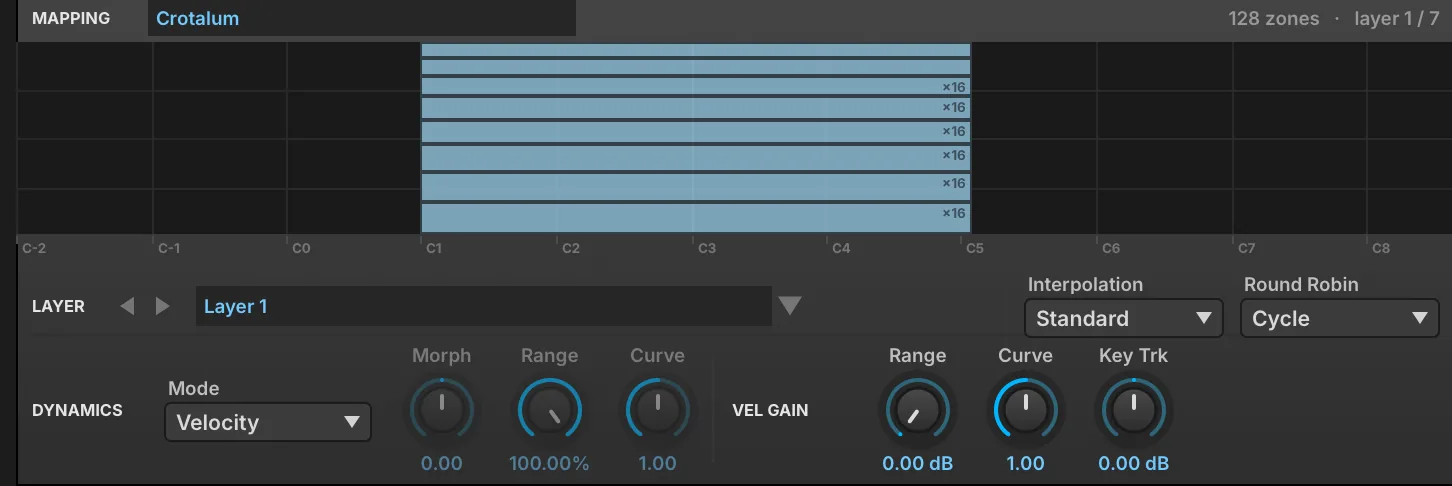
An oscillator that plays a whole set of samples described by a mapping file, in which each zone has its own sample, key and velocity span, round-robin take and layer. It is the oscillator UVI’s own instruments are built on, suited to large multisampled instruments.
Read more ↓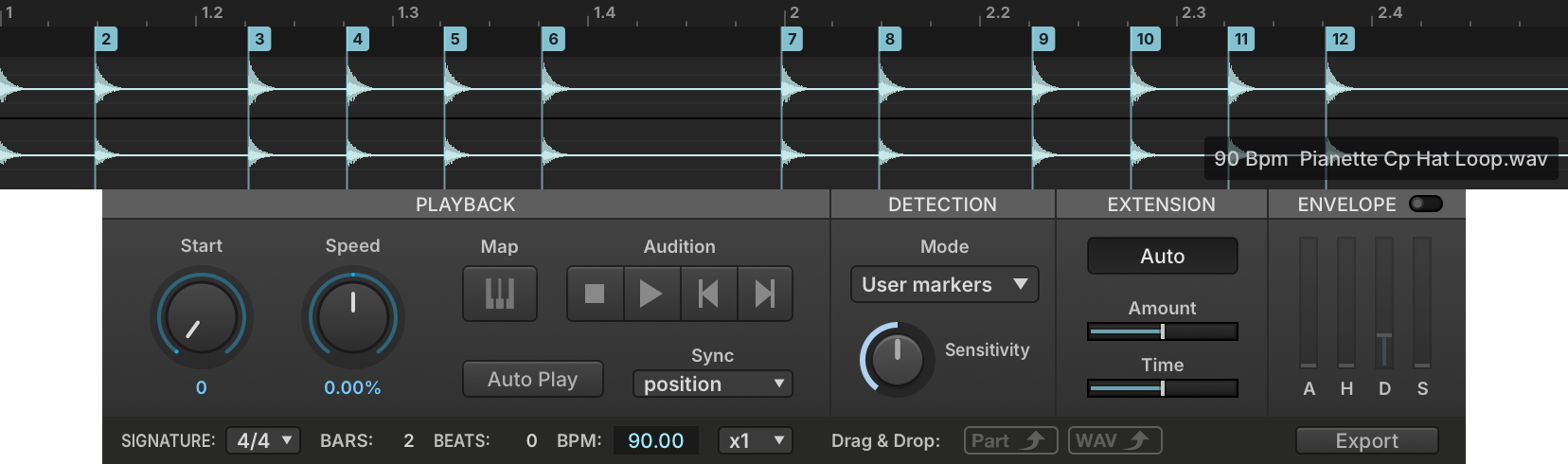
A sampling oscillator that divides a sample into slices at its transients, or at markers embedded in the file such as those of REX files. It suits rhythmic and percussive material: the slices can be resequenced, mapped to keys, or exported by drag and drop as a Falcon patch, separate WAV files or a MIDI sequence.
Read more ↓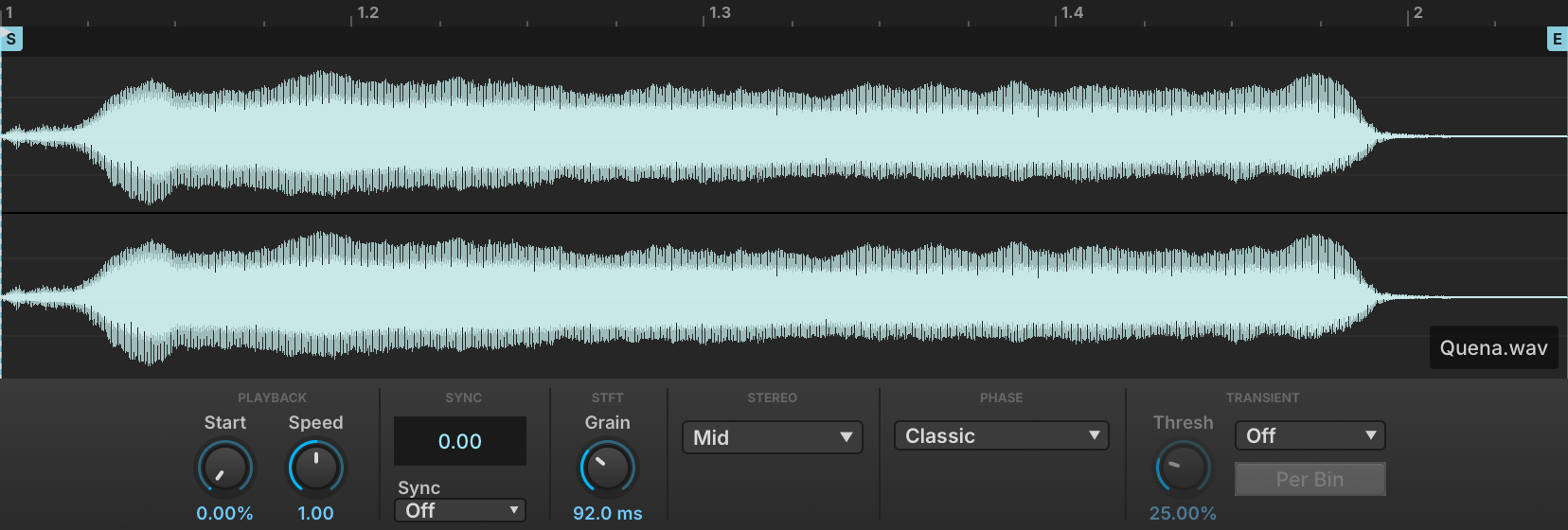
A phase-vocoder sampling oscillator that separates playback speed from pitch, so a sample can be slowed down, held on a single spectrum or synced to the host tempo while its pitch follows the keyboard. Transient detection and stereo phase locking keep rhythmic and stereo material intact at large stretch ratios.
Read more ↓
A low-CPU pitch-shifting sampling oscillator that transposes a sample by up to ±2 octaves in real time while keeping its duration. It suits loops and phrases that must change pitch but not length, with adjustable sample start, playback mode and tempo analysis, and a Solo Mode switch between monophonic and polyphonic algorithms.
Read more ↓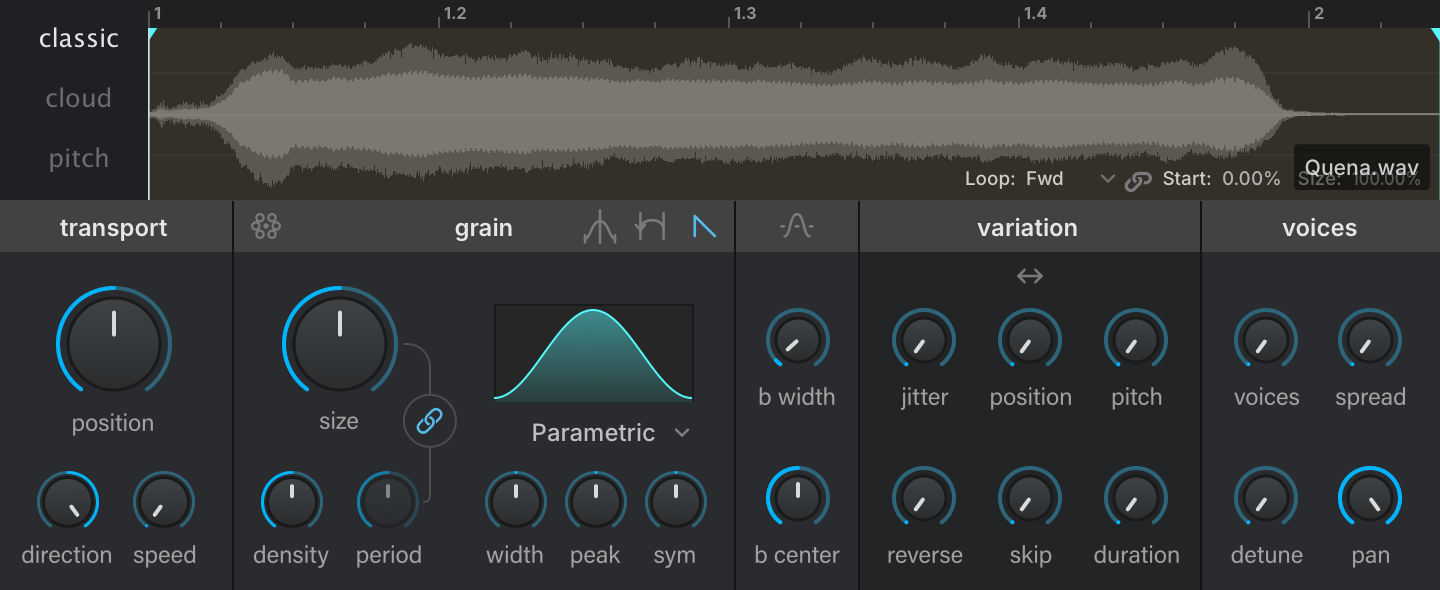
A granular sampling oscillator with Classic, Cloud and Pitch scheduling modes, a parametric grain envelope, and per-grain filtering with formant control. It suits intricate textures and rhythmic motion built from any sample.
Read more ↓
IRCAM’s granular oscillator, which divides a sample into grains and recombines them, with controls such as Size, Density, Jitter, Position, Speed, Direction and Pitch Variation. It suits realistic pitch-shifting as well as soundscapes.
Read more ↓
A multi-voice version of IRCAM Granular, with the same controls plus a section setting the number of voices, their position and their spread. It suits complex unison sounds.
Read more ↓
A sampling oscillator for random-access scrubbing through a sample, with speed and direction control, built on the algorithm of IRCAM Stretch. It gives higher quality than IRCAM Granular in exchange for more processing power.
Read more ↓
A time-stretching and pitch-shifting sampling oscillator built on IRCAM’s phase vocoder, which preserves transients and the spectral envelope. It gives a clear quality improvement over the standard pitch-shifting oscillators, at a higher CPU cost.
Read more ↓
A circuit-modeled recreation of the classic analog drum-machine bass drum, with Tone, Decay and Pulse controls. It covers kicks from soft thumps to hard-hitting punches.
Read more ↓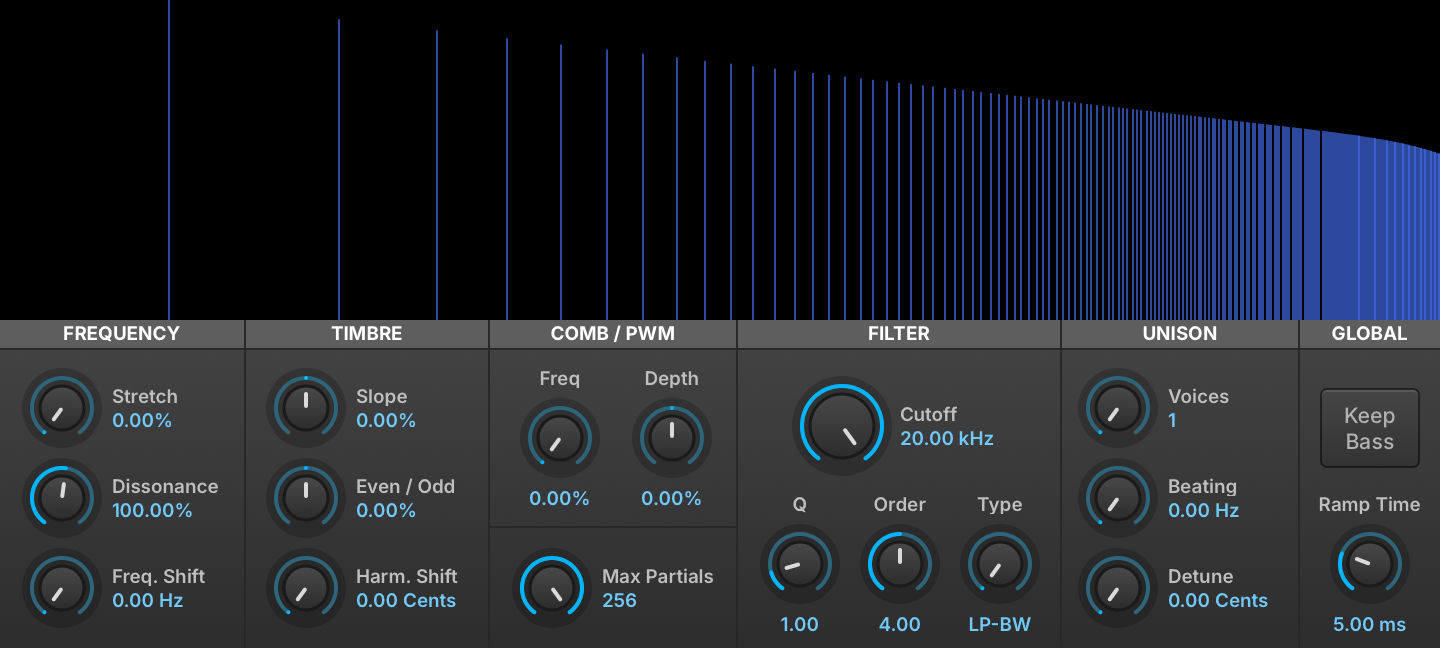
An additive oscillator with controls laid out like a subtractive synth: partial stretching, frequency shifting, fractional-order filtering, even/odd harmonic balance and a continuous morph from square to saw. It gives detailed control over the harmonics through familiar controls.
Read more ↓
A virtual analog oscillator with sine, saw, square, triangle, noise and pulse waveforms, pulse width modulation, sync, and a unison section of up to 8 voices with phase, tuning and spread control. It is the basis for classic subtractive synth sounds.
Read more ↓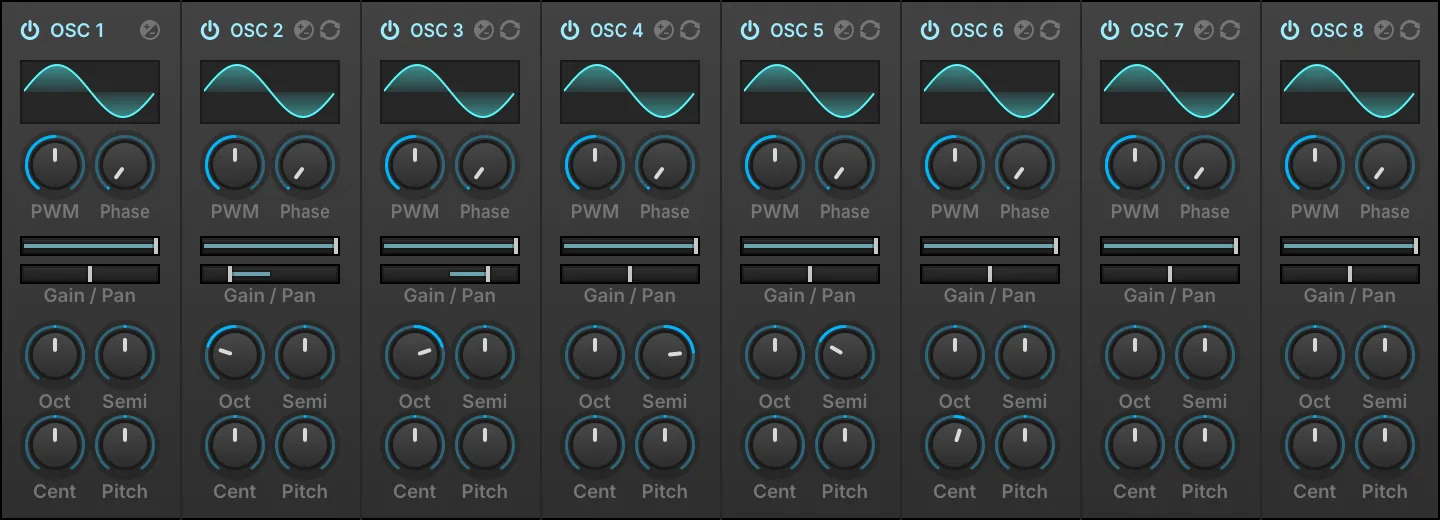
An 8-voice version of the Analog oscillator in which each voice has its own pan, gain and pitch, in place of the Unison and Sync sections. It suits quick layering and detuning of several oscillators in one module.
Read more ↓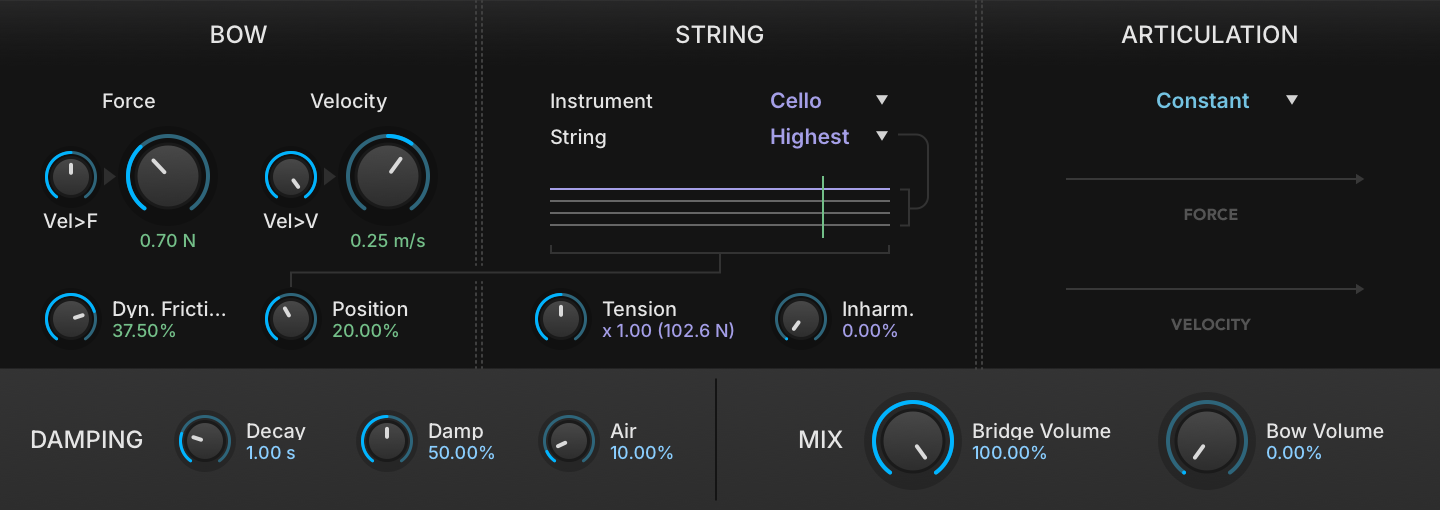
A bow and string emulation with in-depth control over numerous articulation modes. It produces a wide variety of bowed string tones.
Read more ↓
A percussion oscillator that combines a pitched oscillator and a noise generator, each with its own AD amplitude envelope, plus pitch modulation on the oscillator and EQ and distortion in the master section. It suits drum and percussion sounds built from scratch.
Read more ↓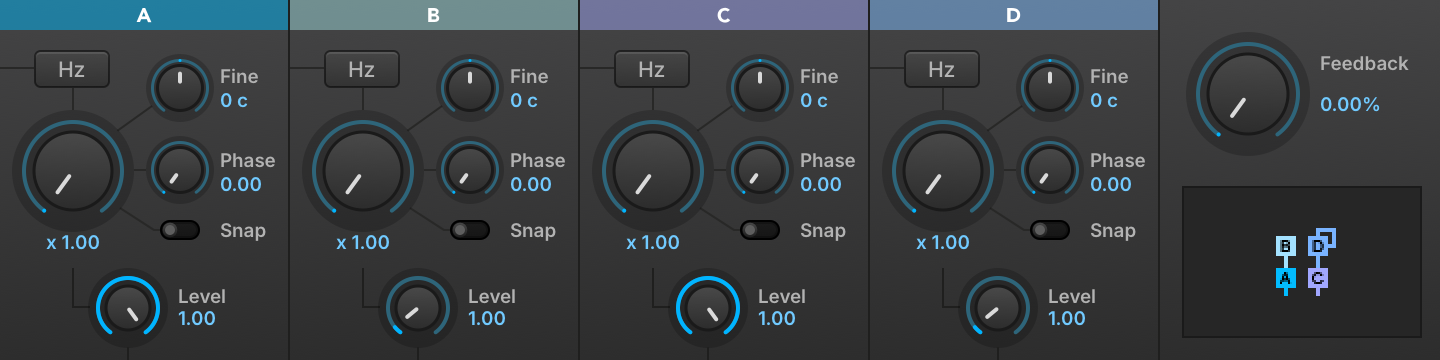
A four-operator FM oscillator with 11 operator configurations, working in ratio or Hz mode, with Snap Ratio (which quantizes modulation frequencies to harmonics) and Start Phase controls. It suits classic FM timbres.
Read more ↓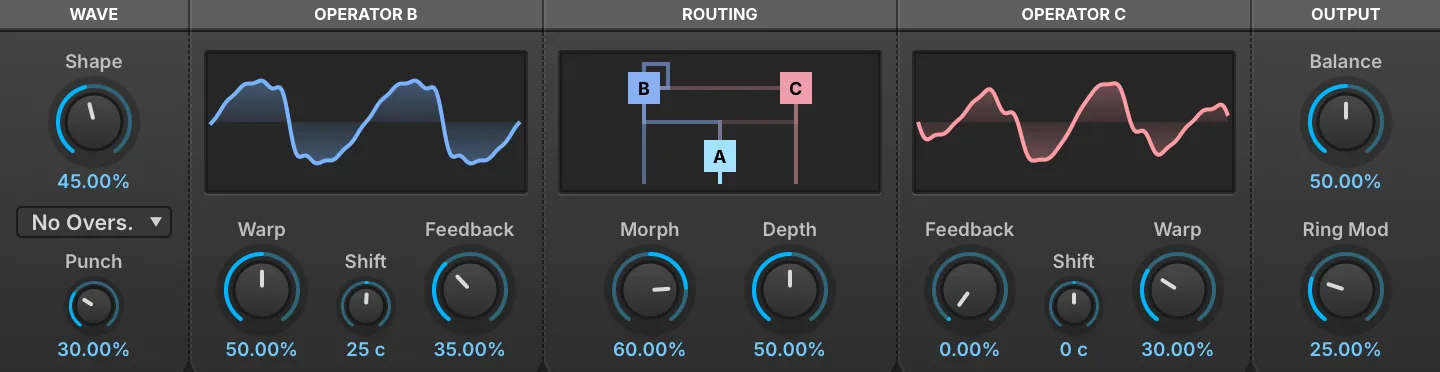
A three-operator FM oscillator whose single Morph control sweeps the routing from one series chain, through both modulators in parallel, to the other series chain. Since Morph can be modulated like any other parameter, it suits sounds whose FM topology itself moves.
Read more ↓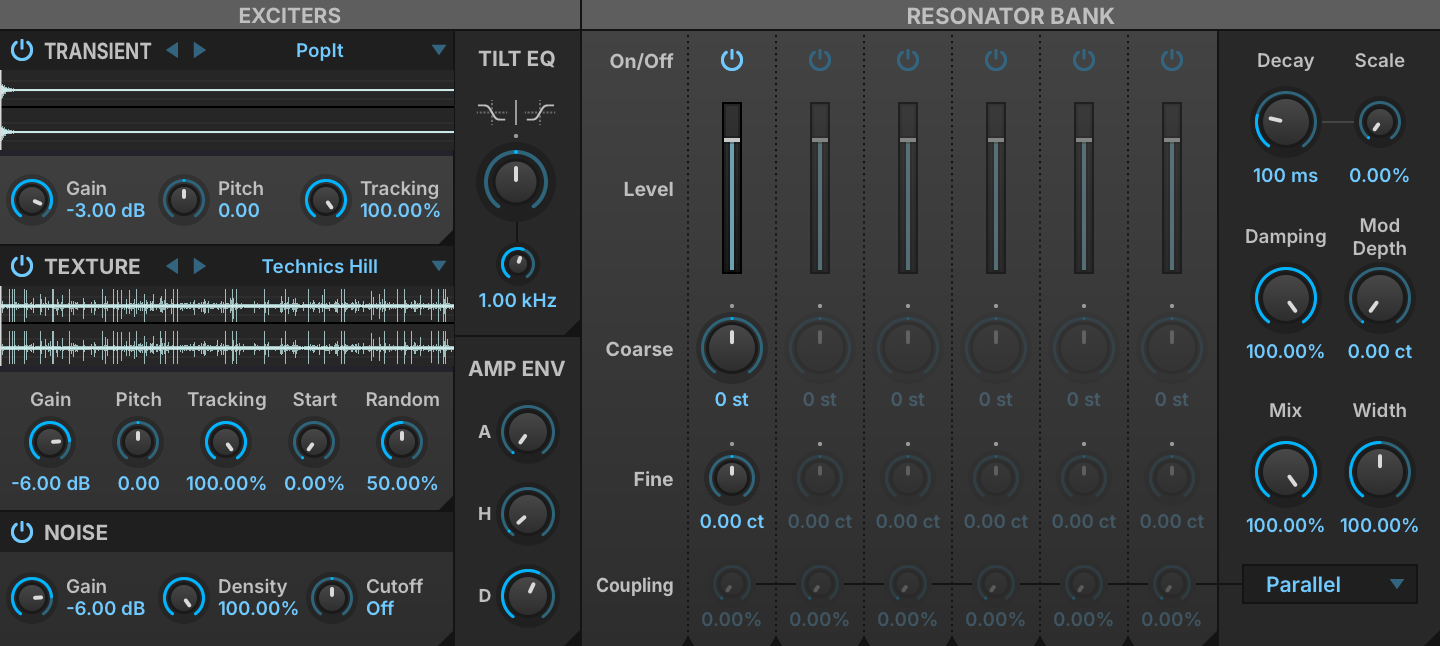
A resonator oscillator in which three mixable exciters (transient, texture and noise) drive a bank of six resonators, each with its own coarse and fine tuning and coupling. It suits resonant, physically inspired tones.
Read more ↓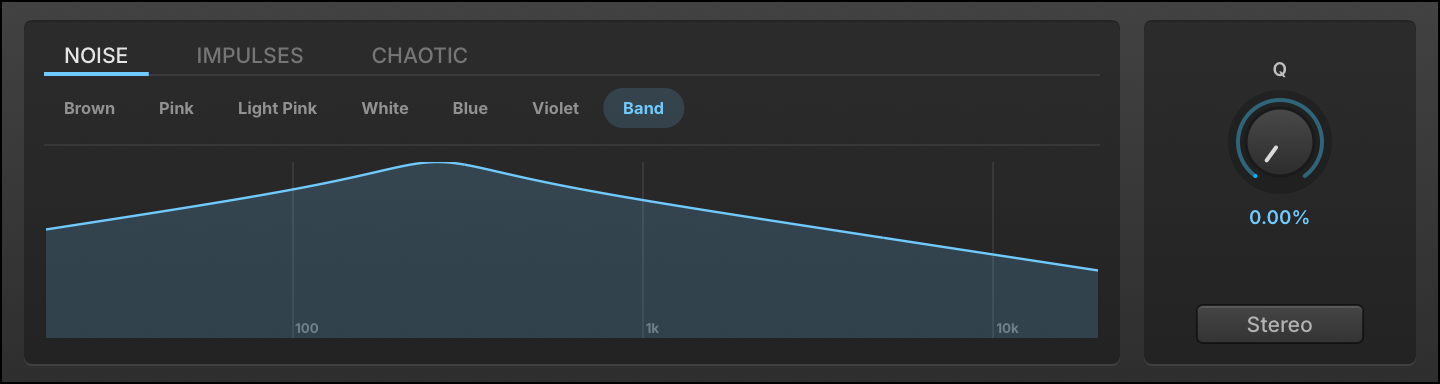
A noise oscillator with 15 noise shapes, from colored noises (white, pink, brown, blue, violet) to chaotic and sparse ones such as Lorenz, Rossler, Crackle, Logistic, Dust and Velvet. It provides noise sources for textures and percussion, with extra controls such as Static Density and Logistic Chaos on the dynamic shapes.
Read more ↓
A drawbar organ oscillator with 9 harmonic bars, each with its own gain and pan, and a percussion section with Fast/Slow and Harmonic controls. Paired with the Rotary effect, it gives a classic organ sound.
Read more ↓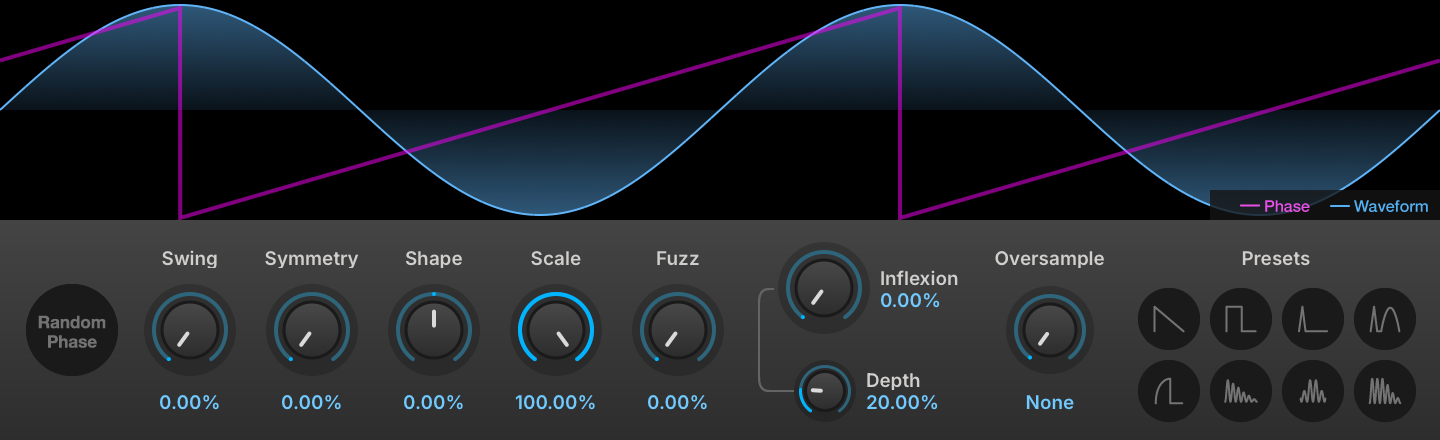
A phase distortion oscillator that shapes waveforms with Symmetry, Inflexion and Fuzz controls. It covers timbres from subtle warmth to aggressive digital tones and complex textures.
Read more ↓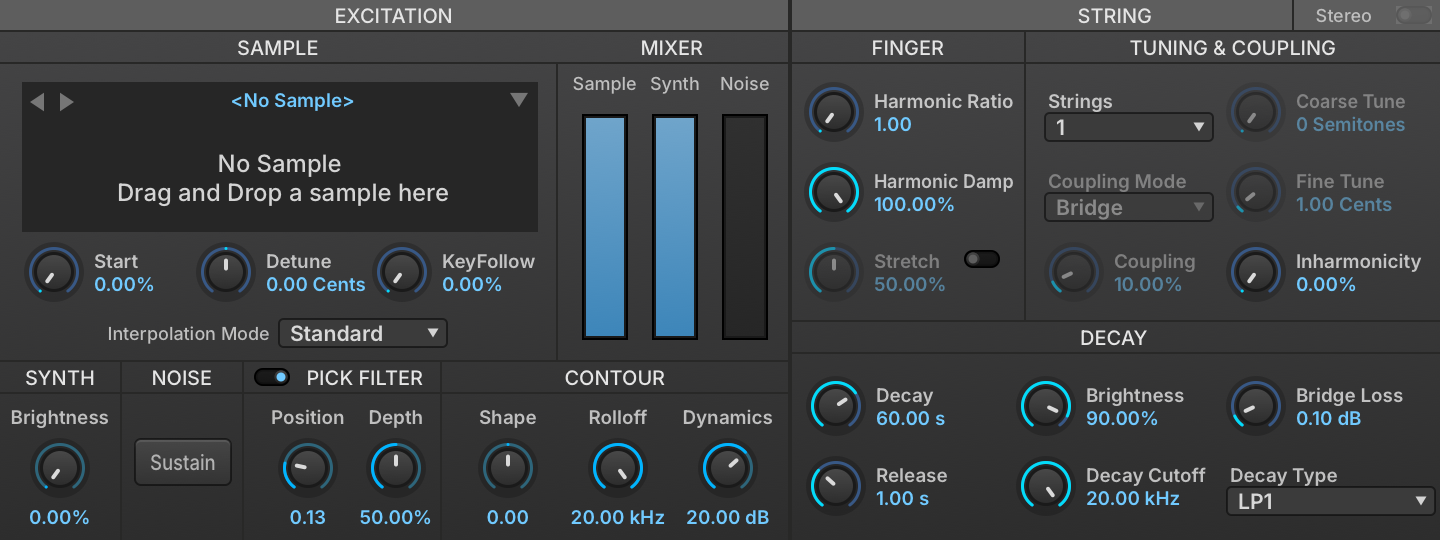
A physically inspired string synthesis oscillator: a short excitation is fed through a filtered delay line, and the excitation waveform, filter style and other settings shape the decay. It suits synthetic plucked sounds with a natural decay.
Read more ↓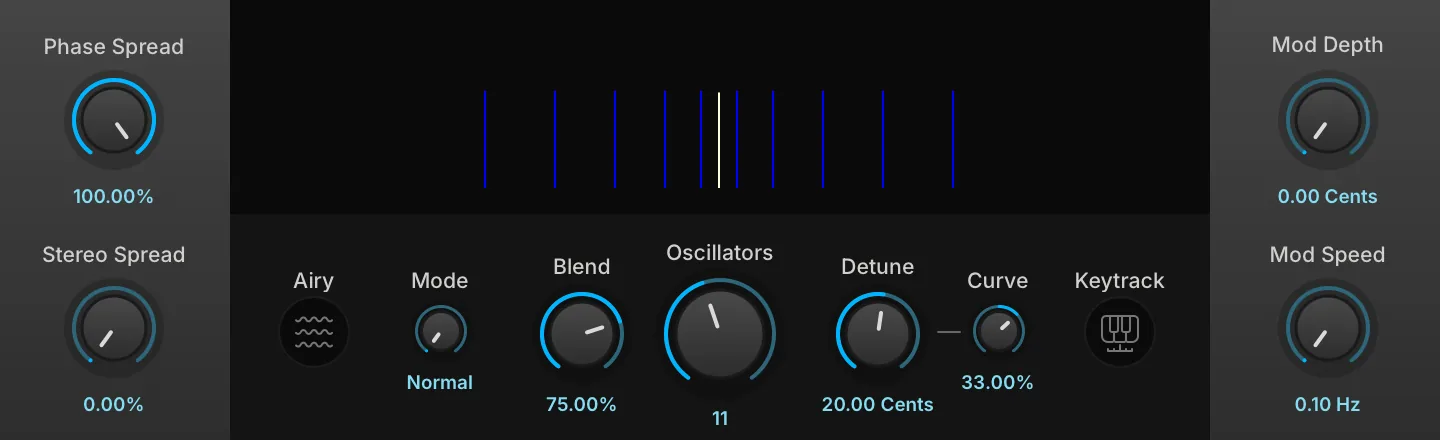
An oscillator that stacks up to 24 sawtooth oscillators, with Detune, Stereo Spread and Blend controls. It suits large pads, leads and dense textures.
Read more ↓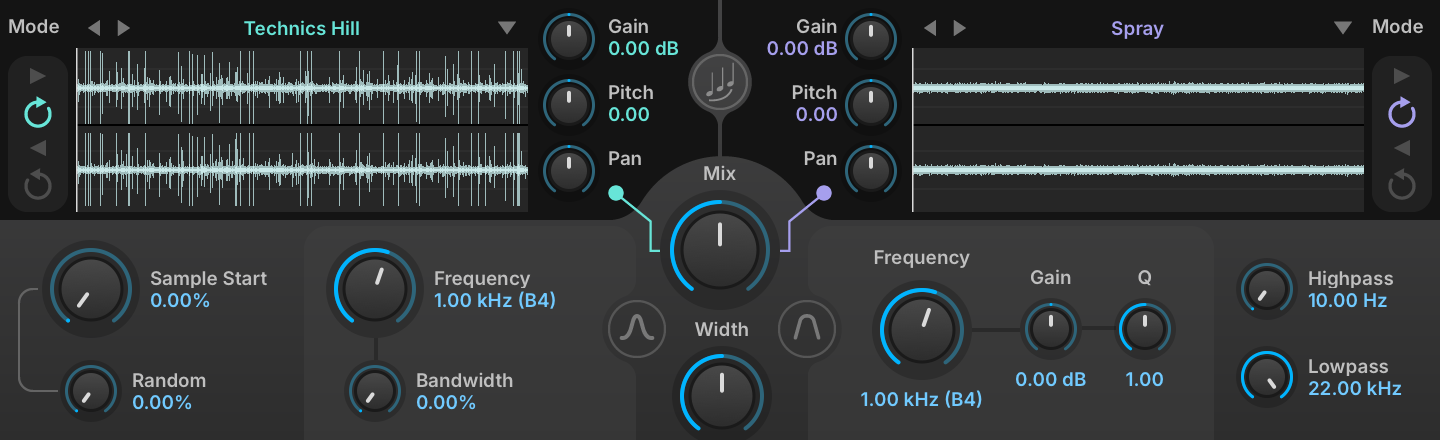
A dual sample-based oscillator with key-tracked band-pass and peak filtering, mix, pitch, playback modes, stereo controls and randomness, and hundreds of built-in samples. It suits complex, varying textures.
Read more ↓
A vocal synthesis oscillator based on the vintage VOSIM technique, with two modes, Formant and Phonem, each with its own controls. It suits vowel-like and formant sounds.
Read more ↓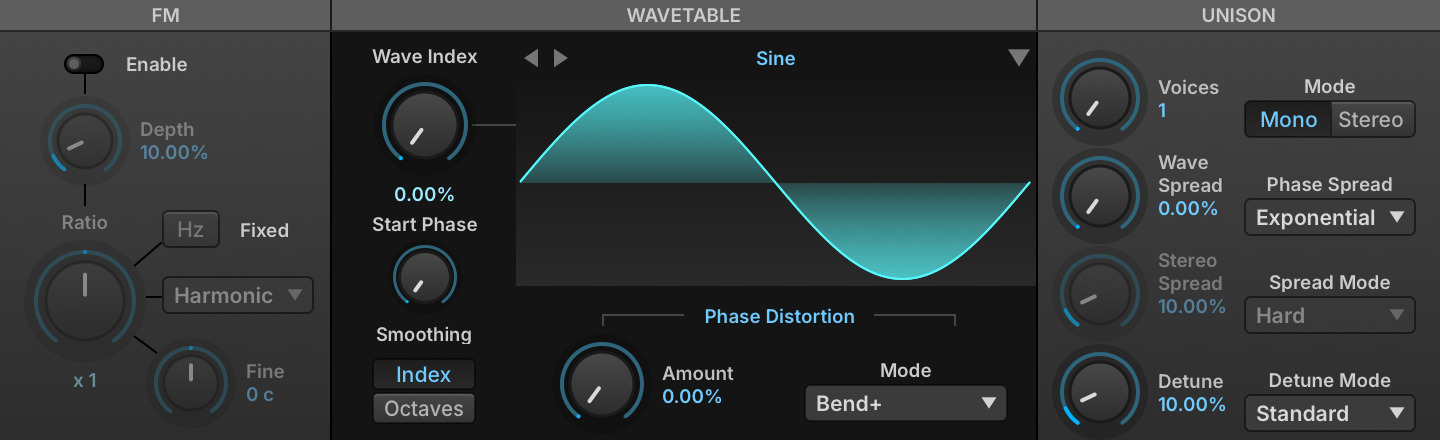
An oscillator that plays one waveform at a time from a table of waveforms, and moves between them as its Wave Index changes. It suits sounds whose timbre changes over time.
Read more ↓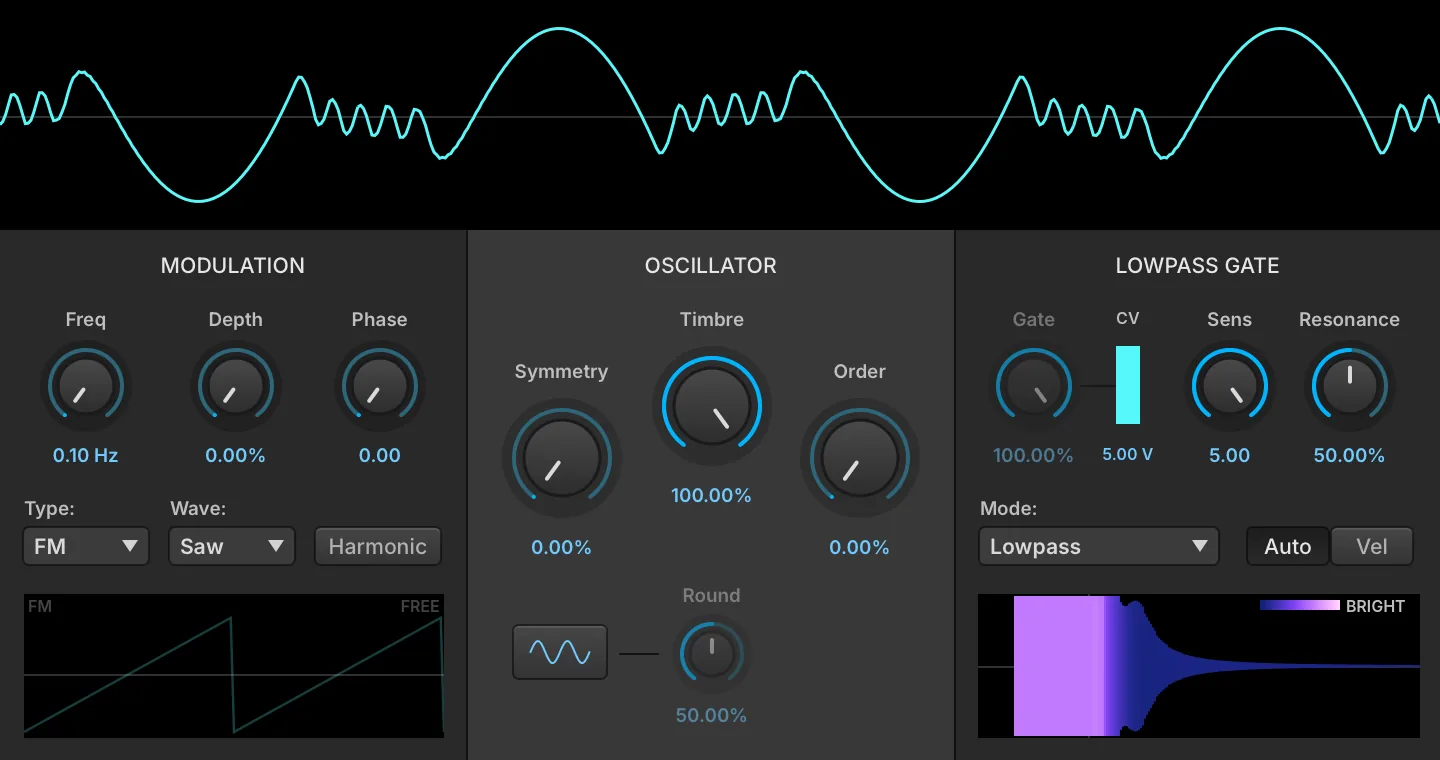
A complex oscillator in which a sine core drives a circuit-modeled wavefolder and then a vactrol low-pass gate, with an internal modulator adding frequency or amplitude modulation ahead of the folder. It suits plucked percussive tones, evolving bells and metallic drones.
Read more ↓Sampling Oscillators
Falcon includes 10 sampling oscillators each equipped with a unique feature set suited for a variety of tasks from basic playback, loop slicing, to advanced time stretching and granular processes.
All of them share a set of controls in the module header. The gears button shows or hides the oscillator’s parameter panel, leaving just the waveform display; the choice is remembered and applies to every sampling oscillator (out of the box the panel starts hidden on Sample and shown on the others). The info button overlays the loaded sample’s details: its path, bit depth, sample rate and channel count, its length in seconds, frames and megabytes, and its start/stop and loop markers or One Shot status. The module menu adds SAVE SAMPLE and SAVE SAMPLE AS…, each with a “with playback options” variant that writes the oscillator’s start, end and loop settings into the file. Dropping an audio file anywhere on the editor loads it into the oscillator.
Sample
A no-frills workhorse sample oscillator, ideal for basic soundboards and traditional sample playback. The Sample display can be interactively resized and provides editing functions such as crop, normalize, silence, reverse and fade in/out along with the ability to apply any of Falcon’s effects in-place. Due to Falcon’s ability to efficiently stream samples from disk you can manage tens of thousands of samples at once without a massive RAM footprint.
SAMPLE START (0–100 %) sets the starting point for playback when the sample is triggered, as a percentage of the time between the Sample Start and Sample End markers in the sample file (see: Interface › Sample Editor).
The INTERPOLATION MODE sets the quality of the transposition. Choosing Lo-fi will reduce the amount of processing needed to transpose the file compared to Standard mode, and likewise choosing Best will increase the processing overhead. (For other styles of transposition, try the other sampling oscillators as well.).
When ALLOW STREAMING is enabled, the sample will be streamed from disk if the program has Streaming enabled. When disabled, the sample will always be played from memory and not streamed from disk, even if Streaming is enabled for the program.
REVERSE sets the sample playback mode to reverse.
MultiSample
MultiSample plays a whole set of samples from one oscillator. A mapping file describes the zones — each one a sample with its own key and velocity span, its round-robin take and its layer — and the oscillator sends every note to the zone that matches it. It is the oscillator UVI’s own instruments are built on. The editor is read-only: a mapping is authored as a file, and Falcon has no way to write one back, so the editor loads a mapping and shows it, and the zones are changed in the file itself.
Click the file name beside MAPPING to choose a mapping, or drop a .dmap, .sfz or .xml file anywhere on the editor. The readout at the right of that row counts the zones of the layer on display, gives its position among the layers (for example layer 3 / 12), and reports how many samples could not be found.
The zone map below plots the zones of the displayed layer, key from left to right and velocity from top to bottom, on the same axes as the Mapping Editor. Round-robin takes that share a span are drawn as one zone, marked with their count (×4); zones still loading are drawn dimmer, and zones whose sample is missing are outlined in red. While you play, the map highlights the column of each held key and marks its velocity, so you can see which zone the note lands on. Hovering a zone shows the sample it holds, its key and velocity span, its round-robin index, its base note, tuning and gain, how many takes share the span, its maximum sample start and its velocity shelf, and whether it is purged, not found or still loading.
LAYER chooses which layer the map shows, one at a time. The arrows step through the layers and wrap around; clicking the layer name opens a menu of all of them. Layer names that use slashes, such as Sustain/Close/Soft, are grouped into submenus on each slash, which keeps a mapping with hundreds of layers navigable. A badge reads PURGED when the whole layer has been dropped from memory, PART PURGED when only some of its zones have. The editor has no per-layer solo or mute: which layer plays is decided by the note, or by the program’s script.
INTERPOLATION sets the quality of the transposition — Lo-fi, Standard or Best — as it does on the Sample oscillator.
ROUND ROBIN chooses which take is played when several zones share the same key and velocity span: First always plays the lowest-numbered take, Cycle advances through them in order, and Random picks one at random.
Dynamics
MODE chooses how the velocity layers are played. Velocity picks a single layer per note, as a conventional keymap does. Continuous and Velocity XFade instead treat the layers as a ladder and crossfade between the two that bracket the current position, so the timbre moves continuously rather than in steps.
MORPH (±100 %) sets the position on that ladder. In Continuous mode it is the position itself; in Velocity XFade it offsets the position the note’s own velocity sets. It is a per-voice control read afresh on every block, so it keeps moving the timbre of a note that is already held — assign it to a controller, to aftertouch or to MPE pressure.
RANGE (0–100 %) restricts how far down the ladder Morph reaches, leaving the softest layers out of play, and CURVE (0.25–4) shapes how quickly it travels. Both are available only when Mode is not Velocity.
Vel Gain
RANGE (0–90 dB) sets how much quieter the softest velocity is than the hardest, and CURVE (0.25–4) shapes that fall, 1 being a straight line in decibels. KEY TRK (±6 dB) adds to the range for every octave above middle C, so the top of the keyboard can be made more or less dynamic than the bottom.
Slice
Ideal for rhythmic and percussive material, the Slice oscillator can divide samples into discrete keygroups to be resequenced. Adjust transient sensitivity manually or use embedded markers like those found in REX files. Sliced files can be exported by drag and drop in several ways, including as a Falcon patch, discrete WAV files or a MIDI sequence.
Tempo
To set the loop’s tempo, choose its SIGNATURE — 2/4, 3/4, 4/4, 5/4, 6/8 or 7/8 — and enter the loop’s duration in BARS (0–99) and BEATS (0–99). The BPM field is read-only and updates as you change the other tempo parameters.
If you’d like to play back the loop at a multiple of its original tempo, use the TEMPO FACTOR menu for coarse speed adjustments, choosing /4, /2, x1, x2 or x4.
Detection
The Detection MODE setting determines whether to use slices already saved in the file (Imported) or the slices you’ve defined (User markers). Loops in UVI Soundware will have imported slices, as will common loop formats such as REX and Apple Loop files.
If you choose to create your own slices, use the SENSITIVITY knob (0–1) to automatically detect and create slices; it is only available with User markers selected. At the far left, slices will be created only by very prominent beats and there will be a small number of slices; at the far right, slices will be created by more subtle variations in the sample and there will be a larger number of slices.
To add a slice manually, double-click in the space between the sample’s waveform and the time ruler. You can also add multiple slices at once on divisions of the musical grid by right-clicking, choosing ADD MARKERS WITH GRID SETTING, and choosing a beat division such as eighth note.
Existing slices can be moved by clicking and dragging anywhere along the slice. To protect a slice from being edited, right-click the slice and choose LOCK. The slice can be ignored by right-clicking it and choosing MUTE, or it can be removed entirely with DELETE.
Playback
A single slice can be auditioned by clicking anywhere on its waveform. When a slice is selected, you can also use the forward/back AUDITION buttons to audition the next/previous slice; the left and right arrow keys are shortcuts for those two buttons. The Audition play and stop buttons can be used to play back the entire file. When AUTO PLAY is enabled, the loop will be triggered when Falcon’s playback begins. (This button is the same as the AutoPlay button in the Parts List.).
SYNC determines how the loop interacts with Falcon’s tempo and playback position. When set to “position,” the sample is played back at Falcon’s tempo and also locks to its playback position; in “tempo” mode, only the tempo is matched. When set to “off,” Falcon’s tempo and playback position are ignored and the sample is played back at its original tempo.
In all Sync modes, the START control sets the slice where playback begins when the loop is triggered, with zero being the first slice in the loop. The SPEED parameter adjusts the loop’s playback tempo, up to 50% faster or slower.
For MAP, see: Exporting and Converting the Loop.
Extension
When the loop’s playback tempo is slower than its original tempo, you can choose to extend the slices so that the loop is still continuous. With the Extension section’s AUTO button enabled, extension of the slices will be configured automatically. When disabled, use the AMOUNT (0–200 %) and TIME (0–100 %) parameters to fine-tune how the slices are extended.
Envelope
You can also optionally enable a slice envelope. When enabled with the ENVELOPE button, the ATTACK (0–100 ms), HOLD (0–2 s), DECAY (0.01–2 s) and SUSTAIN (0–100 %) parameters adjust an amplitude envelope that is applied to each slice as it is triggered.
Exporting and Converting the Loop
The entire loop can be exported as a new audio file with the WAV button. When you press on it and drag, it creates a new audio file that can be dragged to your host application or desktop. The new audio file is created with all of the current settings applied: tempo, envelope, etc.
Or, to export the slices with each as an individual audio file, choose EXPORT and specify the folder where the samples will be saved. To save a program with the slices mapped to individual keys, press on the PART button and drag it to the Parts List or to the desktop or other folder.
If you would prefer to create a new layer in the current program rather than a separate program, press the MAP button in the Playback section. This will Mute and MIDI Mute the original layer, and create a new layer with the slices mapped to individual keys.
This will also change the audio drag & drop button to a MIDI button. When you press on it and drag, it creates a MIDI file that can be dragged to your host application or desktop. The MIDI file triggers the slices in their original order and timing, which you can then edit for new arrangements of the slices.
Spectral Stretch
Spectral Stretch plays a sample through a phase vocoder, which separates the speed of playback from the pitch: the sample can be slowed to a crawl, held on a single spectrum, or run in time with the host, while the pitch of the note still follows the keyboard. Transient detection and stereo phase locking keep rhythmic and stereo material intact at stretch ratios that would otherwise smear it.
The sample editor sits above the controls, which are grouped into sections; when the panel is narrow the sections wrap onto several rows rather than shrink. Start and Speed are the two controls available as modulation destinations, the rest of the panel being set once for the oscillator.
Playback
START (0–100 %) sets the position in the sample where playback begins when a note is triggered.
SPEED (0–4x) sets how fast playback travels through the sample. The pitch is unaffected, so lowering the speed stretches the sound in time rather than transposing it. Below a hundredth of normal speed the voice freezes: the analysis position is held, and the spectrum under it goes on sounding for as long as the note lasts.
Sync
SYNC sets how Speed is read. Off leaves it continuous. Ratio snaps it to eleven musical ratios spanning two octaves either side of unity — 1/4, 1/3, 1/2, 2/3, 3/4, 1, 4/3, 3/2, 2, 3 and 4 — and the Speed knob shows the fraction in place of a number. Tempo applies the same snap and multiplies it by the ratio between the host tempo and the sample’s own tempo, so the sample keeps time with the session.
The sample’s own tempo is set with the TEMPO (0–300) field. A Tempo of 0 means “not set”, in which case the tempo stored in the sample file’s metadata is used instead.
STFT
GRAIN (40–200 ms) sets the length of the analysis window. Short windows follow attacks closely at the cost of low-frequency detail, while long ones resolve steady tones and low registers but blur transients. When the sample is transposed, the window covers a different length of it.
Stereo
The STEREO menu sets how the phase relationship between the left and right channels is handled. Off leaves the two channels independent. Every other entry locks them together and names the channel the others are locked to — Mid, Left, Loudest, or PCA, which follows the dominant direction of the stereo signal — so a stereo image survives the stretch instead of drifting apart.
Phase
The PHASE menu chooses how the phase of each analysis frame is carried over to the next, which is what decides how coherent the stretched sound stays:
-
CLASSIC: each frequency band is advanced on its own, as in the original phase vocoder.
-
LOOSE: neighboring bands are summed together, so a partial and the bands around it stay in step.
-
LOCKED: the peaks are located and the region around each one is rotated as a block.
-
LOCKED SOFT: the same peak locking, with the deviations around each peak scaled rather than discarded.
-
COHERENT: the phase is reconstructed across time and frequency at once, holding transients and tonal material together; this is the default.
-
COHERENT DIFFUSE: the same, with random phase below the noise floor for a more diffuse, textural result.
-
COHERENT FULL: the same with no threshold at all, every band passing through the reconstruction.
Transient
The TRANSIENT menu sets what happens when an attack is detected: Off ignores them and stretches straight through, Reset restarts the phase so the attack comes out sharp, and Hold freezes the phase across it.
THRESH (0–100 %) sets how much spectral movement counts as an attack, low values catching a great deal and high values only the sharpest. PER BIN applies the handling to the frequency bands where an attack was found rather than across the whole spectrum. Both are inactive while the Transient menu is set to Off.
Stretch
A real-time, low-CPU pitch-shifting sample oscillator. Stretch can adjust pitch up to ±2 octaves while maintaining sample duration. Freely adjust sample start time, playback mode and tempo analysis. Use the Solo Mode button to switch between discrete monophonic and polyphonic pitch-shifting algorithms.
The Stretch oscillator will pitch-shift the sample ±2 octaves from its root key. Beyond that range the pitch will be constant, even if the keygroup’s key range extends further.
SAMPLE START (0–100 %) sets the starting point for playback when the sample is triggered, as a percentage of the time between the Sample Start and Sample End markers in the sample file (see: Interface › Sample Editor).
Additionally, when LEGATO MODE is enabled, if a new note re-triggers the sample, playback will continue from the current sample position but at the new pitch. With Legato mode disabled, playback will always begin from the sample’s start position.
Sample Tempo
Although the speed of sample playback is constant across its key range, enabling SYNC will sync the sample’s playback speed to Falcon’s tempo. Set the sample’s base tempo with the TEMPO (0–300) field, which can be modified with the TEMPO FACTOR (x0.25–x4, continuously variable) and TEMPO FINE (±50 %) controls. A Tempo of 0 means “not set”: when a sample is loaded, Falcon substitutes the tempo found by its own analysis, or failing that the tempo stored in the sample file’s metadata, and writes the resolved value into the field.
Analysis
To fine-tune the pitch-shifting, adjust the GRAIN SIZE (10–100 ms) and SENSITIVITY (0.1–10) parameters. For highly rhythmic or percussive material, try increasing Sensitivity for better transient preservation. Additionally, if a sample contains a solo instrument, try enabling SOLO MODE for the best pitch-shifting; for polyphonic samples, turn off Solo Mode.
Grains
Falcon’s most advanced granular engine, rebuilt for deep sound design. Explore Classic, Cloud, and Pitch scheduling modes, a fully parametric grain envelope, and per-grain filtering with formant control for intricate textures and rhythmic motion.
Grain Scheduling Mode
-
CLASSIC: periodically spaced grains
-
CLOUD: randomly spaced grains
-
PITCH: pitch-periodic grains
Waveform Display
LINK enables Loop Start link to Transport Position. Click the left blue line or drag the START (0–100 %) to set the loop start point. Click the right blue line or drag the SIZE (0–100 %) value to set the loop end point.
LOOP, at the left of the same bar, sets what the play head does when it reaches the end of the loop: None ignores the loop and reads on to the end of the play zone, Fwd returns to the loop start, and Fwd-Bwd turns round and reads back the other way. The loop is the region set by START and SIZE (or by POSITION when LINK is on), whether or not the sample carries a loop of its own.
Transport
POSITION (0–100 %) determines the starting point for grain playback within the audio sample. This is the central point around which grains are generated. SPEED (0–10) sets the speed at which the main Position marker moves through the sample, with 0 as static and higher values faster.
DIRECTION (−1 to 1) sets the direction of playback, from +1 for fully forward to −1 for fully reverse.
Grain
RANDOM PAN (the left icon of the title bar): enables randomization of the pan position for each grain. The voices are panned in a more structured, alternating pattern when disabled.
ATTACK (the right icon of the title bar): enables triggering of the very first grain instantly when a note is played, rather than waiting for the first period to elapse. This provides a more immediate attack.
CENTER GRAINS (the icon left of Wrap Grains): Position names the middle of each grain instead of its start, so every grain is pulled back by half its own length. Because the offset follows the grain size, grains stay centered on Position as the size is modulated.
WRAP GRAINS AT LOOP (the icon between Center Grains and Attack): a grain that runs into the end of the loop wraps back to the loop start instead of reading on into the material past it. Where Loop Mode moves the play head, this moves each grain; it does nothing when Loop Mode is None, and is grayed out there.
SIZE (0.002–2 s) (in Classic and Cloud mode) sets the duration of each individual grain in seconds. Shorter grains sound more textural and abstract, while longer grains are more recognizable as snippets of the original sample. FORMANT (−12–12 st) (in Pitch mode) shifts the resonant character (timbre) of the sound without changing its fundamental pitch. This can make a sound source sound like it’s coming from a larger or smaller body.
PERIOD (0.001–2 s) sets the base time interval between the start of successive grains.
Size and Period are both tempo-syncable: with the module’s sync button engaged they read in bars and beats rather than in seconds, and follow the host.
PITCH CORRECTION chooses how transposition is compensated — None, Grain size or Period.
The LINK button beside PERIOD (not the Link button on the waveform bar) sets the period to half of SIZE and grays out the Period knob.
DENSITY (0.1–10) sets how many grains overlap. In Classic and Cloud mode it divides the PERIOD, so 2 doubles the grain rate; in Pitch mode it multiplies the grain length relative to the pitch period. The output level is compensated as Density rises.
WIDTH (±100 %) modifies the steepness of the envelope’s attack and decay. Negative values result in a wider, softer envelope, while positive values create a narrower, more percussive sound.
ENVELOPE MODE, under the envelope display, chooses the window each grain is shaped by. Parametric is the continuously variable shape the three controls below draw. Triangle, Hanning, Welch and Squared are exact windows that those same three controls still reshape; Triangle and Welch cannot be reached by the parametric shape, whose curve is always flat at the edges.
PEAKINESS (±100 %) controls the curvature of the envelope. Higher values create a sharper, more defined peak, while lower values result in a smoother, more rounded shape. SYMMETRY (±100 %) adjusts the shape of each grain’s volume envelope. Negative values create a fast attack and slow decay (like a plucked string), while positive values create a slow attack and fast decay (reversed sound). These three controls can also be adjusted by click-dragging the ENVELOPE DISPLAY above.
Band Limit Grains
Click the icon button to enable a dedicated band-pass filter that is applied to each individual grain. BAND WIDTH (1–100 %) controls the width of the per-grain filter. Lower values create a narrow, resonant peak, while higher values allow a wider range of frequencies to pass through.
BAND CENTER (0–100 %) sets the center frequency of the per-grain filter. This allows you to isolate specific tonal characteristics from the source sample for each grain.
Variation
JITTER (0–100 %) introduces a small amount of random variation to the timing of each grain’s trigger, making the sound less robotic and more organic.
POSITION (0–1 s) adds a random offset to the start position of each individual grain. Higher values will grab grains from a wider area around the main Position, creating a more varied texture.
BIPOLAR (the icon above that knob) lets the random offset run both ways. Off, the variation only ever pushes a grain later, so the average read point sits half the variation past Position; on, grains scatter to either side and the average stays on Position.
PITCH (0–12 st) introduces random pitch deviation to each individual grain, measured in semitones. Useful for creating dissonant clouds or subtle chorusing effects. REVERSE sets the probability (from 0 % to 100 %) that an individual grain will play in reverse, independent of the main playback Direction.
SKIP (0–100 %) sets the probability that a scheduled grain will be skipped entirely. This can be used to thin out the texture in a random way.
DURATION (0–100 %) adds randomness to the length of each grain. At 0%, all grains have the exact same duration. Higher values create more variety.
Voices
VOICES (1–8) sets the number of simultaneous grain streams (or playheads). Increasing this number creates a rich, layered unison or chorus effect.
SPREAD (0–10 s) spreads the playback position of the unison voices around the main position.
TIME SPREAD (0–100 %) staggers the grain onsets of the unison voices across the grain period. It has no knob on the panel and is reached from the parameter list.
DETUNE (0–50 cents) applies a small amount of pitch difference between the unison voices, thickening the sound. PAN controls the stereo width of the grains. At 0%, the sound is mono. At 100%, grains and unison voices are spread across the entire stereo field for a wide, immersive effect.
IRCAM Granular
IRCAM’s premier granular oscillator divides an audio sample into grains and recombines them for realistic pitch-shifting or soundscape generation. Adjust Grain parameters such as Size, Density, Jitter, Position, Speed, Direction, Loop Mode, Pitch Variation and Correction Method.
The GRAIN section configures the shape of the grains.
SIZE (5–500 ms) sets the duration of the grains. DENSITY (0.1–10) determines how many grains will be played at once, with 1.00 representing standard playback. With values less than 1.00, there will be silence between the grains with a rhythmic result similar to tremolo; with values over 1.00, there is increasingly more overlap of grains with a harmonic result similar to a chorus or sometimes a ring modulator. JITTER (0–100 %) varies the consistency of grain playback timing.
FADE (0–100 %) sets the amount of the grain affected by the fades of the grain envelope’s attack and decay, as a percentage of the full grain size. At the default 100%, the full grain can be faded, which results in a triangle-shaped envelope. At less than 100%, there is a plateau in the middle, resulting in a more trapezoidal envelope.
SYMMETRY changes the skew of the grain window by balancing the grain envelope attack and decay, as percentages of the grain size:
-
0%: set an attack of 0% and decay of 100%; this results in more percussive grains.
-
50%: set an attack of 50% and decay of 50%; this is the standard, balanced window.
-
100%: set an attack of 100% and decay of 0%; this results in reversed grains.
WINDOW sets the shape of the window (an envelope applied to the signal when creating grains); choose from Triangle, Hanning or Welch curves, or Squared.
PITCH VARIATION (0–1200 cents) adds randomization to the pitch of each grain, from minor variations of a few cents to an entire octave.
PITCH CORRECTION sets how grains are transposed. Transposition is done by resampling, which on its own shortens each grain as the pitch rises; this control chooses what is adjusted to compensate. GRAIN SIZE scales the read window with the transposition, so the grain length you hear and the grain rate both stay as set, and each grain simply covers more (or less) of the source. PERIOD leaves the read window as set, so the grain length you hear scales with the transposition, and the period between grains is scaled by the same amount to preserve the overlap. Transposition is clipped to ±48 semitones.
Position
The POSITION section controls determine the playback position in the sample file.
POSITION (0–100 %) determines the starting point for playback, as a percentage of the duration between the sample start and end markers. With Speed set at or near zero, this can be used to manually scrub to any location within the file. POSITION VARIATION adds randomization to the current position, with a range of zero to 500 ms from the current position.
SPEED sets the scrubbing speed factor, with 1.00 as normal speed, zero as staying in place on the current grain, and 10.00 as 10x faster. DIRECTION sets the direction of scrubbing, from +1.0 for fully forward to −1.0 for fully reverse.
If there is a loop in the audio file, the Loop Mode sets how it will be handled:
-
NONE: The loop will be ignored.
-
FORWARD: The looped section is played forward; when playback reaches the end of the loop, playback begins again from the loop start point.
-
FORWARD-BACKWARD: The looped section is played alternately forward (from the loop start to loop end) and reverse (from loop end to loop start).
IRCAM Multi Granular
A multi-voice implementation of the IRCAM Granular oscillator which can be used to great effect to achieve a range of complex unison sounds. Includes the same control set as IRCAM Granular with an additional section to control voice quantity, position and spread.
This module adds a VOICES section and two Grain settings (DURATION VARIATION and REVERSE, described below) not found in IRCAM Granular.
The VOICES section sets the voice-specific settings. VOICES (1–8) sets the number of unison voices. With a single voice, the result will be similar to the standard IRCAM Granular oscillator.
The other Voice controls set relative variations for each voice; TIME SPREAD (0–100 %) adjusts the timing of each voice’s trigger, and POSITION SPREAD (0–10,000 ms) adds a random variation to each voice’s starting position within the sample file. DETUNE (0–50 cents) spreads the unison voices in pitch symmetrically around the played note.
Grain
The GRAIN section shapes the grains themselves. Most of the GRAIN parameters are the same for the IRCAM Multi Granular oscillator as the IRCAM Granular oscillator; for details, see: Oscillators › IRCAM Granular.
-
SIZE (5–500 ms)
-
DENSITY (0.1–10)
-
JITTER (0–100 %)
-
WINDOW
-
FADE (0–100 %)
-
SYMMETRY (0–100 %)
-
PITCH VARIATION (0–1200 cents)
-
PITCH CORRECTION
DURATION VARIATION (0–100 %) sets the amount of grain size variation. Enabling Reverse will reverse the individual grains (not the overall playback direction, which is controlled with Direction).
Position
The POSITION parameters are the same for the IRCAM Multi Granular oscillator as the IRCAM Granular oscillator; for details, see: Oscillators › IRCAM Granular.
-
POSITION (0–100 %)
-
RANDOM (0–500 ms) — the same Position Variation control as IRCAM Granular, labeled Random here.
-
SPEED (0–10)
-
DIRECTION (−1 to 1)
-
LOOP MODE
IRCAM Scrub
Similar in use to IRCAM Granular, IRCAM Scrub offers random-access scrubbing, speed and directional control but uses the same top-quality algorithm found in IRCAM Stretch. As with IRCAM Stretch, this requires more processing power than the standard granular oscillator.
Playback
The Playback parameters are the same for the IRCAM Scrub oscillator as the IRCAM Granular oscillator; for details, see: Oscillators › IRCAM Granular › Position.
-
SPEED (0–10, default 1.00)
-
POSITION (0–100 %, default 0) — unlike IRCAM Granular, where Position sets a grain center subject to the position variation controls, Scrub’s Position is an absolute read-head location, re-evaluated whenever you change it.
-
DIRECTION (−1 to 1, default 1 for forward playback).
Analysis
The Analysis parameters are the same for the IRCAM Scrub oscillator as the IRCAM Stretch oscillator; for details, see: Oscillators › IRCAM Stretch › Analysis.
-
WINDOW (40–200 ms)
-
PADDING (x1, x2, x4)
-
OVERLAP (3–8)
Remix
Remix mode separates the signal into 3 discrete components and allows you to mix and automate their levels. Enable it with the power switch in the Remix header, then set the level of each component — SINE (harmonics), NOISE and TRANSIENT — from −inf to +12 dB, 0 dB being unity. With Remix disabled the three sliders have no effect, and the Transient level additionally requires the TRANSIENTS option to be enabled.
Options
The Options parameters are the same for the IRCAM Scrub oscillator as the IRCAM Stretch oscillator, except that Scrub has no Legato option; for details, see: Oscillators › IRCAM Stretch › Options.
-
TRANSIENTS (enabled by default)
-
ENVELOPE
-
STEREO
-
SHAPE
IRCAM Stretch
Similar to the Stretch oscillator, but implementing IRCAM’s high-quality phase vocoder for time-stretching and pitch-shifting with transient and envelope preservation. Requires more processing power than the standard pitch-shifting algorithms used in other oscillators but with a significant quality improvement.
Playback
SPEED (0–10, default 1.00) sets the playback rate factor, with 1.00 as normal speed and 10.00 as 10x faster. Very low settings approach a freeze but never quite reach one — the stretch ratio is clamped at 1000x, or 0.001x real time. START (0–100 %) sets the starting point for playback when the sample is triggered, as a percentage of the time between the Sample Start and Sample End markers.
Sample Tempo
Set the sample’s base tempo with the TEMPO field (0–300), then scale it with TEMPO FACTOR (x0.25–x4, continuously variable) and TEMPO FINE (±50 %). SYNC chooses whether playback follows Falcon’s tempo (“ TEMPO ”) or ignores it (“ OFF ”).
Tempo defaults to 0, meaning the sample’s tempo is unknown. In that state Sync has no effect and Speed, Tempo Factor and Tempo Fine act directly as a playback-rate multiplier; once you enter a tempo, playback is scaled by the ratio between it and the target tempo.
Analysis
WINDOW (40–200 ms, default 92 ms) sets the length of the analysis window; the FFT itself is the next power of two above it. PADDING (x1, x2, x4; default x1) sets the amount of frequency oversampling, enlarging the FFT beyond the window. As oversampling is processor intensive, it’s recommended to apply as little as is necessary to reduce unwanted artifacts — often, none will be needed. OVERLAP (3–8, default 4) sets how far the analysis windows overlap: the analysis hop is the Window divided by the Overlap, so higher values give smoother results at the cost of proportionally more processing. 8 is the highest quality, 4 is usually indistinguishable from it, and 3 may introduce small artifacts.
Remix
Remix mode separates the signal into 3 discrete components and allows you to mix and automate their levels. Enable it with the power switch in the Remix header, then set the level of each component — SINE (harmonics), NOISE and TRANSIENT — from −inf to +12 dB, 0 dB being unity. With Remix disabled the three sliders have no effect, and the Transient level additionally requires the TRANSIENTS option to be enabled.
Options
-
TRANSIENTS: Transient preservation; helpful for highly rhythmic or percussive samples.
-
ENVELOPE: Envelope preservation; helpful for avoiding unwanted pitch artifacts with some samples.
-
STEREO: Phase locks between stereo channels.
-
SHAPE: Shape preservation; helpful for preserving the character of voices and other monophonic sounds.
-
LEGATO: New voice playback position will start where currently playing voices are located.
The module menu adds one entry specific to this oscillator, EXPORT WITH STRETCH/PITCH APPLIED, which renders the sample through the phase vocoder at its current settings and writes the result to a WAV file.
Synthesis Oscillators
Falcon includes 18 synthesis-oriented oscillators including featured Additive, VA, analog stack, percussion, noise, organ, FM, Texture, wavetable, west-coast folding and a physical string modeling oscillator.
8o8 Bass Drum
Recreate the legendary analog bass drum with Falcon’s circuit-modeled 808 oscillator. From soft thumps to hard-hitting punches, precise Tone, Decay, and Pulse controls deliver iconic kick sounds perfect for any rhythmic foundation.
Set the playback mode with: KICK for machine emulation with short variable decay and true trigger, or BASS for longer fixed decay and reinit before trigger.
Select the TRANSIENT setting: Soft, Normal or Punchy.
TONE (0–100 %) adjusts the high end of the sound. DECAY (0–100 %) adjusts decay.
TRUE TRIGGER enables true trigger in Kick mode.
Decay and True Trigger are only available in Kick mode; Bass mode uses its own fixed decay and both controls are grayed out.
Additive
An easy-to-use additive oscillator inspired by classic subtractive synthesis, with additive twists like partial stretching, frequency shifting, fractional order filtering, even/odd harmonic control, continuous morph from square to saw and more…
MAX PARTIALS (1–256) sets the maximum number of harmonics. For example an A2 note has 200 harmonics for a sampling frequency of 44.1 kHz. It can be used either for sound design to limit the spectrum or to control the amount of CPU which is proportional to the number of partials.
Frequency
STRETCH (0–100 %) sets the amount of inharmonicity (partial stretching) of the partials. This is similar to the one present in stiff-stringed instruments like the piano or the guitar, great to spice up static spectrums thanks to the dispersive behavior.
DISSONANCE (0–800 %, 100 % being the untouched harmonic series) disturbs the harmonic series according to the law.
fn = f * (1 + n * dissonance).
-
At 100% the partials are harmonics: f * (1 2 3…).
- At 200% we only have odd harmonics: f * (1 3 5 7)
-
At 50% the partials are harmonic but interlaced with the odd partials of its (missing) sub-octave: f * (1 3/2 2 5/2 3) = f * (1 2 3…) + f/2 * (3 5 7…).
-
For irrational amounts, the partials are inharmonic.
QUANTIZE DISSONANCE snaps the Dissonance value to the nearest multiple of 25 % or of 16.67 %, whichever falls closer, so that the partials keep to simple ratios instead of landing on an inharmonic spacing.
FREQ. SHIFT (0–20,000 Hz) transposes the spectrum by a fixed amount in Hertz, making all the partials inharmonic.
Timbre
SLOPE (±100 %) sets the Slope / Tilt of the Spectrum.
-
The default position decays as 1/f and generates a sawtooth wave.
-
At +100% the spectrum is flat, generating a bipolar impulse-like train.
-
At -100% generates a parabolic wave decaying as 1/f^2 (or, when even harmonics are omitted, a wave with the same spectrum as a triangle, see the Even/Odd parameter).
-
EVEN/ODD (±100 %) controls the levels of even and odd harmonics.
-
At +100% removes even harmonics and generates a square wave by default
-
At -100% removes odd harmonics and results in the same waveform at the octave e.g. (2f 4f 6f …) = 2(f 2f 3f …)
-
-
HARM. SHIFT simulates transposition of the spectrum up to +48 semitones, but forces the resulting partials to stay in harmonic relation with the fundamental frequency. This can be compared to (soft-)hard-sync of analog oscillators. Below one semitone the value is displayed in cents, and in semitones from one semitone upward.
Comb/PWM
FREQUENCY (0–100 %) sets the relative frequency of a comb filter applied to the harmonic series of the oscillator.
This is useful to simulate PWM (Pulse Width Modulation) by sweeping the frequency of notches in the spectrum. DEPTH (±100 %) sets the amount of cancellation of the Comb Filter; it is bipolar, so positive and negative amounts cancel complementary sets of partials.
Filter
CUTOFF (20–20,000 Hz) sets the cutoff frequency of the fractional order filter. Q (0.5–100) sets the resonance of the filter (available according to Filter Type). ORDER adjusts the order / slope of the filter. This includes fractional filter slopes from 0.0 to order 8.0 (48 dB/octave) that cannot be achieved with traditional filters. TYPE sets the type of filter: LP-BW, BP-BW and HP-BW are Butterworth low-pass, band-pass and high-pass (no Q), while LP-Res, BP-Res and HP-Res are their resonant counterparts.
Unison
VOICES (1–3) sets the number of unison voices.
BEATING (0–10 Hz), when Unison is activated, sets the fixed amount in Hertz that partials are shifted.
This results in natural built-in Amplitude Modulation (with no LFO involved) whose frequency can be controlled by the Beating frequency. (Only possible with additive synthesis.) DETUNE (0–40 cents) sets the detuning in cents of each unison voice. PHASE SPREAD (0–100 %) offsets the start phases of the unison voices either side of the common start phase, spanning a quarter of a cycle at the default 100 %; with a single voice it has no effect.
Global
KEEP BASS forces the fundamental frequency of the oscillator to be preserved. Some spectral modifications like Comb or HarmShift may result in cancellation of the fundamental frequency, which is not always desired; KEEP BASS retains the fundamental frequency as a reference point while the remaining parts of the spectrum are being processed.
RAMP TIME (0–1000 ms) sets the Ramping time between amplitude changes.
START PHASE (0–100 %) sets the phase at which the partials start when a note is triggered. The whole series is shifted by the same amount rather than delayed, so moving it changes the shape of the waveform: at the default 0 % every partial starts as a sine, and a quarter of the way round they line up into a sharper, more impulsive attack.
Analog
A virtual analog oscillator outfitted with a traditional selection of waveforms including Sine, Saw, Square, Triangle, Noise and Pulse. Includes pulse width modulation, sync control and a robust unison section supporting phase, tuning and spread control on up to 8 voices.
The Analog section contains the primary oscillator controls. WAVEFORM sets the shape of the waveform; choose from saw, square, triangle, sine, noise, or pulse. PWM (1–99 %) (pulse width modulation) sets the pulse width of the square wave and shifts the symmetry point of the saw, triangle and sine shapes, and is often modulated with an LFO. On the pulse shape (a train of short positive and negative impulses) it sets where in the cycle the negative impulse falls. It has no effect on noise. Its usable span narrows as the played pitch rises. START PHASE (0–100 %) adjusts the point in the waveform at which playback will begin, and POLARITY reverses the polarity of the waveform.
The Hard Sync section determines the phase sync between voices. When SYNC is enabled, voices are phase-synced to a control oscillator that is not displayed or heard; SHIFT (0–36 st) sets the amount of drift from the control oscillator. Modulation can carry it past the top of that range, up to a ceiling of 72 semitones.
The Unison section sets the number of voices and how they will be modified. VOICES (1–8) sets the number of simultaneous voices, and STEREO toggles between mono and stereo. Neither of the two can be modulated, and because Stereo changes the oscillator’s channel configuration, switching it stops any notes currently sounding; a change of Voices leaves them running. PHASE SPREAD sets the style of phase spread for the voices: Uniform spaces the start phases evenly, Exponential clusters them towards the first voice, and Random offsets each voice randomly per note. When stereo is enabled, the STEREO SPREAD (0–100 %) knob controls the amount of stereo spread and the menu chooses its style: Uniform ramps the pan positions evenly across the voice pairs, while Hard pans each pair fully left and right. The DETUNE knob (0–100 %) and menu adjust the amount and style of pitch adjustment applied to each voice: Standard reaches ±50 cents at full amount, while Large scales the detuning by voice pair as well, so the outermost pair of eight voices reaches several hundred cents.
Analog Stack
An 8-voice implementation of the Analog oscillator designed to facilitate rapid layering. Each voice utilizes the same basic engine found in the Analog oscillator, replacing the Unison and Sync sections with Pan and Gain to facilitate spatial and level mixing and a pitch section for subtle to extreme voice detuning.
Each oscillator has a subset of the controls available on the full Analog oscillator: ENABLE/DISABLE, WAVEFORM SHAPE, PWM (1–99 %), PHASE (0–100 %), and POLARITY. For details on those parameters, see: Oscillators › Analog.
Additionally, oscillators 2–8 carry a sync button that locks their phase to oscillator 1; oscillator 1 has none, since it is the reference.
The Mixer section adds GAIN (−inf to 0 dB) and PAN controls for balancing the level and stereo placement of each oscillator.
The Transposition section has four controls for adjusting each oscillator’s pitch: OCT (−2 to 2) and SEMI (−12–12 st) for MIDI transposition, and CENT (±100 cents) and PITCH for audio transposition. Pitch is an unclamped offset in semitones that also serves as a modulation destination, with a modulation range of ±48 semitones.
Bowed String
A bow and string emulation, Bowed String provides in-depth control over numerous articulation modes, capable of creating a variety of tones.
Bow
This section controls the bow action of the instrument. FORCE (0–2 N) sets how the bow pushes the string and VELOCITY (−1 to 1 m/s) controls bowing speed. VELF (0–100 %) and VELV (0–100 %) set MIDI velocity modulation amount of force and velocity. DYN. FRICTION (0–50 %) controls the friction factor of the bowing action. POSITION (1–49 %) sets the bowing position of strings. HYSTERESIS, enabled by default and reached from the parameter list rather than the panel, gives the friction model its stick-slip memory: the string holds onto the bow until the static friction limit is passed, then keeps sliding until it can grip again, which is what gives the attack its grain. Disabled, the string is taken as gripped again at every instant, for a smoother and more uniform attack.
String
This section controls the string parameters of the instrument. Choose INSTRUMENT type: Violin, Viola and Cello from the menu, and select the STRING — Highest, High, Low or Lowest — from the menu. TENSION (x0.5–x2) multiplies the tension factor of the string, and displays the resulting tension in newtons for the selected instrument — on Violin, x0.50 to x2.00 spans 28.6 N to 114.2 N. INHARM. (0–100 %) sets the inharmonicity amount when bowing happens; it scales the modeled string’s bending stiffness, so 0 % gives the ideal harmonic series and higher values progressively sharpen the upper partials.
Articulation
MODE sets the articulation mode from the menu: Constant, Sautillé, Fast Martelé, Staccato, Tremolo, Detaché, Accentue, Bouncing and Manual to play. Additional parameters vary by mode:
-
Constant — no stroke parameters; the bow keeps a constant force and velocity.
-
Sautillé — Stroke Frequency, Stroke Pulse Width, Stroke Phase Offset.
-
Fast Martelé — Stroke Duration, Stroke Pulse Width, Stroke Attack, Stroke Release.
-
Staccato — Stroke Duration, Stroke Pulse Width.
-
Tremolo — Stroke Frequency
-
Detaché and Accentue — no stroke parameters; Accentue is the mirror of Detaché, starting above the target bow velocity and falling to it.
-
Bouncing — Stroke Frequency, Stroke Pulse Width, Stroke Phase Offset, Bouncing Damp.
-
Manual — Manual Bow; you bow the string yourself by modulating this position, with velocity and force derived from its movement.
Articulation Parameters:
-
STROKE FREQUENCY (0.1–10 Hz) sets the stroke speed/frequency.
-
STROKE PULSE WIDTH (5–100 %) sets the length balance of the stroke up and down.
-
STROKE PHASE OFFSET (0–100 %) sets the stroke start point.
-
STROKE DURATION (0.005–0.5 s) sets the length of the stroke.
-
STROKE ATTACK (0–100 %) sets how abruptly the stroke reaches full bow speed, shaping the rise curve rather than its length.
-
STROKE RELEASE (0–100 %) sets how abruptly the stroke comes to a stop, shaping the fall curve rather than its length.
-
BOUNCING DAMP (0–100 %) sets the damping factor of the bouncing stroke.
-
MANUAL BOW (0–100 %) for manual control of the bow.
Stroke Duration and Stroke Freq can also be locked to the tempo. With the sync icon in the module header enabled, they are read as note values instead of seconds and hertz, ranging from 32 bars down to 64th-note triplet, synced to Falcon’s tempo.
Damping
Sets the damping factor of the instrument body. DECAY (0.1–1000 s) sets the decay time of the low frequencies. DAMP (0–100 %) changes the amount of viscoelastic damping relatively. AIR (0–100 %) changes the frequency of the air radiation relatively.
Mix
Sets the BRIDGE VOLUME (0–100 %) and BOW VOLUME (0–100 %) individually.
Drum
Designed for the creation of rhythmic and percussive sounds, Drum utilizes both a pitched oscillator and noise generator. Both pitched and noise oscillators sport discrete AD amplitude envelopes with the former providing pitch modulation. EQ and distortion are available in the master section for broad shape control.
The pitched oscillator begins with a WAVEFORM SHAPE; choose from sine, triangle, saw, or pulse. Set the base pitch of the oscillator with FREQUENCY (20–20,000 Hz), and then use the PITCH MODULATION controls to further adjust it. DEPTH (−96 to 96 semitones) sets the amount of modulation, and RATE determines how quickly that pitch range is modulated. The SHAPE of the modulation can be exponential (a steady fall to zero over the Rate time), sine (traditional up and down LFO), or noise (low-pass-filtered noise whose cutoff is set by Rate); Shape also determines how Rate reads out — in Exponential it is displayed as a decay time (up to 10 s), in Sine it spans 0–2,000 Hz and in Noise 0–20,000 Hz.
The AMPLITUDE ENVELOPE is a simple AD envelope, with ATTACK (0–10 s) and DECAY (0.01–10 s) parameters.
Noise
The Noise generator provides a FILTER. The Filter type can be set to low-pass, band-pass, or high-pass, and both FREQUENCY (20–20,000 Hz) and Q (0.1–10,000) can be adjusted.
The AMPLITUDE ENVELOPE offers ATTACK (0–10 s) and DECAY (0.005–10 s; the noise decay can be shorter than the pitched oscillator’s 0.01 s minimum). Additionally, you can choose a DECAY STYLE of exponential or linear; exponential decay is more rapid at first, while linear decay is a constant rate.
Mixer
The MIXER (0–100 %) sets the relative levels of the oscillator and noise generators, reading out as a pair of gains for the two sources. When centered, the two are mixed together in equal amounts; drag the slider up or down for relatively more or less of each sound source — fully down is the oscillator alone, fully up the noise generator alone.
Master
The Master section provides overall adjustment and effects for the oscillator: EQ GAIN (−40–40 dB), EQ FREQUENCY (20–20,000 Hz), DISTORTION (0–100 %), and VOLUME (−40–40 dB).
The three frequency controls — the oscillator’s Frequency, the noise filter’s Frequency and EQ Freq — display the nearest note name and its cents deviation alongside the value (for example 1.00 kHz reads as B4 +21 cents), and accept a note name typed in directly. All three also follow the played note: the noise filter and the EQ bell are transposed by the same interval as the pitched oscillator, so the drum keeps its timbre as it is played up and down the keyboard.
The VEL SENS group sets velocity sensitivity (0–100 %) independently for three destinations, each on its own slider: O for oscillator volume, P for oscillator pitch modulation, and N for noise volume.
The whole editor is a drop target: dragging a Falcon oscillator preset (.preset or .btosc) onto it loads that preset.
FM
A four-operator FM oscillator which can be used in either ratio or Hz modes and is arrangeable in one of 11 configurations. Additional operator controls include Fine Ratio/Freq Multiplier, Snap Ratio (which quantizes modulation frequencies to harmonics) and Start Phase.
There are four operators. Each operator has a RATIO (1–40) which defines its frequency relative to the base frequency. At 1.0, the frequencies are the same; at 2.0, the frequency of the operator is double the base frequency; and so on.
The HZ toggle changes the operator from a relative ratio frequency to an explicit frequency set in Hz.
The FINE control provides fine tune adjustment of +/- 1200 cents. If HZ mode is enabled, RATIO and FINE are replaced by FREQ (0–2), which sets the frequency, and FREQUENCY MULTIPLIER, which picks its decade (1 Hz to 10 kHz); the resulting frequency is Freq × Multiplier, from 0 Hz up to 20 kHz, and either can be typed in directly in Hz or kHz.
The LEVEL (0–20) control sets the output level for each operator. Depending on the topology chosen, this control will instead adjust the modulation index for operators B, C, and D.
Master
The relationship between the operators and how they modulate each other is chosen with the TOPOLOGY menu. Additionally, operator D can be fed back into itself, with the FEEDBACK (0–100 %) knob setting the amount.
The PHASE (0–1) control sets the start phase for the operator.
The SNAP toggle locks RATIO to harmonic intervals (e.g. x1, x2, x3 etc.). In HZ mode this control is disabled.
FM Explorer
FM Explorer is a three-operator FM oscillator built for exploring the space between algorithms rather than picking one from a list. Operator A is the carrier, B and C modulate it, and a single MORPH control sweeps the routing from one series chain, through both modulators running in parallel, to the other series chain. Morph is a parameter like any other, so the topology itself can be modulated.
Two displays draw the waveform each modulator produces from its own Warp, Shift and Shape settings. The display between them diagrams the routing as lettered blocks for the three operators, with the connections colored by the operator they come from and a loop drawn out of any block that is feeding back on itself.
Wave
SHAPE (0–100 %) shapes the waveform of both modulators, from a sine at 0 % to a saw at 100 %.
PUNCH (0–100 %) does two things at note on. It adds a fast decaying burst of FM index on top of Depth, over six cycles of the played note clamped to between 6 and 80 ms, and it aligns the operators’ start phases: at 100 % they all start together for a hard transient, at 0 % they are spread apart.
The oversampling menu — No Overs., 2x Overs., 4x Overs. and 8x Overs. — trades processing for a cleaner top end. It is a fixed setting rather than a modulation target.
Operator B and Operator C
WARP (0–100 %) crossfades the operator continuously across three whole-number frequency ratios, so its partials stay harmonic the whole way across: B travels x1 → x2 → x3, and C travels x2 → x3 → x5.
SHIFT (±1200 cents) detunes the operator against the played pitch, by up to an octave either way.
FEEDBACK (0–100 %) feeds the operator back into itself, taking it from a clean tone towards noise as it is raised.
Routing
MORPH (±100 %) sets the topology. At −100 % the operators run in series as B → C → A; at 0 % both modulate the carrier in parallel; at +100 % they run in series the other way, as C → B → A. Every setting in between is a blend of the two.
DEPTH (0–100 %) sets the FM index feeding every modulation path at once, and is the oscillator’s main brightness control.
Output
BALANCE (0–100 %) mixes the two modulators into the output alongside the carrier, which is always heard at full level.
RING MOD (0–100 %) ring-modulates the two modulators against each other after the FM stage, for inharmonic and metallic tones.
Harmonic Resonators
3 mixable exciter sources (transient, texture, and noise) combine to drive a 6-channel resonator bank with per-channel control over coarse and fine tuning, and coupling.
Exciters
TRANSIENT oscillator defines the attack portion of the sound. To load an AUDIO SAMPLE, press on the menu above the.
waveform image and choose from the menu of factory presets. GAIN, PITCH (−24 to 24) and TRACKING (0–100 %) set the sample gain, pitch and pitch tracking.
TEXTURE oscillator defines the sustain portion of the sound. To load an AUDIO SAMPLE, press on the menu above the waveform image and choose from the menu of factory presets. GAIN, PITCH (−24 to 24) and TRACKING (0–100 %) set the sample gain, pitch and pitch tracking. START (0–100 %) determines the starting point for playback, as a percentage of the duration, and RANDOM (0–100 %) adds randomization to the sample start position.
NOISE generator adds static noise to the sound. GAIN (−inf to 0 dB) and DENSITY (0–100 %) set the noise level and amount; at low Density settings the noise thins out into sparse crackle at a constant loudness. CUTOFF is a one-knob low-pass/high-pass filter: at the center it reads Off, turning it counter-clockwise sweeps a low-pass down, and clockwise sweeps a high-pass up.
Each of the three exciters has its own on/off button, and its GAIN covers −inf to 0 dB.
The TILT EQ (−6–6 dB) combines both low and high-shelf EQs into a single knob; turn clockwise for high-shelf, counter-clockwise for low-shelf; while the small knob below sets the cutoff frequency (20–20,000 Hz) utilized by both.
The AMP ENV is a three stage envelope that sets the ATTACK (0–10 s), HOLD (0–10 s) and DECAY (0.005–10 s) of the sound. Hold can also be set to UNTIL RELEASED, below its minimum value, which holds the exciter at full level for as long as the note is held. Note that this envelope shapes the exciters — the length of the resonated tail is set by the Resonator Bank’s own Decay.
Resonator Bank
The 6 bands each offer control of:
-
ON/OFF (power) button
-
LEVEL adjusts the band level, from −inf to +6 dB.
-
COARSE (−24–24 st) to set the filter frequency in semitones.
-
FINE (±50 cents) to fine-tune the filter frequency in cents.
-
COUPLING (0–100 %) to set the coupling amount in Reflect and RotCirc (aka Circular Rotation) modes; it has no effect in Parallel mode.
DECAY (20–20,000 ms) sets the filter decays of all bands.
SCALE (0–100 %) controls how much each band’s decay follows its own tuning: at 0 % a band tuned an octave up rings half as long as one at the played note, at 100 % every band rings for the full Decay time whatever its tuning.
DAMPING (0–100 %) adjusts the high frequency damping of each band, sweeping the damping corner from 440 Hz at its lowest setting up to 20 kHz at its highest. MOD DEPTH (0–20 cents) sets the filter modulation depth in cents.
MIX (0–100 %) balances the raw exciters against the resonator bank’s output, and WIDTH (0–200 %) adjusts the stereo width of the result.
COUPLING MODE sets the relationship between the filter bands:
-
PARALLEL mode: processing all bands in parallel (or independently).
-
REFLECT mode: a weighted sum of each resonator’s energy is fed back into all the others.
-
ROTCIRC: rotates a small fraction of energy from each band to the next (circularly).
Noise
A robust noise oscillator offers 15 unique noise shapes including Band, S&H, Static I, Static II, Violet, Blue, White, Pink, Brown, Lorenz, Rossler, Crackle, Logistic, Dust and Velvet. Dynamic shapes provide additional control such as Static Density and Logistic Chaos.
The NOISE TYPES are laid out on a grid; select a name to choose the noise type. A single VALUE (0–100 %) control sits alongside the grid and takes its label from the selected type, which also determines what it does:
-
Band → BANDWIDTH, the width of a band-pass tracking the played note, inverted: 0 % is one octave wide, 100 % narrows it to 1/64 octave (the most resonant setting).
-
SampleAndHold → RATE, 20 Hz to 20 kHz.
-
Static I and Static II → DENSITY, 1 Hz to 20 kHz. Static I draws its inter-arrival times from a uniform distribution, Static II from an exponential one (a true Poisson process).
-
Crackle → COLOR, which sets the chaos coefficient of the crackle generator, inverted: 0 % is the most chaotic, broadband setting, and raising the knob thins the output out until it settles into a periodic tone.
-
Logistic → CHAOS, sweeping the logistic map through its period-doubling region into full chaos.
-
Dust and Velvet → DENSITY. The law is squared, so most of the useful range sits towards the top of the knob.
-
Violet, Blue, White, Pink, Brown, Lorenz and Rossler have no second parameter; for these the knob reads NONE and is disabled.
STEREO switches the oscillator between mono and stereo. In stereo, the left and right channels are generated independently, giving fully decorrelated noise. Because it changes the oscillator’s channel configuration, switching it stops any notes currently sounding, and it cannot be modulated.
Organ
A drawbar-style organ oscillator with 9 bars representing different harmonics traditionally used on pipe organs. Organ provides discrete Gain and Pan controls for each partial and a percussion section with Fast/Slow and Harmonic controls. Pair with the rotary effect for a classic organ sound.
There are nine drawbars, each representing a different harmonic, labeled with the traditional pipe sizes originally used on pipe organs: 16’, 5 1/3’, 8’, 4’, 2 2/3’, 2’, 1 3/5’, 1 1/3’ and 1’. The 8’ drawbar is the base note, and each doubling or halving of the pipe size represents an octave downward or upward. For example, when a C3 is triggered, 8’ plays C3, 16’ plays C2, and 2’ plays C5.
Each drawbar has GAIN (0–8, the traditional drawbar detent scale) and PAN controls. The Gain slider is used in the traditional drawbar style, where pulling it towards you (in this case, downward) increases the gain for that harmonic. Per-drawbar panning is a Falcon addition rather than a feature of the original instruments.
The PERCUSSION section adds a percussive harmonic, when enabled with the ON button. This harmonic is chosen with the HARMONIC knob, which selects one of the same nine pipe sizes as the drawbars (16’ to 1’), and the FAST mode toggle sets its decay speed — 300 ms when enabled, 630 ms when not. This additional harmonic decays quickly, even when notes are otherwise sustained, and in the manner of the original instruments it only re-triggers once all keys have been released.
Phase Shaper
Sculpt bold and evolving timbres with advanced phase distortion. Shape waveforms using Symmetry, Inflexion, and Fuzz controls, unlocking everything from subtle warmth to aggressive digital chaos. A powerful tool for creating complex textures and cutting-edge tones.
Enable RANDOM PHASE for random phase start.
Adjust the SWING (0–100 %), SYMMETRY (0–100 %), SHAPE (±100 %), SCALE (0–100 %) and FUZZ (0–100 %) to shape the waveform and phase.
INFLEXION (0–100 %) sets the period of a ripple added to the phase, from many fine wobbles at low values to a single broad bend at the top, and DEPTH (0–100 %) sets how strongly that ripple bends it. Neither affects the pitch of the note.
OVERSAMPLE sets the amount of oversampling applied — None, 2x, 4x, 8x or 16x.
The eight PRESETS buttons each load a factory starting point: SawTooth, Square, Pulse, DoubleSine, SawPulse, SawToothResonance, TriangleResonance and TrapezoidResonance.
Pluck
Pluck is a physically inspired string synthesis module, aimed toward synthetic sounds with a natural decay. A short excitation waveform is triggered and fed through a filtered delay line; the characteristics of the decay are determined by the waveform, filter style, and other adjustments.
There are three sources for the initial excitation: a pitched oscillator, a noise oscillator, and an audio sample. You can blend the levels of each sound source with the MIXER section’s SAMPLE, SYNTH and NOISE sliders, each covering −inf to 0 dB. Noise starts fully down, so raise it before using the Noise controls.
Sample
To load an AUDIO SAMPLE, press on the menu above the waveform image and choose from the menu of factory preset samples. Alternatively, you can load your own audio file by dragging and dropping it onto the sample area. NEXT and PREVIOUS buttons are also present, for browsing samples. START sets the sample start time. DETUNE provides sample pitch control of +/- 48 semitones. KEYFOLLOW sets how much the played key transposes the sample; at zero the sample always plays back at its original pitch, and at 100 % it tracks the keyboard. INTERPOLATION MODE chooses the quality of sample playback, from Lo-fi, Standard or Best. Standard is ideal for most scenarios.
Pick
The Pick parameters adjust the character of the plucking point. Enable the PICK FILTER to add a picked simulation to the string excitation; set the position on the string with PICK POSITION (0.02–0.5) and the intensity of the picking with PICK DEPTH (0–100 %).
Contour
SHAPE (−1 to 1) adjusts the relative roundness or thinness of the Synth and Noise exciters; negative values are rounder, and positive values are thinner. The Sample source is left untouched. ROLLOFF (20–20,000 Hz) is a low-pass filter of the excitation sources.
DYNAMICS (0–30 dB) sets the range of high frequency attenuation between the minimum and maximum note-on velocity. At lower velocities, more high frequency attenuation is applied.
Synth
EXCITATION BRIGHTNESS (0–100 %) shortens the Synth exciter pulse, brightening the attack much as narrowing a pulse width does. It has no effect on the Noise or Sample sources.
Noise
The noise exciter is normally injected for the first period of the note only, which is what gives Pluck its plucked character. Enable SUSTAIN to inject it for as long as the note is held instead, turning the string into a continuously driven one — closer to a bowed or blown tone. It has no audible effect while the Mixer’s Noise slider is fully down.
Finger
With a HARMONIC RATIO of 1.00, the fundamental of the triggered note is played; above 1.00, a harmonic note above the base note is played. The value is a ratio relative to the base note: 2.00 is one octave higher than the fundamental, and so on. Just as with a physical string, not all ratios will produce a clear harmonic tone. Some more commonly used ratios include whole integer values (1.0, 2.0, etc.) and simple integer ratios such as 1.5 (3/2), 1.33 (4/3), and 1.25 (5/4). Additionally, a ratio of 1.01 is useful for simulating a palm-muted string, which is also where the control starts working: below 1.01 the finger is lifted off the string entirely and the ratio is ignored. HARMONIC DAMP (0–100 %) sets how firmly the string is damped at that harmonic node: at zero the Harmonic Ratio has no effect at all, and raising it brings the harmonic out by canceling the partials below it.
When STRETCH is enabled, each sample is either processed through the delay and filter or passed through unprocessed. Increasing the Stretch value (0–100 %) will increase the likelihood of samples passing through unprocessed. With more unprocessed samples, the result is a slight buzzing sound which is useful for noise or drum sounds.
Tuning & Coupling
By default, one plucked string is simulated; for two strings, change the STRINGS value. When there are two strings, the COUPLING MODE determines how they interact and the COUPLING amount (0–100 %) is interpreted by that mode, as described below.
-
SERIAL: The two strings are in series, with the first feeding the second through a fixed amount; here Coupling sets which of the two you hear rather than how much they interact. With Coupling at 0 %, only the first string is heard; at 100 %, the first string is not directly heard, and only the second string (excited by the first) is heard. A Coupling of 100 % results in a slower attack time, similar to a cello.
-
BRIDGE: Both strings share a common bridge, each one being excited by the other’s energy through cross feedback. Coupling shapes the bridge filter rather than the amount fed to it: the exchange is strongest at 0 % and softens progressively as Coupling rises.
-
BEATING: Strings are coupled through a rotation matrix, causing the sound to beat at a few Hz. As Coupling increases, the beating will be faster. Detuning the second string also has an impact on the depth and complexity of this beating.
-
INHARMONIC: Similar to Beating, but the beating frequency is in the audible range. This can result in bell-like or plate-like sounds, similar to a ring modulator.
To tune the second string relative to the first, set COARSE TUNE to the interval in semitones (up to +2 octaves) and FINE TUNE in cents (up to 20 cents).
STEREO (the switch at the top right of the String section) spreads the two strings across the left and right outputs instead of summing them to mono. It is only available with Strings set to 2, and because it changes the oscillator’s channel configuration, switching it stops any notes currently sounding.
Some string materials, such as steel piano strings, are more inharmonic than others, such as nylon guitar strings. INHARMONICITY (0–99.99 %) controls the amount of stretch of the string partials from the harmonic series.
Decay
DECAY (0.1–1000 s) and RELEASE (0.1–100 s) set the durations for the amplitude envelope decay time, the latter taking over once the note is released. BRIGHTNESS (0–100 %) highlights or attenuates a high frequency shelf for the decay, and DECAY CUTOFF (20–20,000 Hz) sets the cutoff for a low-pass filter. DECAY TYPE chooses the damping filter used in the string loop, from LP1, MA, MA2 or Shelf.
BRIDGE LOSS sets an amount of additional high frequency dampening applied, in dB per cycle of the string. On physical strings, high frequencies dampen more quickly than lower frequencies; applying some additional dampening can help make the decay sound more natural. It is unavailable when Decay Type is set to MA.
DECAY TYPE chooses the filter type used to dampen the decay:
-
MA: The classic damping mode as used in the pioneering Karplus-Strong paper on plucked-string synthesis.
-
MA2: A linear phase damping filter that is more controllable than the MA filter.
-
LP1: The MA and MA2 have a gentle dampening and may be too bright for some uses. LP1 is a more progressive filter that dampens high frequencies more than MA or MA2. Conversely, LP1 may dampen too much for some sources, but is a good fit for sounds like muted basses.
-
SHELF: Compromises between MA and LP1; high frequencies are not dampened as much as with LP1, but the filter curve is more progressive than the MA or MA2 filters.
Which of the decay controls are live depends on that choice. MA has a damping of its own and takes none of them, so Brightness, Bridge Loss and Decay Cutoff are all inert. MA2 is shaped by Brightness and Bridge Loss but has no cutoff frequency to set, leaving Decay Cutoff inert. Only LP1 and Shelf use all three.
SupraSaw
Build massive, epic sounds by stacking up to 24 sawtooth oscillators. With Detune, Stereo Spread, and Blend controls, craft lush pads, soaring leads, and monumental textures, the ultimate choice for huge, anthemic sound design.
OSCILLATORS (1–24) sets the number of the oscillators. The AIRY button sets how the saws themselves are generated: off keeps them free of aliasing, while on lets the fold-back through for the grainier, brighter top end of the vintage supersaw machines, and rolls off the low end below the played note. MODE determines the oscillators’ pitch configuration: Normal stacks them all around the played pitch, Center -12 and Center -24 drop the center oscillator by one or two octaves, Octave +12 raises alternating side oscillators by one octave, Octave +24 raises them alternately by two octaves and by one, Fifth raises alternating side oscillators by a fifth or an octave, and the combined entries — Ctr -12 / Oct +12, Ctr -24 / Oct +12, Ctr -12 / Oct +24, Ctr -24 / Oct +24, Fifth / Ctr -12 and Fifth / Ctr -24 — apply both at once.
BLEND (0–100 %) adjusts the balance of the center and side oscillators. DETUNE (0–100 cents) and CURVE (±100 %) set the pitch interval of the oscillators. The KEYTRACK button scales the detuning with the played pitch: the amount is as set at C3, and grows or shrinks by 20 % of that value for every octave above or below it.
PHASE SPREAD (0–100 %) varies the start phase of the oscillators. STEREO SPREAD (0–100 %) sets the stereo spread of the oscillators.
MOD DEPTH (0–50 cents) and MOD SPEED (0.1–10 Hz) add pitch modulation.
Texture
A dual sample-based oscillator that allows you to create complex and varying textures using key-tracked band-pass and peak filtering, mix, pitch, playback modes, stereo controls and randomness. Includes hundreds of built-in samples as starting points for your sonic adventure.
Press on the waveform menu to choose from one of the many factory preset waves or use the next/previous buttons to browse. Additionally, you can load your own audio files by dragging and dropping them onto the waveform area.
The oscillator employs four built-in filters on the mixed output of the two slots, applied in this order: band-pass (the left section), high-pass, low-pass, then peak (the right section).
MODE is a column of four buttons per slot that sets sample playback direction: Forward, Forward Looped, Backward or Backward Looped.
GAIN (−12–12 dB), PITCH (−24 to 24) and PAN set the sample gain, pitch and stereo position for each slot.
LEGATO (triplet icon) enables legato mode for both slots: while a note is already sounding, each new note resumes from the playback position that note has reached instead of restarting at the Sample Start point.
MIX (0–100 %) sets the balance of two samples, and WIDTH (0–200 %) sets the width of the stereo image of the mix output.
SAMPLE START (0–100 %) determines the starting point for playback, as a percentage of the region between the sample’s start and end markers — measured back from the end marker in the Backward modes — and RANDOM (0–100 %) adds randomization to it, the two wrapping around once their sum passes 100 %.
Click the icon at left of the Width label to ENABLE the BP filter. FREQUENCY (20–20,000 Hz) sets the filter frequency, the note name corresponding to the frequency is also displayed, for example, 2.00 KHZ (B5). BANDWIDTH (0–100 %) sets the filter’s shape, narrowing the band as it is raised.
Click the icon at right of the Width label to ENABLE the PEAK filter. FREQUENCY (20–20,000 Hz) sets the filter frequency, the note name corresponding to the frequency is also displayed, for example, 2.00 KHZ (B5). GAIN (−20–20 dB) control for boosting or cutting the frequency. Q (0.1–10) control sets the filter’s shape.
HIGHPASS (10–22,000 Hz) sets the cutoff frequency of the high-pass/low-cut filter. LOWPASS (10–22,000 Hz) sets the cutoff frequency of the low-pass/high-cut filter.
VOSIM
A tribute to vintage vocal synthesis, VOSIM offers 2 different oscillator modes: Formant and Phonem, providing dedicated controls for each synthesis type.
FORMANT mode uses formant resonant oscillation. FORMANT (20–4,000 Hz) sets the base frequency of the formant and RESONANCE (0–100 %) sets the amount of resonance.
PHONEM mode uses vowel oscillation. The first knob — unlabeled, with the current vowel shown in large type beneath it — selects from AA, AE, AO, AW, AX, AY, EH, ER, EY, IY, OW, OY, UH, UX and Y. FORMANT SHIFT (−12–12 st) sets the frequency, MORPH TIME (0.01–1 s) sets the transition time when changing the vowel while holding the note. NUM FORMANTS (2–5) sets the formant count.
PULSE WIDTH (0–100 %) adjusts the formant width (duration).
MOD. TYPE sets the pitch modulation source, NOISE or SINE. MOD. DEPTH (0–1200 cents) sets the amount of the modulation. MOD. RATE (4–15 Hz) sets the speed of the modulation.
Wavetable
The Wavetable oscillator uses a table containing multiple waveform shapes. While a single waveform is played at any given time, modulation between the different waveforms produces distinct and unique sounds.
Audio files are imported with one slice per channel. Slices will also be imported if slices are arranged one after the other within an audio file, and the number of samples per slice is specified at the end of the file name following an underscore (e.g. “MySweep_128.wav”). Image files are imported with each row of pixels as the wave cycle, with one slice per row. (Very large image files may be resampled or cropped.).
Press on the WAVEFORM MENU to choose from one of the many factory preset waves or use the next/previous buttons to browse. Additionally, you can load your own audio files (or even image files) by dragging and dropping them onto the waveform area.
If the wave has multiple slices, the WAVE INDEX (0–100 %) determines which slice in the wavetable will be played. Commonly, this is modulated to sweep through slices while playing.
Depending on the wavetable, transitioning from slice to slice has the potential to be abrupt. The SMOOTHING group therefore offers two options, INDEX and OCTAVES.
ALIASING TOLERANCE (0–100 %) governs how cautiously the oscillator picks its band-limited copy of the wave as the played note rises. At the default 0 % it always takes the safest copy, for the darkest tone and no fold-back; raising it reaches for progressively brighter copies and allows some of the upper harmonics to fold back into the audible range.
PHASE DISTORTION MODE chooses the style of the phase distortion — PWM, PWM2+, PWM2, Bend+, Bend-, Bend+-, Formant, SymForm, Fuzzy or ResoForm — and PHASE DISTORTION AMOUNT (0–100 %) sets the amount.
To set the point within the waveform cycle where it will begin when triggered, change the START PHASE (0–100 %) control. For simple waveforms, the image of the waveform will update to show the result of the phase change.
FM provides frequency modulation of the wavetable by introducing a sine wave modulator. ENABLE turns FM on or off. DEPTH (0–100 %) controls the amount of modulation applied. RATIO (−48–48 st), by default, sets the frequency of the sine wave modulator relative to note pitch. Adjacent to the Ratio knob is a SNAPPING menu, which quantizes the Ratio: Free applies no quantization at all, Harmonic snaps to whole frequency ratios (x2, x3…) above unity and their reciprocals (x 1/2, x 1/3…) below it, Chromatic snaps to whole semitones, Octaves to 12-semitone steps, Oct + 5th to octaves plus an optional fifth above each octave, Fourths to 5-semitone steps and Fifths to 7-semitone steps. FINE (±1200 cents) adjusts the Ratio in cents (for best results try holding the Cmd/Ctrl key while sweeping values). HZ changes Ratio from note-relative to absolute frequency; the frequency is then set by a FREQ knob together with a MULT menu that scales it by 1 Hz, 10 Hz, 100 Hz, 1 kHz or 10 kHz, reaching 20 kHz at the highest multiplier.
The majority of the UNISON controls for the WaveTable module are the same as found on the Analog module; for details, see: Oscillators › Analog › Unison. There is one additional Unison parameter for the WaveTable oscillator, WAVE SPREAD (0–100 %), which sets the range of Wave Index values for each voice.
West Folder
West Folder is a complex oscillator in the Buchla tradition: a sine core is driven into a circuit-modeled wavefolder and then through a vactrol low-pass gate. An internal modulator adds frequency or amplitude modulation ahead of the folder, so the harmonic content moves with the note instead of standing still. It is at its best on plucked percussive tones, evolving bells and metallic drones.
Four displays sit among the controls. The waveform across the top of the panel draws the output of the folding core on its own, with the modulator at zero depth and the gate held open. Under the Modulation section a smaller display draws the internal modulator’s waveform, start phase and depth. Under the Lowpass Gate section a third traces one second of a single note as the circuit equations produce it, its height standing for level and its color for brightness; with Auto Gate a line marks the note off, and everything after it is the vactrol relaxing on its own. The vertical bar in that same section reads the control voltage reaching the vactrol, in volts.
Oscillator
SYMMETRY (0–100 %) does three things at once: it crossfades the core between a saw and a square, biases the sine that enters the wavefolder, and sets the threshold at which the square folds back on itself.
TIMBRE (0–100 %) sets the drive into the wavefolder, from half the level of the sine up to ten times it, and is the main source of the added harmonics. An internal normalization compensates for the folder’s own gain, so the output level stays steady as the drive is raised.
ORDER (0–100 %) blends between the unfolded core and the folded output.
The toggle beside Order chooses the shape that feeds the folder, and its icon shows which is in use: a sine for a true sine, a triangle for the tanh-shaped triangle of the Easel circuit. ROUND (0–100 %) rounds that triangle back towards a sine, and is active only when the triangle is chosen.
Modulation
FREQ (0.1–1000 Hz) sets the rate of the internal modulator when it runs independently of the note. DEPTH (0–100 %) sets how much of it is applied, and PHASE (0–1) sets the phase the modulator starts from at note on.
TYPE selects frequency or amplitude modulation, and WAVE selects the modulator’s shape, Saw, Triangle or Square.
HARMONIC locks the modulator to the pitch of the note, replacing Freq with RATIO (x 1/16 to x 16), which is quantized to octaves and reads as a multiple or a division of the played frequency. It is available with frequency modulation only, and choosing amplitude modulation clears it.
Lowpass Gate
MODE sets what the gate does: Lowpass for the vactrol filter, VCA for level alone, or Both for the two together. RESONANCE (0–100 %) emphasizes the moving filter corner, and is available in Lowpass mode only.
With AUTO enabled the gate opens and closes with the note, fully open while it is held; disable it and the gate rests at the level set by GATE (0–100 %) instead. VEL scales that automatic gate by the note’s velocity rather than opening it fully, so a harder note opens the gate further; it is available only with Auto enabled. SENS (0–5) scales the control voltage reaching the vactrol, which is the gate level multiplied by the sensitivity, and which the bar at the end of the section displays.